Cryptography Concepts
Okay so after the CIA Triad room, TryHackMe asks a genuinely good question right at the start. You see that little padlock icon in your browser all the time. But what is actually happening behind it? Like what is stopping someone from reading your data as it flies across the internet? That question is what this whole room is about. Cryptography is one of those topics where once it clicks, you feel like you finally understand a piece of the internet you have been using your whole life without thinking about.
Tasks
- Task 1 — Introduction
- Task 2 — Hiding Information - Symmetric Encryption
- Task 3 — Sharing Keys Safely: Asymmetric Encryption
- Task 4 — Conclusion
Task 1 — Introduction
The room kicks off by connecting back to the CIA Triad. Remember confidentiality, integrity, and availability? We talked about how attackers try to break those through disclosure, alteration, and destruction. Cool, great, we know the theory. But the room is now asking: okay but how do we actually stop that from happening in real life?
The answer is cryptography.
To make it concrete, the room gives you a scenario. You run a small medical clinic. You need to send patient records, names, conditions, treatment history, to specialists and insurance companies over the internet. The problem is that data does not travel in a straight line from you to the person you are sending it to. It bounces through dozens of computers and routers along the way. Without protection, anyone sitting at any of those stops could read it, change it, or block it entirely.
Cryptography fixes this by using math and secret keys to scramble information into gibberish that only the right person can unscramble. And the good news is the room promises no math background needed. Plain language and analogies only.
By the end of the room you should be able to explain what cryptography is, what the difference between plaintext and ciphertext is, what keys and algorithms do, and how symmetric and asymmetric encryption are different and how they work together. That last part is actually the interesting one because the two types do not compete with each other, they team up. But we will get to that.
Task 2 — Hiding Information: Symmetric Encryption
The opening question here is a fun one. If someone is listening to every single piece of data travelling between two people, how can those two people still share secrets? Sounds impossible right?
The core terms
Before anything else, the room defines the vocabulary you need.
Plaintext is a message you can actually read. Something like HELLO or Patient name: Alice Smith. Normal readable stuff.
Ciphertext is the scrambled version that is supposed to look like nonsense. Like KHOOR or Sdwlhqw qdph: Dolfh Vplwk. If you saw that on its own you would have no idea what it means, which is the whole point.
A key is the secret ingredient that controls how the scrambling and unscrambling works. Think of it like a password that the algorithm uses.
An algorithm is the public recipe. It is the set of steps that explain how to use the key on the message. Here is the part that surprises people: everyone can know the algorithm. The security does not come from hiding the recipe. It comes from keeping the key secret.
So the process looks like this:
Encryption: plaintext + algorithm + key = ciphertext
Decryption: ciphertext + algorithm + key = plaintext
The lockbox analogy
The room uses a lockbox to explain this. Think about a physical lockbox.
The algorithm is how the lock works mechanically. Anyone can see you insert a key and turn it. That part is not secret.
The key is your specific metal key. Only people with that exact key can open the box.
The plaintext is the letter sitting inside the box.
The ciphertext is that locked box travelling through the postal system.
Nobody hides how locks work in general. The security comes from keeping your specific key private. Same idea with cryptography. Algorithms are usually public and tested by experts worldwide. The key is what you protect.
So Alice wants to send Bob a secret letter through the public postal system where anyone could open it. Here is what she does:
She writes her message on paper.
She puts it in a lockbox.
She locks it with a padlock using her key.
She sends the locked box through the mail.
Bob gets it, uses his copy of the same key to open it, and reads the message. Anyone who intercepts it along the way just sees a locked metal box. Without the key, useless.
That is symmetric encryption. One key locks the box. The same key unlocks it.
Plaintext versus ciphertext in practice
Alice wants to send the word HELLO. That is the plaintext.
She uses an algorithm and a secret key to scramble it and it becomes KHOOR. That is the ciphertext. To anyone without the key, KHOOR is meaningless random garbage.
Bob receives KHOOR, uses the same key and algorithm, and gets back HELLO.
The Caesar cipher
To actually show how this works, the room uses the Caesar cipher. It is named after Julius Caesar who reportedly used it over 2000 years ago for military messages. It is simple enough to understand easily, but the room is very upfront that it is terrible for real security. We are using it to learn the concept, not as something you would ever actually use.
How it works: the Caesar cipher shifts each letter in your message by a fixed number of positions in the alphabet. That fixed number is your key.
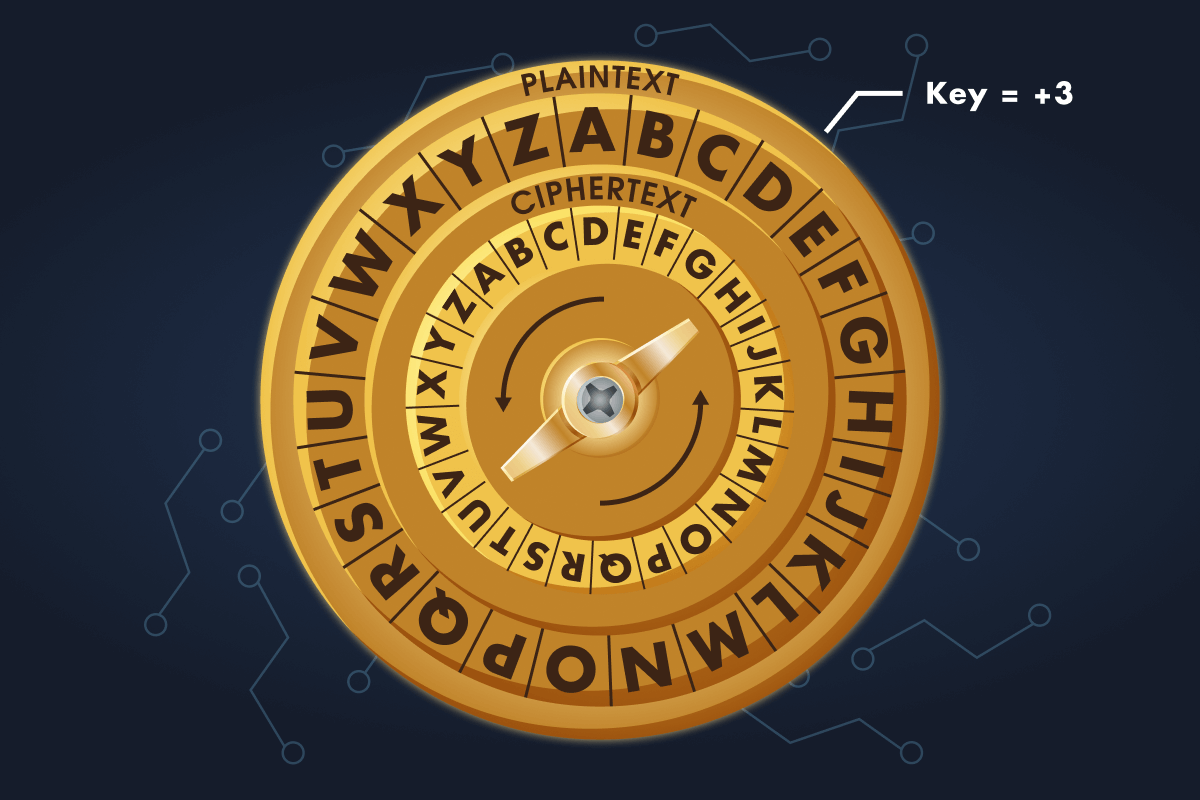
With a key of 3:
A shifts forward 3 spots and becomes D
B becomes E
C becomes F
X becomes A because it wraps around back to the start
Y becomes B
Z becomes C
So if Alice wants to encrypt HELLO with a key of 3:
H becomes K
E becomes H
L becomes O
L becomes O
O becomes R
HELLO becomes KHOOR.
To decrypt it, Bob just shifts each letter backwards by 3 and gets HELLO again. Not magic. Just math.
The algorithm here, shifting each letter by some number, is completely public. The key, which is the number 3, is what stays secret. If someone intercepts KHOOR without knowing the key, they have to try all 25 possible shifts to find the right one. For a human that is annoying. For a computer it takes about a millisecond. Which is exactly why the Caesar cipher is not used in real life.
Real algorithms like AES (Advanced Encryption Standard) follow the same basic idea but are vastly more complex and actually secure.
What makes it symmetric
The Caesar cipher is an example of symmetric encryption. Symmetric means the same key both encrypts and decrypts the message. Both the sender and the receiver need a copy of that key, and it has to stay secret from everyone else.
Benefits: it is fast. Symmetric algorithms can go through huge amounts of data quickly. It is also efficient, which makes it great for encrypting files, hard drives, and network traffic where speed matters.
But here is the problem, and it is a real one.
How do Alice and Bob share that key safely in the first place?
If they send it over the internet in plain text, an attacker grabs it and can decrypt every single future message. You might think just encrypt the key, but then you need another key to encrypt that key, and then another key for that one, and you have an infinite loop that goes nowhere.
This is called the key distribution problem. It is the big weakness of symmetric encryption when used on its own. The room says do not worry, the next task solves it. And it does.
The game
There is a hands-on game in this task where you play a security team being monitored on office Wi-Fi. Attackers are watching everything. Your team uses the Caesar cipher to communicate and you need to decrypt intercepted warnings and encrypt new messages yourself. After completing all the levels you get a flag.
Question: What is the flag you received after completing all levels of the Secret Message Rescue game? THM{CAESAR_CIPHER_MASTER_2026}
Question: Using the Caesar cipher with a key of 5, what does CYBER become when encoded? HDGJW
Question: Using the Caesar cipher, find the correct key and decode the following secret message: FVZCYR PNRFNE PVCURE SIMPLE CAESAR CIPHER
Task 3 — Sharing Keys Safely: Asymmetric Encryption
So here is the problem we left off with. Alice and Bob have never met. They cannot safely send a key over the internet because anyone watching could grab it. But they want to start encrypting messages to each other. How?
The key distribution problem revisited
Symmetric encryption is fast and great once you have a shared key. The problem is getting that key to both people without it being intercepted. If you send it in plaintext, it gets stolen. If you try to encrypt the key, you need another key to do that, which just pushes the problem back one step and solves nothing.
Asymmetric encryption is the answer.
Two keys instead of one
Asymmetric encryption uses two mathematically linked keys instead of one.
A public key that anyone can know and use, and a private key that only one person keeps secret.
Here is the clever part. If you encrypt something with someone’s public key, only their private key can decrypt it. The two keys are connected by some serious math, but it would take an ordinary computer hundreds or even thousands of years to work out the private key from the public key. That computational difficulty is what makes it secure.
The mailbox analogy
The room uses a physical street mailbox to explain this.
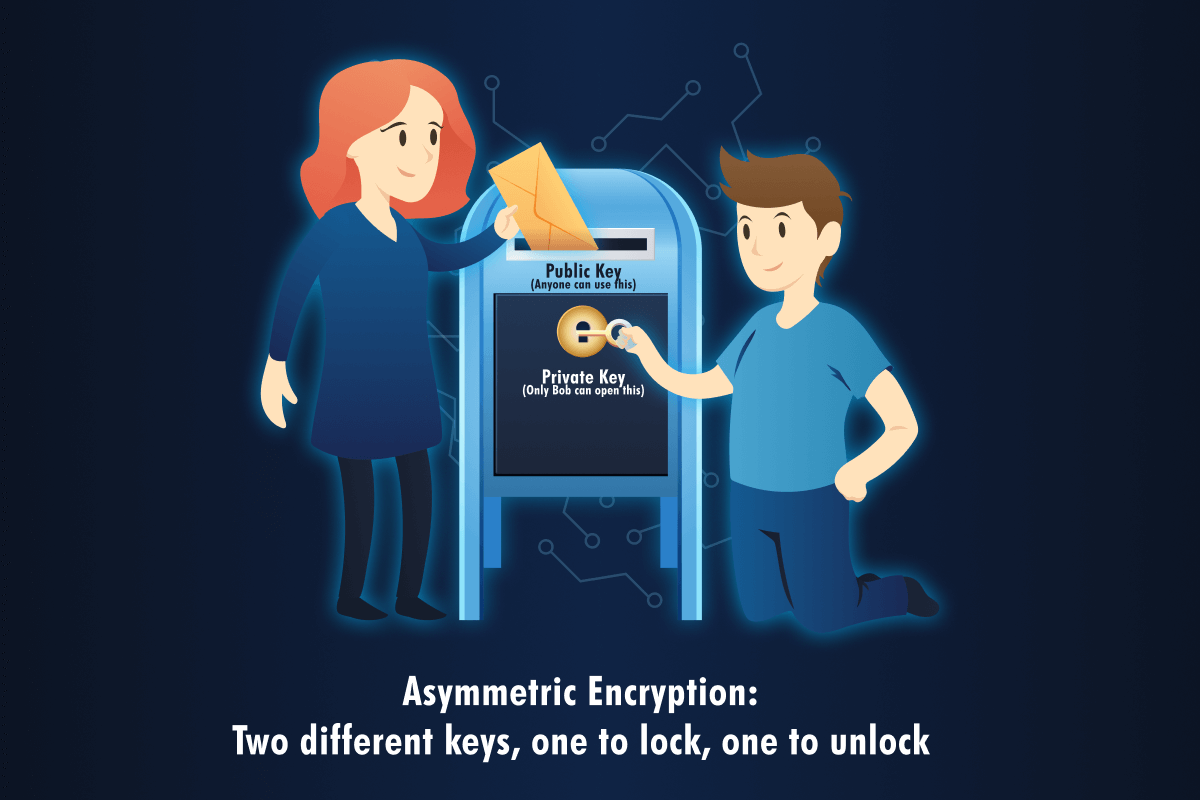
The mail slot at the top is the public key. Anyone walking by can drop a letter in. It is completely open and accessible to anyone.
The locked door at the front is the private key. Only the mailbox owner has the key to open it and get the letters out.
When Alice wants to send Bob a secret:
Alice finds Bob’s public key. This is not a secret at all. Bob can post it on his website or send it around freely.
Alice writes her message, encrypts it with Bob’s public key, and sends it.
Only Bob can decrypt it because he is the only one with the private key.
Even if an attacker intercepts the encrypted message, they cannot do anything with it without Bob’s private key.
How this solves the key distribution problem
With asymmetric encryption, Alice and Bob do not need to secretly share a key beforehand. Here is how it goes:
Bob creates a public key and a private key on his computer. He keeps the private key to himself and shares the public key with anyone who wants it.
Alice grabs Bob’s public key.
Alice encrypts her message using Bob’s public key and sends it.
Bob decrypts it using his private key.
At no point did they exchange a secret key over the network. The only key that travelled publicly was Bob’s public key, and that one is meant to be public anyway. Problem solved.
Real world use: HTTPS
The most common place you see asymmetric encryption in action is HTTPS. That padlock in your browser. Here is what actually happens when you visit https://google.com:
Your browser requests the website’s public key.
The website sends back its public key wrapped in a certificate.
Your browser and the website use asymmetric encryption to agree on a shared secret, which is actually a symmetric key, without anyone else being able to see it.
From that point on they switch to fast symmetric encryption using that shared secret for the rest of the session.
This is called a hybrid approach. Asymmetric encryption solves the key distribution problem. Symmetric encryption then takes over for the actual data because it is way faster. Both types are working together.
Certificates and why you should care
But wait. How does Alice know the public key actually belongs to Bob and not to some attacker pretending to be Bob? This is a real problem and the answer is certificates.
A certificate is a digital document that contains someone’s public key, states who that key belongs to like example.com, and has been digitally signed by a trusted authority called a Certificate Authority or CA.
Your browser and operating system come preloaded with a list of trusted CAs. When a website hands over a certificate, your browser checks that a trusted CA signed it, checks that it is still valid and not expired, and if everything looks good, shows the padlock and trusts the public key.
If something is off, maybe the certificate expired or was signed by an untrusted authority, your browser throws a warning and might refuse to connect entirely. That warning is not there to annoy you. It actually means something.
You can actually look at these certificates yourself right now. On any HTTPS site, click the padlock in the address bar and look for something like “Certificate” or “Connection is secure” or “View certificate.”
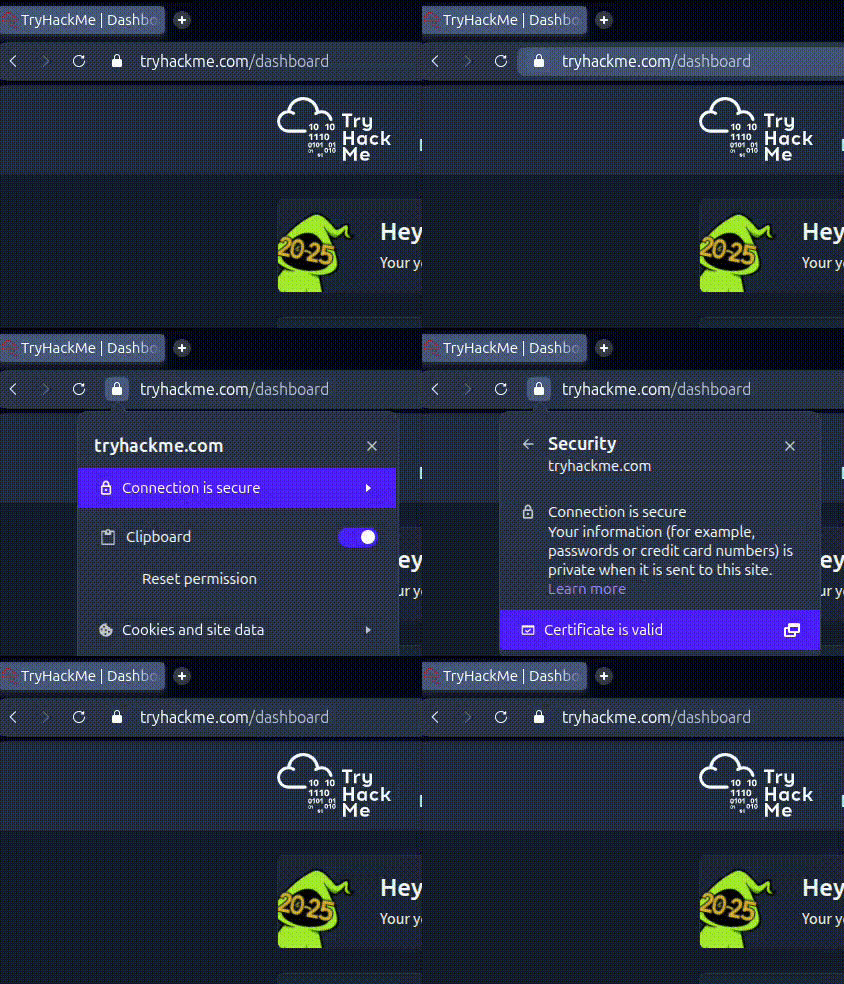
You will see who the certificate was issued to, which CA signed it, and when it expires. It is genuinely interesting to look at once you know what you are seeing.
Symmetric vs asymmetric at a glance
To wrap this up simply:
Symmetric uses one key for both encrypting and decrypting. Both people need that same secret key. It is very fast and great for bulk data but has the key distribution problem.
Asymmetric uses two linked keys. The public key can be shared openly. The private key stays secret. It solves the key distribution problem but is slower, so it is mostly used for the initial handshake and sharing keys rather than encrypting large amounts of data.
In practice, real systems use both. Asymmetric to start the connection and agree on a shared key, symmetric to handle everything after that.
Question: In asymmetric encryption, which key stays secret? Private key
Question: With asymmetric encryption, Alice can encrypt a message using Bob’s public key, and only Bob’s private key can decrypt it. Yay or Nay? Yay
Question: What problem does asymmetric solve that symmetric cannot? Key distribution problem
Question: After initial asymmetric exchange in HTTPS, what encryption type handles bulk data? Symmetric
Task 4 — Conclusion
The room wraps up by recapping everything covered.
Plaintext is what you can read. Ciphertext is scrambled gibberish. A key is the secret that controls the scrambling. An algorithm is the public method for using the key.
Symmetric encryption: one key, encrypts and decrypts, fast and efficient, but needs a secure way to share that key first. The Caesar cipher is the simple example used here.
Asymmetric encryption: two linked keys, public and private, solves the key distribution problem, powers the initial handshake in HTTPS connections.
And in real systems they work together. Asymmetric sets up the shared key at the start. Symmetric handles the actual data because it is faster. That combination is what protects your passwords, banking details, and messages every time you see that padlock.
The room also makes a point that cryptography is not a magic solution to everything. It is one layer in a much bigger picture that includes strong password practices, secure key storage, user awareness and training, regular software updates, and monitoring and incident response. Understanding how cryptography works and where it can fail helps you think about all those other layers more clearly too.