Database SQL Basics
So after all those rooms about how computers work and how code runs, TryHackMe takes a turn and goes “okay now let’s talk about where all that data actually lives.”
The whole room is built around a small café trying to track its orders, and that framing makes everything easy to follow.
Tasks
- Task 1 — Introduction
- Task 2 — Understanding Tables, Rows, and Columns
- Task 3 — Writing Your First SQL Query
- Task 4 — Conclusion
Task 1 — Introduction
The room starts with a question: how does a café keep track of every order and still quickly find information about them later?
And that is a good way to frame the whole thing because it is a real problem. Data is only useful if you can find it again. Anyone can write stuff down. The hard part is organizing it so you can ask questions later and get answers fast.
The room ties this back to something from an earlier module too. When a computer is running, it can hold information in memory. But the second it turns off, that memory is gone. Databases are how you keep information around even after the computer shuts down.
So in this room the goal is to understand what a database is, learn what SQL is and what it does, and start writing queries to pull information out of a database.
Nothing too wild. Foundations stuff.
Task 2 — Understanding Tables, Rows, and Columns
Imagine a café owner who writes every order in a paper notebook. Each order has a drink name, a price, and a time. When the café is small, this is fine. But after a while the notebook fills up and answering simple questions like “how many coffees did we sell today?” means reading through every single page and counting by hand. That is not sustainable.
A database solves this. The room describes it as a digital notebook that never runs out of pages, and more importantly, one that can search, count, and sort information instantly. Even with thousands of orders it can answer questions in seconds.
Inside a database, information lives in tables. And a table is basically a spreadsheet. It has columns across the top that describe what type of information is being stored, and rows going across where each row is one complete record.
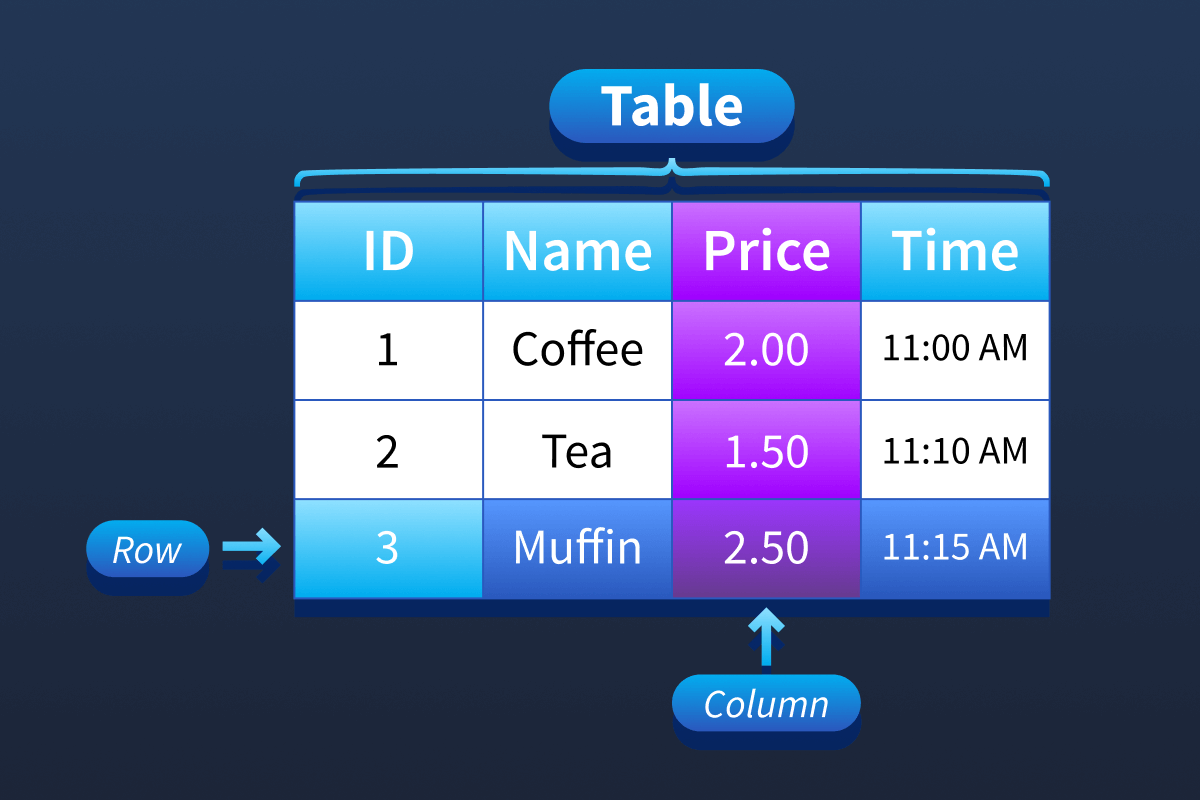
For the café:
Columns would be things like order number, drink name, price, and time. Each row would be one order someone placed.
So one column holds one type of information across all orders. One row holds all the information about a single order. Sell ten drinks, you have ten rows. Add one more order, one more row appears. Remove an order, only that row disappears and everything else stays exactly as it was.
The task also introduces SQL here. SQL is a language you use to ask questions of a database. Instead of reading through rows one by one yourself, you write a query and the database does the searching for you. A query does not change the data, it just retrieves and displays what you asked for.
Question: Inside databases, what is the term for the “spreadsheets” that store the information? Table
Task 3 — Writing Your First SQL Query
Okay so this is the hands on part and it runs in a browser based database client built into the room. There are two tables to work with: Orders which has columns for id, drink, price, and time, and Menu which has drink and price. You cannot break anything. There is a Reset Data button if you mess up.
Step 1: View everything in a table
The most basic query uses SELECT and FROM. The asterisk after SELECT means “all columns.” FROM tells the database which table to look in.
SELECT * FROM Orders;
Run that and every order in the database shows up. All 50 of them.
Step 2: Show only specific columns
Sometimes you do not need everything. You can list specific columns after SELECT instead of using the asterisk.
SELECT drink, price FROM Orders;
Now you only see the drink and price columns. Cleaner, easier to read.
Step 3: Filter results with WHERE
WHERE is where things get actually useful. It lets you keep only the rows that match a condition and filter out everything else.
SELECT * FROM Orders WHERE drink = 'Coffee';
Only coffee orders now. If you are not sure what drink names exist in the database you can check the Menu table first with SELECT * FROM Menu; which is a tip the room gives.
Step 4: Sort results with ORDER BY
ORDER BY sorts your results by a column. Default is ascending order, lowest to highest.
SELECT * FROM Orders ORDER BY price;
Cheapest drinks at the top. Add DESC at the end to flip it.
SELECT * FROM Orders ORDER BY price DESC;
Most expensive first now.
Step 5: Combine filtering and sorting
And then you can mix them together. Filter first, then sort what is left.
SELECT * FROM Orders WHERE drink = 'Coffee' ORDER BY price DESC;
Coffee orders only, sorted from most expensive to cheapest. That is a real query doing real work.
Question: When you showed all orders, how many rows were returned? 50
Question: When you sorted orders by price from cheapest to most expensive, which drink appeared first? Tea
Question: When you sorted the menu by price from most expensive to cheapest, which drink appeared first? Latte
Task 4 — Conclusion
The four keywords from this room: SELECT to choose what to display. FROM to choose which table. WHERE to filter rows by a condition. ORDER BY to sort the results.
Not a huge list. But you can do a lot with just those four.
The room ends with a question worth thinking about: what could happen if someone were allowed to change or remove café orders without permission? The answer is obviously bad things, and that question is setting up future rooms about database security.