Intro to LAN
Tasks
- Task 1 — Introducing LAN Topologies
- Task 2 — A Primer on Subnetting
- Task 3 — ARP
- Task 4 — DHCP
- Task 5 — Continue Your Learning: OSI Model
Task 1 — Introducing LAN Topologies
A topology is just the design of a network, how devices are arranged and connected. There are three main ones, and each has its own trade offs.
Star Topology
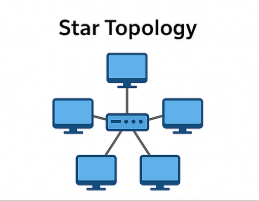
Every device connects individually to a central switch or hub. All data passes through that central device first before reaching its destination. It’s the most common setup today because it’s reliable and easy to scale. Adding a new device is as simple as plugging it in.
The downsides are cost and maintenance. More cabling, dedicated hardware, and the bigger it gets the harder it is to manage. There’s also one critical weak point: if the central switch fails, every device connected to it loses access.
Bus Topology
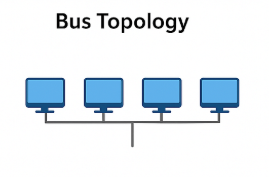
All devices share a single backbone cable. It’s the cheapest and easiest topology to set up. Minimal cabling, no dedicated central hardware needed.
The problem is that everything shares the same line. The more devices sending data at once, the slower it gets. Troubleshooting is painful too since all traffic travels the same route. And if the backbone cable breaks, the whole network goes down with no fallback.
Ring Topology
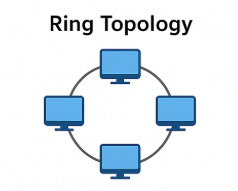
Devices connect directly to each other in a loop. Data travels around the ring from device to device until it reaches the right one. Each device prioritises its own data before forwarding anything else.
Since data only travels in one direction, faults are easy to trace. It’s also less prone to bottlenecks than bus. But it’s slow, data might pass through several devices before reaching its destination. And like bus, there’s no redundancy. One broken cable or failed device kills the whole network.
Switch
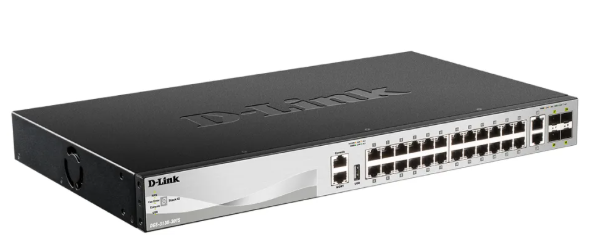
Switches connect multiple devices on a local network. Unlike hubs which blast packets to every port, switches are smart. They track which device is on which port and only send data where it needs to go. This cuts down traffic significantly.
Router
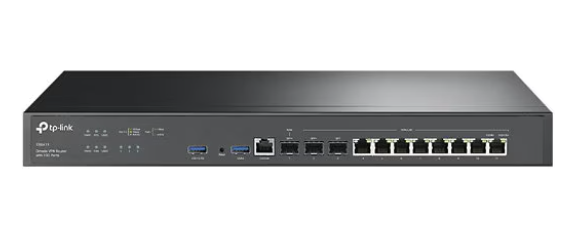
Routers connect different networks together and handle getting data from one to the other. Connecting switches and routers together adds redundancy. If one path goes down, data takes another route and the network stays up.
Practical
The interactive lab shows the weak points of each topology in action. You cut the ring’s cable to stop all traffic, flood the bus until it collapses, and break the star’s central switch to take down every connected device.
Question: What does LAN stand for? Local Area Network
Question: What is the verb given to the job that Routers perform? Routing
Question: What device is used to centrally connect multiple devices on the local network and transmit data to the correct location? Switch
Question: What topology is cost-efficient to set up? Bus Topology
Question: What topology is expensive to set up and maintain? Star Topology
Question: What is the flag given at the end? THM{TOPOLOGY_FLAWS}
Task 2 — A Primer on Subnetting
Subnetting is the process of splitting a network into smaller networks within itself. Think of it like slicing a cake. There’s only so much to go around, and subnetting is how you decide who gets what piece.
A business is a good example. Different departments like Accounting, Finance, and Human Resources all need network access, but they shouldn’t necessarily all be on the same network. Subnetting lets admins carve things up to reflect that.
How it works
A subnet mask controls how many devices can fit in a network. Just like an IP address, it’s made up of four octets. Four sections ranging from 0 to 255.
Subnets use IP addresses in three ways:
- Network Address: identifies the start of the network itself. Example:
192.168.1.0 - Host Address: identifies a specific device on the network. Example:
192.168.1.100 - Default Gateway: a special device that handles sending data outside the network. Usually takes the first or last host address, like
192.168.1.1or192.168.1.254
Why it matters
At home you probably don’t need subnetting. One network with up to 254 devices is more than enough. But in offices and businesses with PCs, printers, cameras, and sensors all over the place, subnetting becomes essential.
The benefits are efficiency, security, and control. A simple real world example is a café. They’ll run one network for staff and registers, and a completely separate one for customer Wi-Fi. Same building, same router, but fully separated. That’s subnetting in action.
Question: What is the technical term for dividing a network up into smaller pieces? Subnetting
Question: How many bits are in a subnet mask? 32
Question: What is the range of a section (octet) of a subnet mask? 0-255
Question: What address is used to identify the start of a network? Network Address
Question: What address is used to identify devices within a network? Host Address
Question: What is the name used to identify the device responsible for sending data to another network? Default Gateway
Task 3 — ARP
ARP (Address Resolution Protocol) is what allows devices on a network to connect a MAC address to an IP address. Every device keeps a record of the MAC addresses of other devices it has communicated with, stored in something called an ARP cache.
How it works
When a device wants to talk to another device but only knows its IP address, it needs to find the matching MAC address first. It does this by sending an ARP Request to the entire network, essentially asking “who has this IP address?” The device that owns that IP responds with an ARP Reply containing its MAC address. The requesting device then saves that pairing in its ARP cache so it doesn’t have to ask again next time.
Question: What does ARP stand for? Address Resolution Protocol
Question: What category of ARP Packet asks a device whether or not it has a specific IP address? ARP Request
Question: What address is used as a physical identifier for a device on a network? MAC Address
Question: What address is used as a logical identifier for a device on a network? IP Address
Task 4 — DHCP
IP addresses can be assigned manually or automatically. DHCP (Dynamic Host Configuration Protocol) is what handles the automatic side. When a device joins a network without a pre assigned IP, it goes through a four step process called DORA to get one.
- DHCP Discover: the device broadcasts (send to all) a message to the network asking if any DHCP servers are available
- DHCP Offer: the DHCP server responds with an available IP address the device can use
- DHCP Request: the device replies confirming it wants that IP address
- DHCP ACK: the server acknowledges the request and the device can now start using the IP address
Question: What type of DHCP packet is used by a device to retrieve an IP address? DHCP Discover
Question: What type of DHCP packet does a device send once it has been offered an IP address by the DHCP server? DHCP Request
Question: Finally, what is the last DHCP packet that is sent to a device from a DHCP server? DHCP ACK
Task 5 — Continue Your Learning: OSI Model
This task just points to the next room in the path: OSI Model. See you there :)