Investigating Windows
This challenge is exactly what it says on the tin. A Windows machine got compromised and I have to investigate it. No exploiting, no shells, just digging through Windows to find evidence. Different vibe from the usual rooms.
Heads up before we start, this machine does not respond to ping and takes a couple of minutes to boot up. Also it’s slow. Like, really slow. More on that at the end.
Q1 - Windows version and year
Easy starter. Settings > System > About.
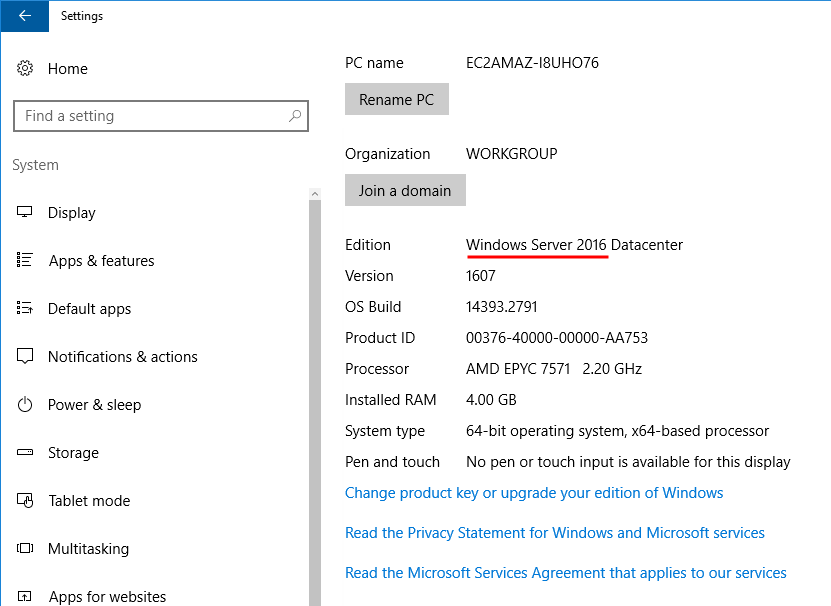
Answer: Windows Server 2016
Q2 - Which user logged in last?
For this one I need to see all the users on the machine and check when each of them last logged in. Windows has a built in tool called net that does exactly this.
Opened cmd and ran:
net user
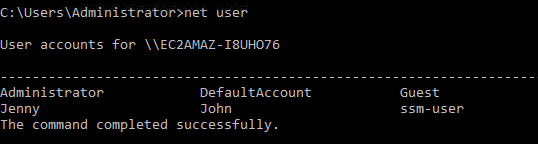
That listed all the users on the system. To get more info on each one I have to run net user <username>. So I went through them one by one.
net user Jenny
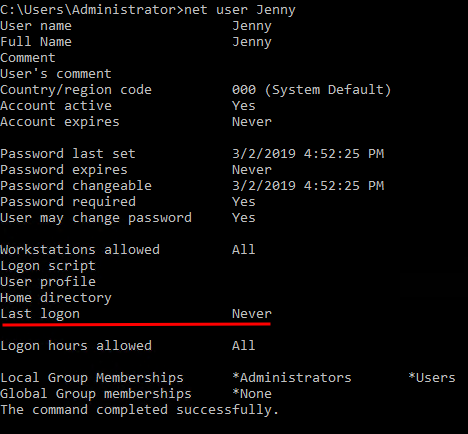
Last logon for Jenny shows Never.
net user John
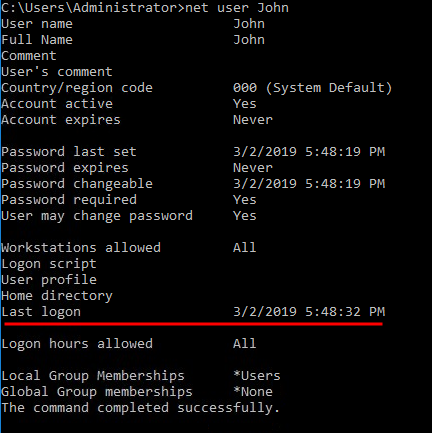
Last logon for John shows 03/02/2019 5:48:32 PM.
net user ssm-user
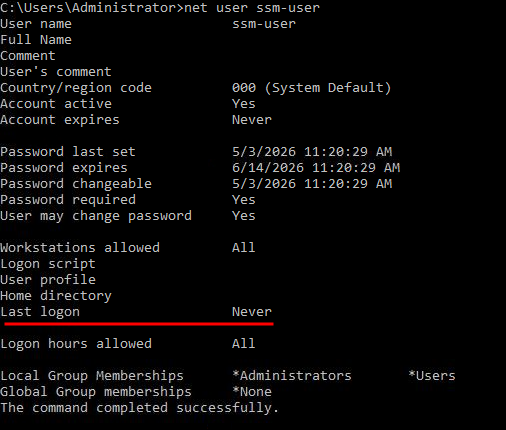
Also Never.
net user Administrator
This one shows today’s date because I’m currently logged in as Administrator. So that’s the answer.
Answer: Administrator
Q3 - When did John log onto the system last?
Already got this from the previous step.
Answer: 03/02/2019 5:48:32 PM
Q4 - What IP does the system connect to when it first starts?
Two ways to do this. The easy way is to just restart the machine and at boot you get a cmd flash up with the IP for a couple of seconds. But I didn’t want to wait through another reboot on this slow machine, so I went the registry route.
Opened Run and typed regedit. Then navigated to:
HKEY_LOCAL_MACHINE\SOFTWARE\Microsoft\Windows\CurrentVersion\Run

That’s where startup scripts live. The IP was right there.
Answer: 10.34.2.3
Q5 - What two accounts had administrative privileges (other than Administrator)?
Already had this from the net user outputs earlier. At the bottom of each user’s info it tells you which local groups they’re in. The two with admin were obvious.
Answer: Guest, Jenny
Q6 - What’s the name of the malicious scheduled task?
Opened Task Scheduler and looked through the tasks. Most of them are normal Windows stuff but one stuck out immediately.
There was a task called clean file system that was running:
C:\TMP\nc.ps1 -l 1348
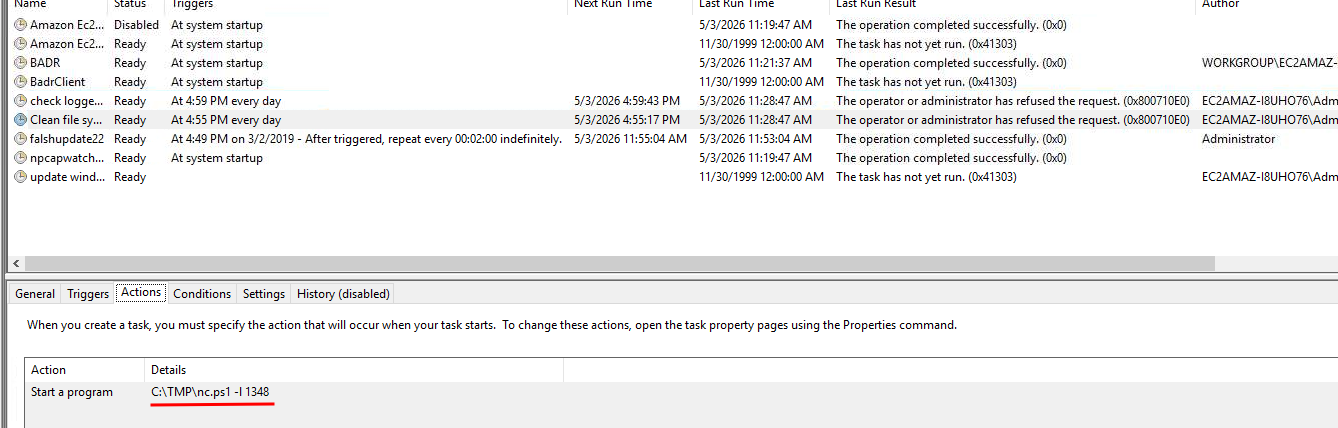
That’s netcat. The -l flag means it’s setting up a listener on port 1348. Plus it’s sitting in C:\TMP which is already sketchy. Legitimate Windows tasks don’t run netcat listeners out of TMP.
Answer: clean file system
Q7 - What file was the task trying to run daily?
Already saw it.
Answer: nc.ps1
Q8 - What port did this file listen locally for?
Same task, same command.
Answer: 1348
Q9 - When did Jenny last logon?
Already had this from the first net user output.
Answer: Never
Q10 - At what date did the compromise take place?
Logic here is simple. The malicious task got created on the day they got in. So I just need to find the creation date of that task.
Back to Task Scheduler, clicked on clean file system, and looked all the way to the right. Creation date is right there.
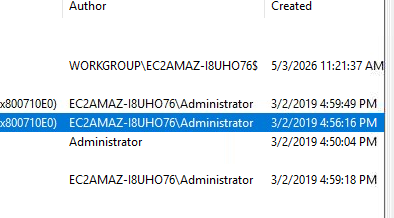
Answer: 03/02/2019
Q11 - During the compromise, at what time did Windows first assign special privileges to a new logon?
This one is an Event Viewer question. There’s a specific event for special privileges assigned to a new logon and I need to find when it first happened on the day of the compromise.
Opened Event Viewer and went to Windows Logs > Security. The Security log has thousands of events so I had to filter it down to just the date of the compromise.
On the right side there’s the Action pane. Pressed Create Custom View and set the date filter to events from 3/2/2019.
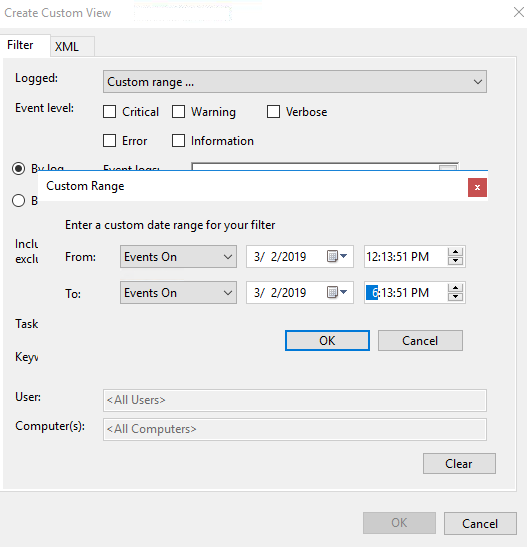
Selected Security for the event logs, hit OK.
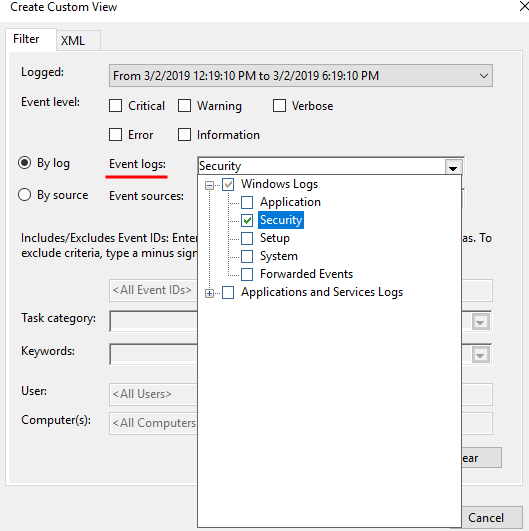
That cut it down a lot. Scrolled through and found the first event for special privileges assigned.
Answer: 03/02/2019 4:04:49 PM
Q12 - What tool was used to get Windows passwords?
Went into the C:\TMP folder since that’s where the attacker was clearly working from. Looking at the files inside I could already tell what it was just from the names. Opened a couple to confirm.
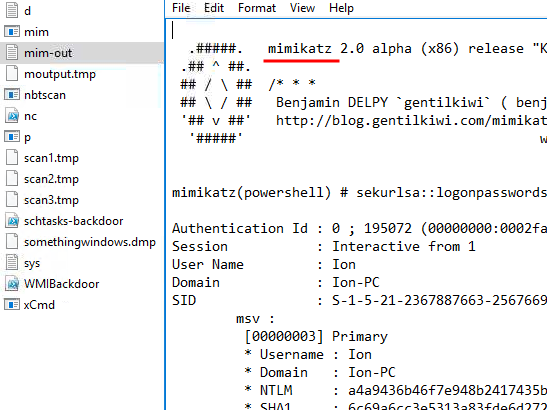
Classic. It’s mimikatz.
Answer: Mimikatz
Q13 - What was the attacker’s external command and control server IP?
When attackers want to redirect traffic or hide a domain, one of the things they sometimes do is mess with the hosts file. That file lives at:
C:\Windows\System32\drivers\etc\hosts
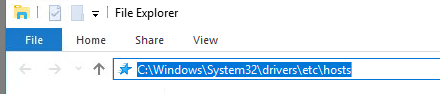
Opened file explorer, pasted the path, opened the file with notepad. There was an entry that wasn’t supposed to be there with the IP.
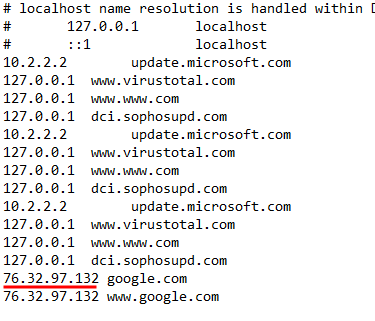
Answer: 76.32.97.132
Q14 - What was the extension name of the shell uploaded via the server’s website?
Web server files on Windows are usually at C:\inetpub\wwwroot. Went there and looked through the files. Among the normal stuff there was a file with an extension that didn’t belong.
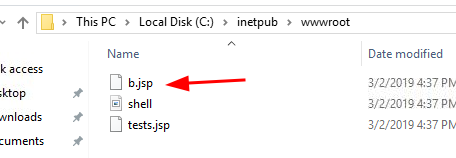
Answer: .jsp
Q15 - What was the last port the attacker opened?
When you open a port you usually add a firewall rule to allow it through. So I opened Windows Firewall rules and looked for anything weird. If you’ve been doing security stuff for more than like a month, this one jumps out at you immediately.

Answer: 1337
Q16 - Check for DNS poisoning, what site was targeted?
Already had the answer from the hosts file earlier. The fake entry was redirecting a real domain.
Answer: google.com
Answers
Whats the version and year of the windows machine? Windows Server 2016
Which user logged in last? Administrator
When did John log onto the system last? 03/02/2019 5:48:32 PM
What IP does the system connect to when it first starts? 10.34.2.3
What two accounts had administrative privileges (other than the Administrator user)? Guest, Jenny
Whats the name of the scheduled task that is malicous. clean file system
What file was the task trying to run daily? nc.ps1
What port did this file listen locally for? 1348
When did Jenny last logon? Never
At what date did the compromise take place? 03/02/2019
During the compromise, at what time did Windows first assign special privileges to a new logon? 03/02/2019 4:04:49 PM
What tool was used to get Windows passwords? mimikatz
What was the attackers external control and command servers IP? 76.32.97.132
What was the extension name of the shell uploaded via the servers website? .jsp
What was the last port the attacker opened? 1337
Check for DNS poisoning, what site was targeted? google.com
Takeaway
Honestly, this one took me way longer than it should have and the only reason for that is the machine was painfully slow. Restarted it a few times because it kept crashing. Without all the waiting and crashes this is probably a 30 minute room. With them it took me around 2 hours.
I don’t know if the slowness was on purpose or just how it is. Either way it killed the vibe a bit.
That said, the actual investigation was fun. You bounce between net user, registry, Task Scheduler, Event Viewer, hosts file, IIS folder, firewall rules. It’s basically a tour of “where do bad things hide on Windows” which is genuinely useful to know. If you’re new to Windows forensics this room hits all the right spots.
Going to make some coffee now.