MrPhisher CTF
This one is a phishing challenge. The story goes that someone received a suspicious email with a weird attachment, and the attachment was asking them to “enable macros”. We need to figure out what the malware was actually trying to do and grab the flag.
What Are Macros?
Macros are basically small programs or scripts that live inside Office documents like Word or Excel. They’re meant to automate repetitive tasks, like formatting a spreadsheet automatically or filling in a form. Totally legitimate in normal use.
The problem is that attackers figured out they can hide malicious code inside these macros. When you open the document and click “enable macros”, you’re basically saying “yes please run this code on my computer”. That’s why you should never enable macros in a document you weren’t expecting to receive. It’s one of the most common tricks in phishing attacks and it still works annoyingly well.
Opening the File
The machine already has everything set up. Navigate to the files we’re working with:
cd /home/ubuntu/mrphisher
There’s a file called MrPhisher.docm. The .docm extension means it’s a Word document that contains macros.
Open it in LibreOffice and enable macros when it prompts you. Yes I know I just said never do this. But we’re in a controlled lab environment and this is literally the point of the challenge, so it’s fine here.
Finding the Macro
Now we need to find the actual macro code that’s hiding the flag. Go to:
Tools > Macros > Edit Macros
Poke around until you find the one called Format. Here’s what it looks like:

Rem Attribute VBA_ModuleType=VBAModule
Option VBASupport 1
Sub Format()
Dim a()
Dim b As String
a = Array(102, 109, 99, 100, 127, 100, 53, 62, 105, 57, 61, 106, 62, 62, 55, 110, 113, 114, 118, 39, 36, 118, 47, 35, 32, 125, 34, 46, 46, 124, 43, 124, 25, 71, 26, 71, 21, 88)
For i = 0 To UBound(a)
b = b & Chr(a(i) Xor i)
Next
End Sub
Okay so what is this actually doing? Instead of just writing the flag as plain text (which would be way too easy to spot), it stores it as a list of numbers. Then it loops through each number and XORs it with its own position in the list. Position 0, position 1, position 2 and so on. Each result gets converted to a character and added to the string b. By the end of the loop, b holds the full decoded flag. It’s a simple obfuscation trick but it gets the job done against anyone who doesn’t bother reading the code.
Getting the Flag
Now we actually need to run this and read what b contains. We can’t just run it straight through because the macro doesn’t print or display anything, it just builds the string internally and stops. So we need to pause it right before it finishes and peek at the value ourselves.
Set a breakpoint on the last line of the macro:
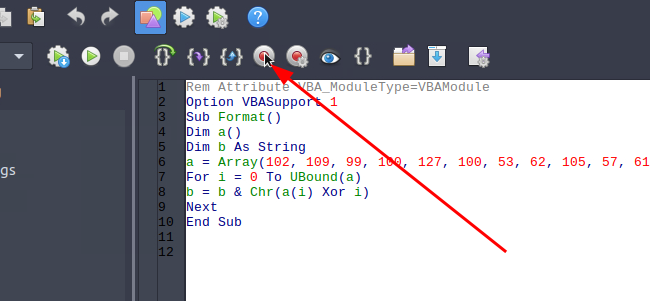
You should see something like this appear:
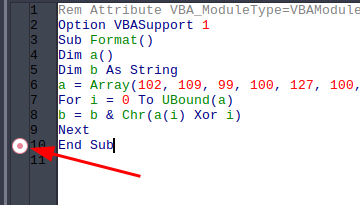
Now hit F5 to run the macro. It will run through the loop and then pause right at your breakpoint before finishing.
At the bottom of the editor there’s a Watch window. Click into it, and type b.
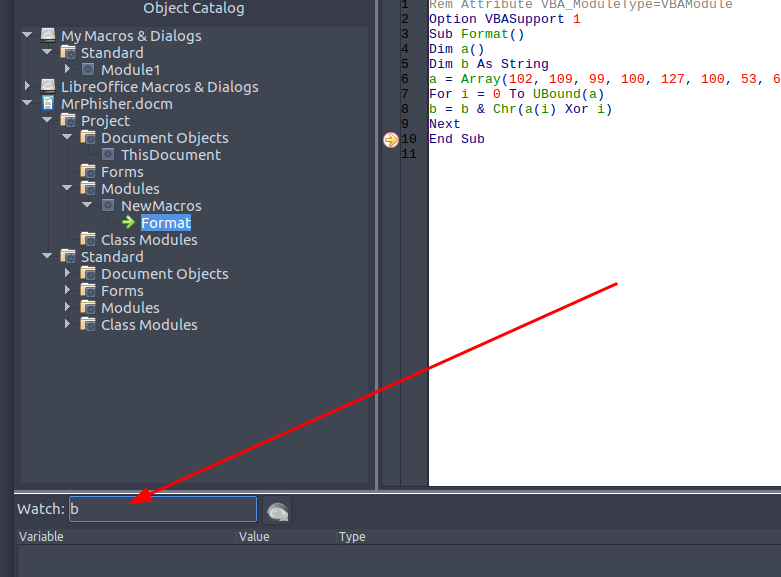
Press enter:

The flag shows up right there in the watch window.
Why Did We Watch b Specifically?
b is the variable where the macro is secretly building the decoded string. The array a just holds the scrambled numbers, and i is just the loop counter. b is the only variable that actually accumulates the final result character by character. So watching b at the breakpoint gives us the fully decoded string right at the moment the loop finishes, before the macro exits and throws it all away. If we ran it without the breakpoint we would get nothing, the macro would just silently finish and the value would disappear.
Flag: flag{a39a07a239aacd40c948d852a5c9f8d1}
Macros in Office documents are a super common phishing vector, never enable them in files you weren’t expecting
When malware doesn’t want to show its strings in plain text, XOR with position is a go to trick because it’s simple and looks like meaningless numbers at a glance
Always look for where the output is being built, in this case b was doing all the work
The macro editor’s watch window is useful, you can inspect any variable mid execution without touching the code