The Greenholt Phish CTF
A sales executive at Greenholt PLC gets an email from what looks like a customer. Generic greeting, out of nowhere money transfer request, and a sketchy attachment. The SOC gets looped in and that’s where we come in. The job is to dig into the email, pull out the important artifacts, and figure out what’s actually going on.
Honestly this one was pretty easy. I got through most of it without any issues. The only moment I had to pause was looking up the exact syntax for the DMARC dig command, which took maybe 2-3 minutes. Other than that it was smooth sailing.
Let’s go through it.
The Email
Here’s the email that was reported:
Good day webmaster@redacted.org
As instructed, funds has been transferred to your account this morning via SWIFT.
Details are as below and a receipt of payment is attached.
Interbank Transfer Reference Number: 09674321
Transaction Status: Successful
Transaction Date / Time: 10-06-2020 09:18:55
Transaction Description: Balance / Final Payment
From Account: 3105234819
Amount: 149,650
Currency: usd
Bank Charges: $ 146.05
Best regards,
Mr. James Jackson
Accounts Payable
SEC MARINE SERVICES PTE LTD
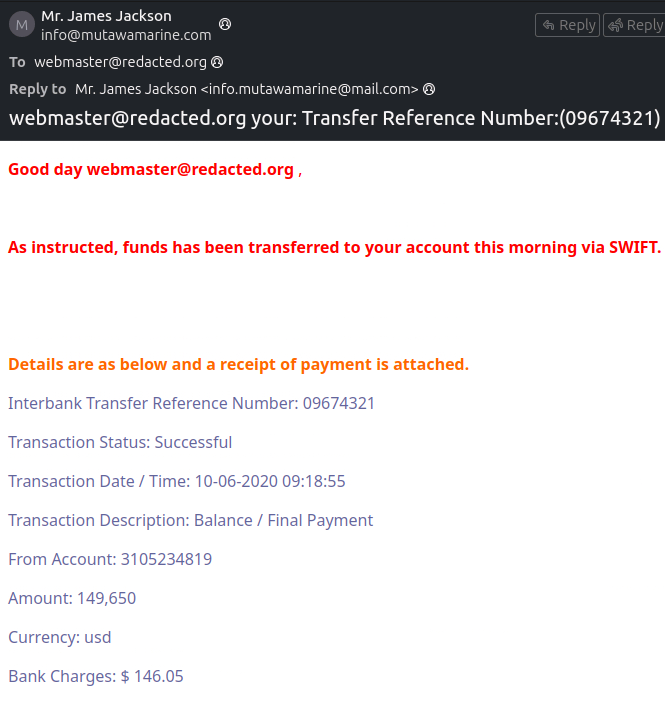
Already looks off. Generic greeting, unexpected money transfer, and an attachment. Classic phishing playbook.
The Easy Stuff
What is the Transfer Reference Number listed in the Subject line? 09674321
What is the display name of the sender? Mr. James Jackson
What is the sender’s email address? info@mutawamarine.com
What email address will receive a reply if you hit reply? info.mutawamarine@mail.com
Notice that this is different from the sender address. That’s not an accident. What’s happening here is called reply-to spoofing. The attacker sets the “From” field to one address but sets the “Reply-To” field to a different one they control. So the email looks like it came from info@mutawamarine.com, but the moment you hit reply, your response goes to info.mutawamarine@mail.com instead. Two completely different addresses, different domains even. The goal is to make you think you’re talking to the real company while actually handing your response directly to the attacker. It’s a simple trick but it works if you’re not paying attention to the headers.
Finding the Originating IP
What is the originating IP address of this email?
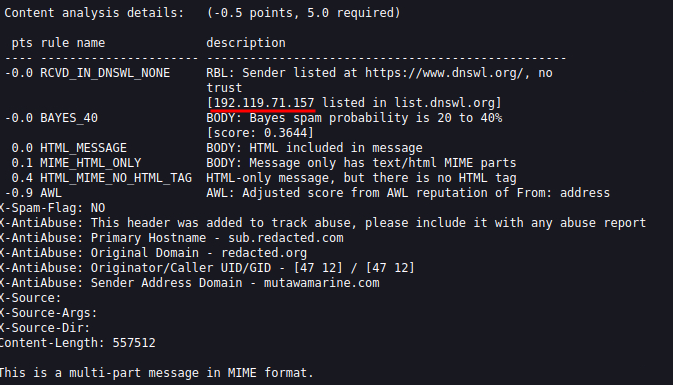
For this one you need to dig into the email headers. In the challenge the email is opened in Thunderbird. To get to the headers, open the email, click the More button at the top right and then click View Source. That opens up the raw email with everything in it, headers included. When you look at the headers you will see three IP addresses showing up: 10.201.192.162, 10.197.41.148, and 192.119.71.157.
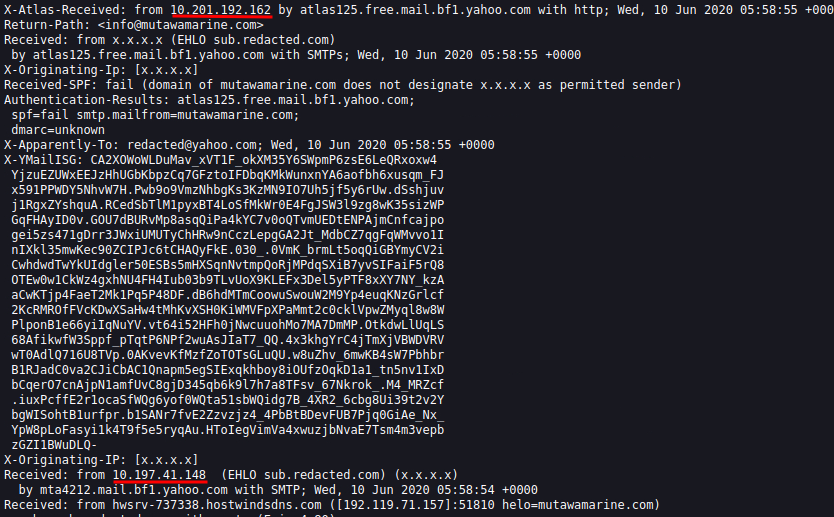
The first two are easy to rule out. If you know your RFC 1918 ranges, 10.0.0.0 through 10.255.255.255 is reserved for private internal networks. Those IPs never touch the public internet so they belong to internal mail servers passing the message along internally. They tell us nothing about where the email actually came from.
The one we care about is 192.119.71.157. That’s a public IP and that’s the originating address.
Who owns it?
Run a whois lookup:
whois 192.119.71.157
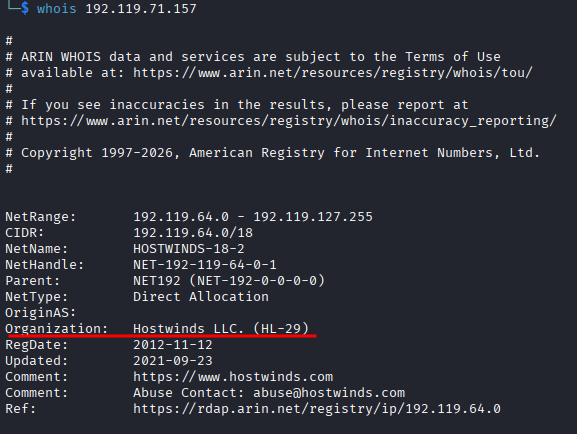
The output gives you the organization. The answer is Hostwinds LLC.
SPF and DMARC Records
What is the SPF record for the domain?
From the email headers, the return path points to mutawamarine.com. To get the SPF record, run:

dig mutawamarine.com TXT
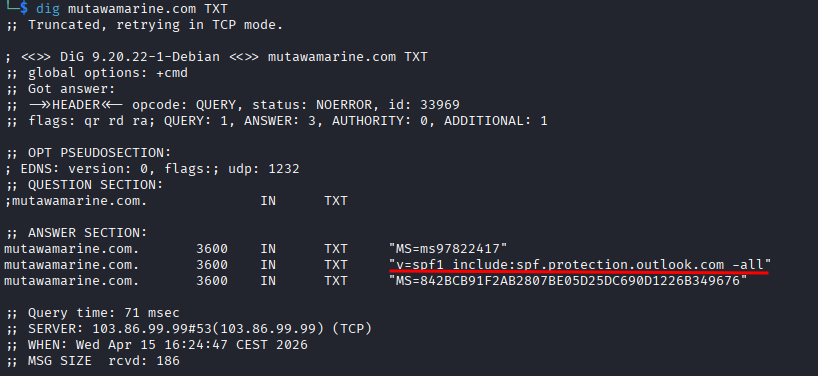
SPF records always start with v=spf1 so they’re easy to spot in the output. The record is:
v=spf1 include:spf.protection.outlook.com -all
What about DMARC?
This is the one that made me stop for a minute. DMARC records live on a specific subdomain and the syntax is slightly different. You have to prepend _dmarc. to the domain name:
dig _dmarc.mutawamarine.com TXT
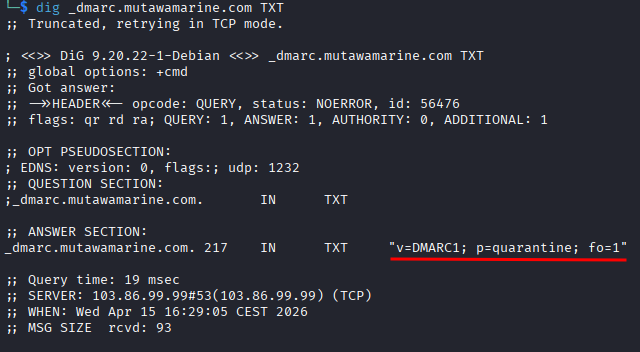
Once I looked that up it was straightforward. The DMARC record is:
v=DMARC1; p=quarantine; fo=1
The Attachment
What is the file name of the attachment?
Just look at the bottom of the email.
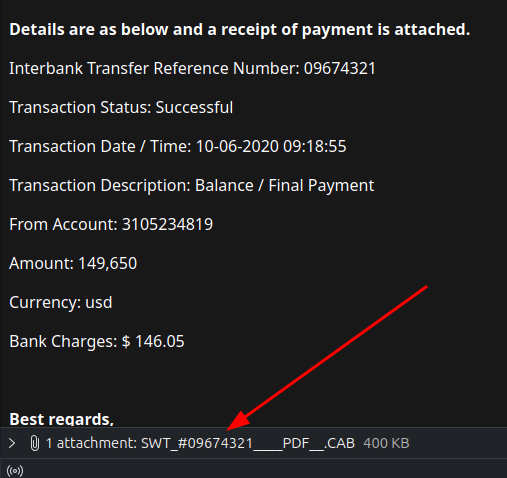
The attachment is called SWT_#09674321____PDF__.CAB.
That filename is doing a lot of work trying to look legitimate. The PDF in the middle is trying to make you think it’s a PDF. It’s not.
What is the SHA256 hash?
sha256sum SWT_#09674321____PDF__.CAB

Hash comes out as 2e91c533615a9bb8929ac4bb76707b2444597ce063d84a4b33525e25074fff3f.
What is the file size?
Take that hash, go to VirusTotal, paste it into search.

Top right of the results page you’ll see the size: 400.26 KB.
What is the actual file type?
Still on VirusTotal, go to the Details tab and look at the file type field.
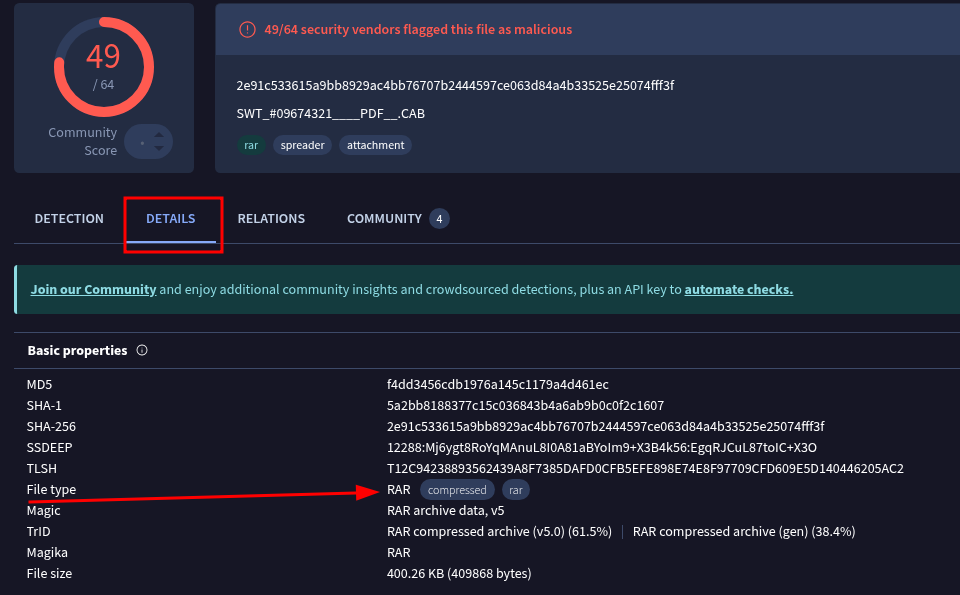
Despite the name trying to convince you it’s a PDF, the actual file type is RAR.
So it’s a RAR archive pretending to be a PDF pretending to be a payment receipt. Layers of deception for what is a pretty simple phishing email at the end of the day.
Wrapping Up
This challenge is a solid introduction to email analysis. Nothing too deep but it covers the important bases. Reply to spoofing, reading headers, whois lookups, digging DNS records, and checking attachments on VirusTotal. Good practice for the fundamentals.
The DMARC syntax is the only thing worth bookmarking if you haven’t done much DNS work before. Everything else you can figure out just by reading carefully.