What is Networking?
Tasks
- Task 1 — What is Networking?
- Task 2 — What is the Internet?
- Task 3 — Identifying Devices on a Network
- Task 4 — Ping (ICMP)
- Task 5 — Continue Your Learning: Intro to LAN
Task 1 — What is Networking?
A network is simply things connected together. In computing, that means technological devices. Anything from two laptops sharing files to billions of devices communicating across the world. Phones, security cameras, traffic lights, even farming equipment.
Networks are everywhere in daily life: power grids, transport systems, postal services. In cybersecurity, understanding how devices connect and communicate with each other is fundamental.
Question: What is the key term for devices that are connected together? Network
Task 2 — What is the Internet?
The Internet is just one giant network made up of many smaller ones. Private networks are the small ones, like your home or office network. Public networks are what connect all those private networks together, and that’s the Internet.
It started with the ARPANET project in the late 1960s, funded by the US Defence Department. But the Internet as we know it today didn’t really exist until 1989, when Tim Berners-Lee invented the World Wide Web, turning it into a place to store and share information.
Question: Who invented the World Wide Web? Tim Berners-Lee
Task 3 — Identifying Devices on a Network
Devices on a network need a way to identify themselves, just like people do. There are two ways a device is identified:
- IP Address — can change, like a name
- MAC Address — permanent, like a fingerprint
IP Addresses
An IP address is a set of numbers split into four octets (e.g. 192.168.1.1). Devices can have two types: a private IP for communicating within a local network, and a public IP for communicating on the Internet. Both devices on the same network can share the same public IP, assigned by your ISP.
The version most people are familiar with is IPv4, which supports around 4.29 billion addresses. With more and more devices connecting every year, that’s running out fast. IPv6 was introduced to fix this, supporting 340 trillion plus addresses and being more efficient overall.
MAC Addresses
A MAC address is a unique 12 character hexadecimal number assigned to a device’s network interface at the factory. The first six characters identify the manufacturer, the last six are unique to the device.
MAC addresses can be spoofed. Meaning a device can pretend to have a different MAC address. This can be used to bypass security measures that trust devices based on their MAC address, like a firewall that only allows traffic from the admin’s device.
Practical
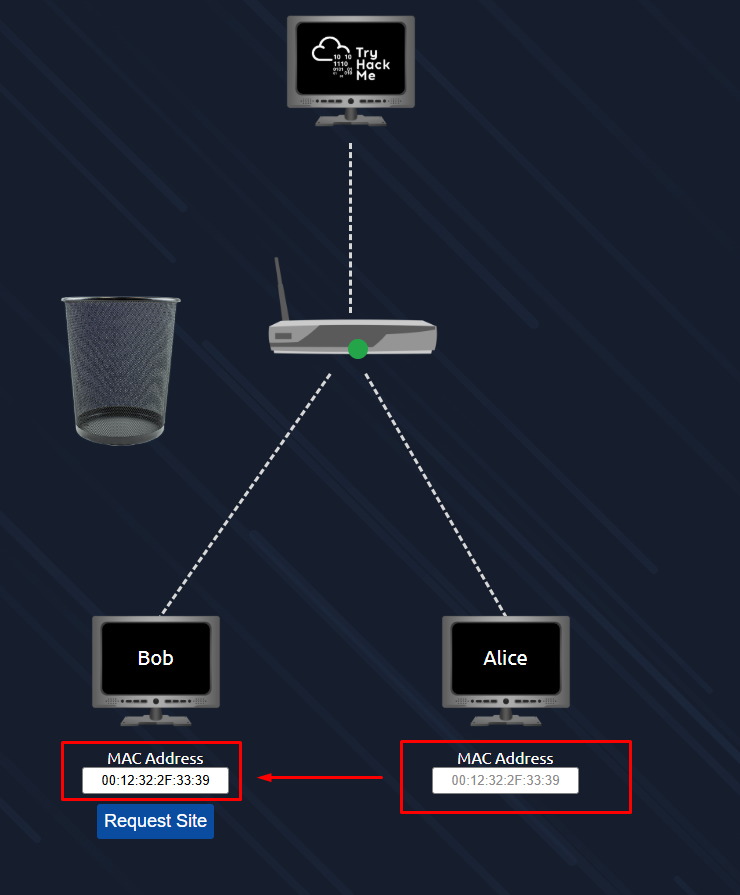
The interactive lab simulates a hotel Wi-Fi network. Bob’s packets are being blocked because he hasn’t paid, while Alice’s go through fine. The goal is to spoof Bob’s MAC address to match Alice’s and get access.

Question: What does the term “IP” stand for? Internet Protocol
Question: What is each section of an IP address called? Octet
Question: How many sections (in digits) does an IPv4 address have? 4
Question: What does the term “MAC” stand for? Media Access Control
Question: What is the flag? THM{YOU_GOT_ON_TRYHACKME}
Task 4 — Ping (ICMP)
Ping is one of the most basic network tools, but it’s useful. It uses ICMP (Internet Control Message Protocol) to check if a connection between two devices exists and how reliable it is. It works by sending an echo packet and waiting for an echo reply, then measuring how long that took.
The syntax is simple: ping IP address or website URL
The practical gives you a terminal and asks you to ping 8.8.8.8. You run 8.8.8.8 and the flag appears in the output.
Question: What protocol does ping use? ICMP
Question: What is the syntax to ping 10.10.10.10? ping 10.10.10.10
Question: What flag do you get when you ping 8.8.8.8? THM{I_PINGED_THE_SERVER}
Task 5 — Continue Your Learning: Intro to LAN
This task just points to the next room in the path: Intro to LAN.